> ## Documentation Index
> Fetch the complete documentation index at: https://zite.com/llms.txt
> Use this file to discover all available pages before exploring further.
# Connect Zite Database to Relay.app
> Automate workflows by connecting your Zite database tables to other apps with Relay.app.
## Overview
The [Zite Relay.app integration](https://www.relay.app/apps/zite/integrations) lets you connect your Zite databases and tables to other apps. You can automate workflows by triggering actions when data changes in Zite, or push data into Zite from other applications.
Relay.app offers human-in-the-loop functionality, allowing you to add manual approval or review steps in your automations.
## How it works
Create a free [Relay.app account](https://www.relay.app). Click `Apps` followed by `Manage apps`.
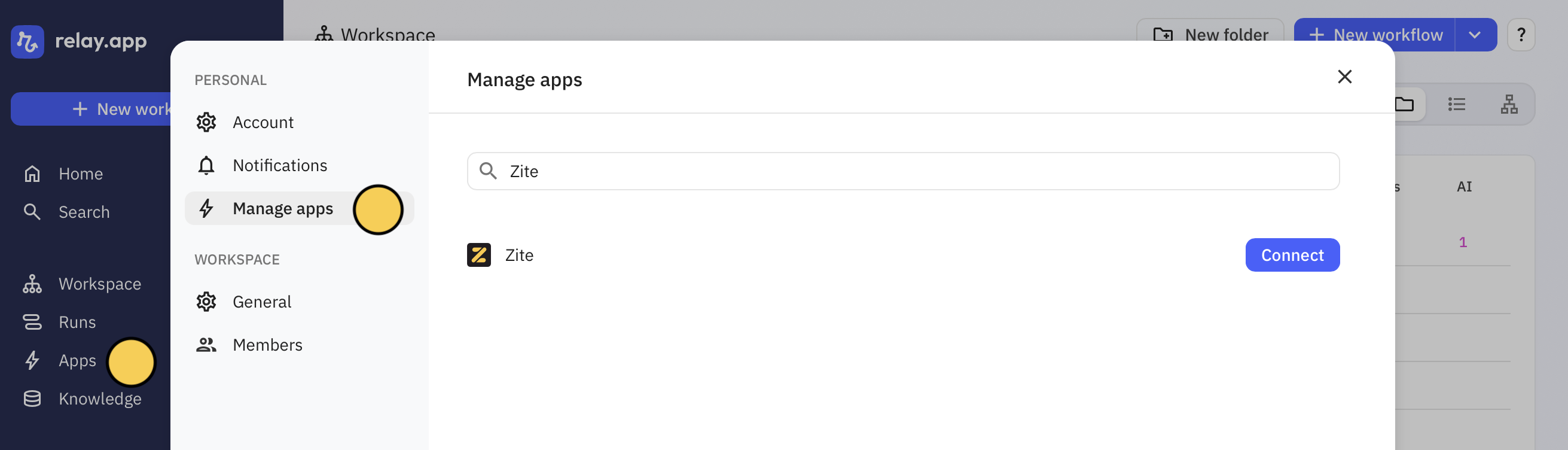 Then, search for `Zite`.
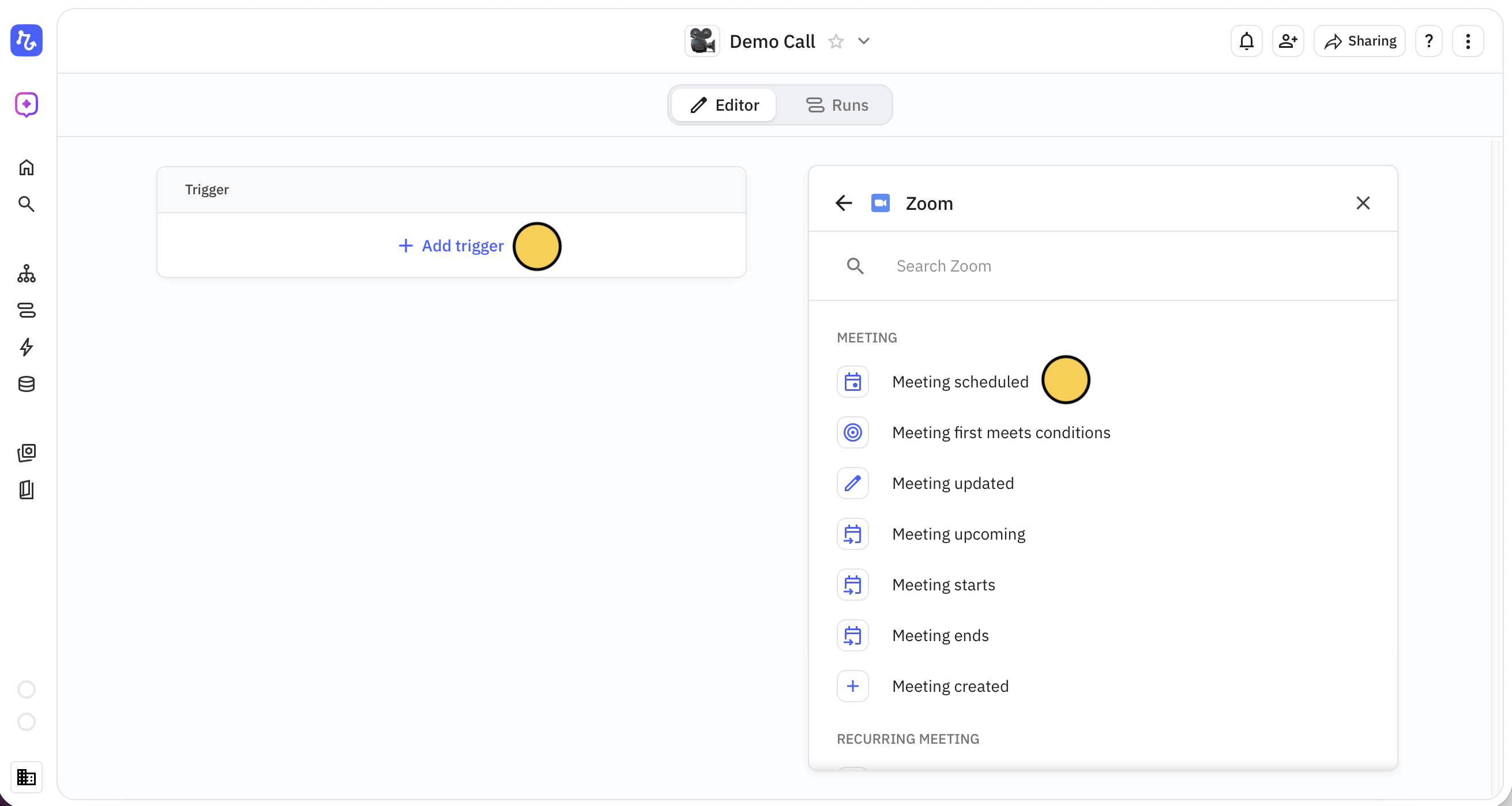
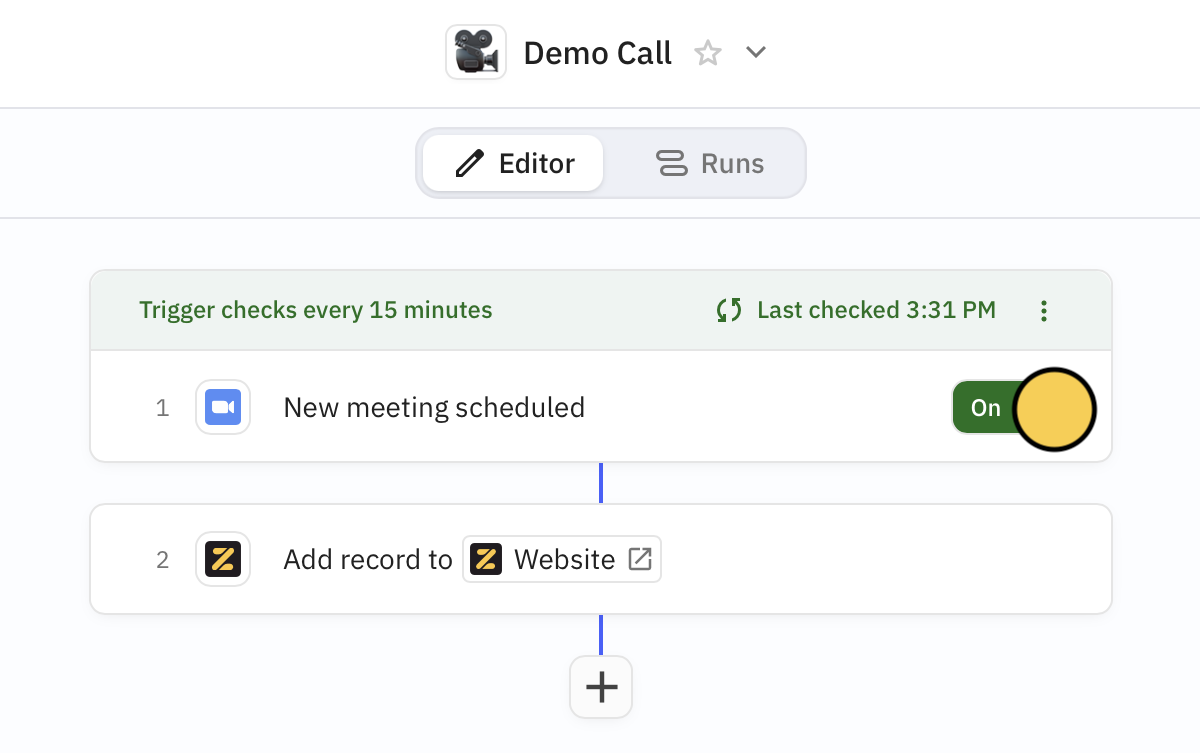
On the upper left side, click `+ New workflow`. You can select Zite as the trigger or use it in succeeding steps. For example, let's record web visitors who book a Zoom demo as leads in our Zite database.
First, `+ Add trigger`. Let's click `Zoom`, followed by `Meeting scheduled`.
Then, search for `Zite`.
On the upper left side, click `+ New workflow`. You can select Zite as the trigger or use it in succeeding steps. For example, let's record web visitors who book a Zoom demo as leads in our Zite database.
First, `+ Add trigger`. Let's click `Zoom`, followed by `Meeting scheduled`.
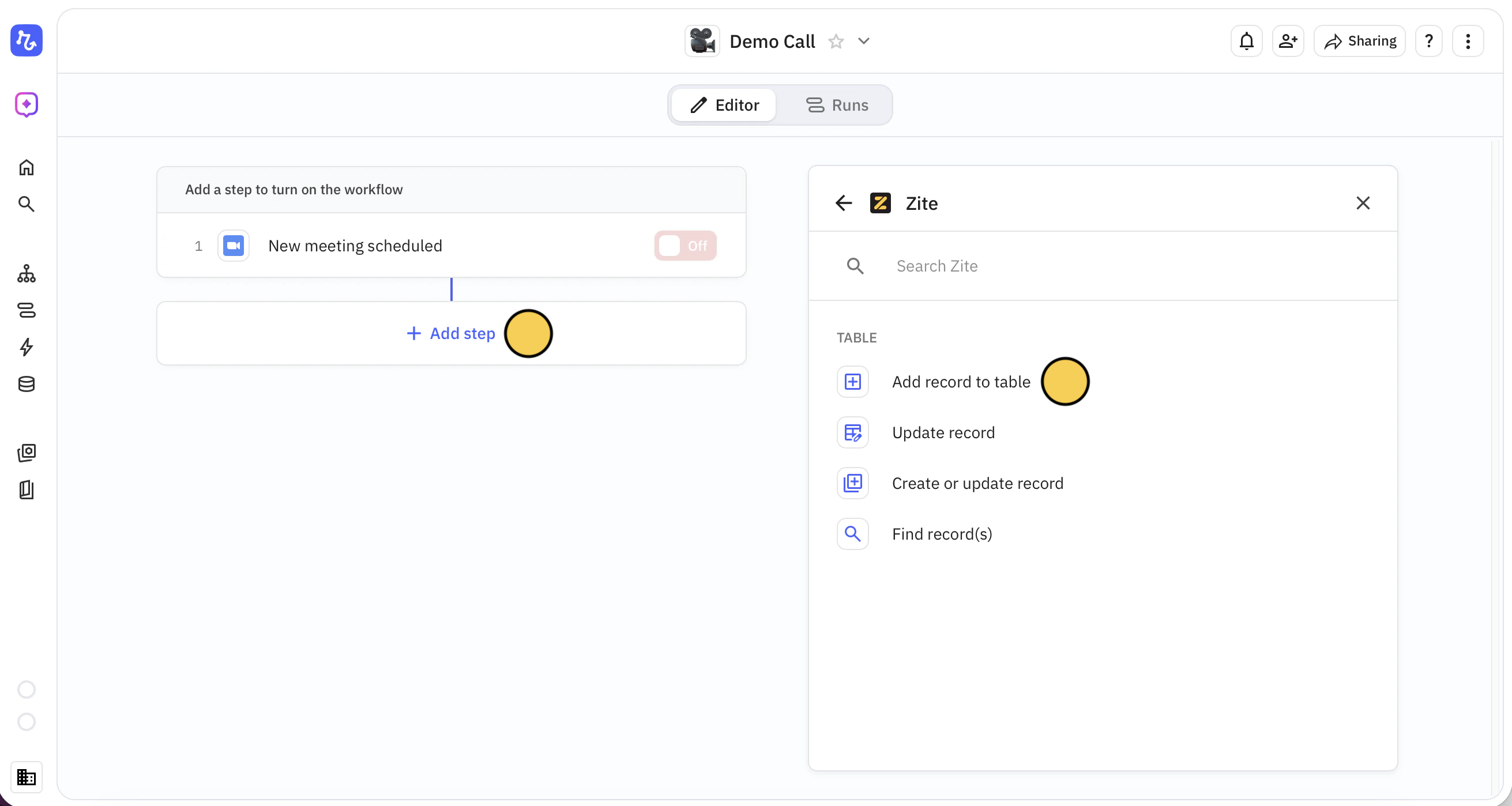
 Now, let's `+ Add step`. Here, we'll choose `Zite` and `Add record to table`.
 Choose the Zite **Database** and **Table** you want to connect. Add and map **Fields to populate**. In our example, we'll auto-populate the email and meeting date columns in our database for every new meeeting.
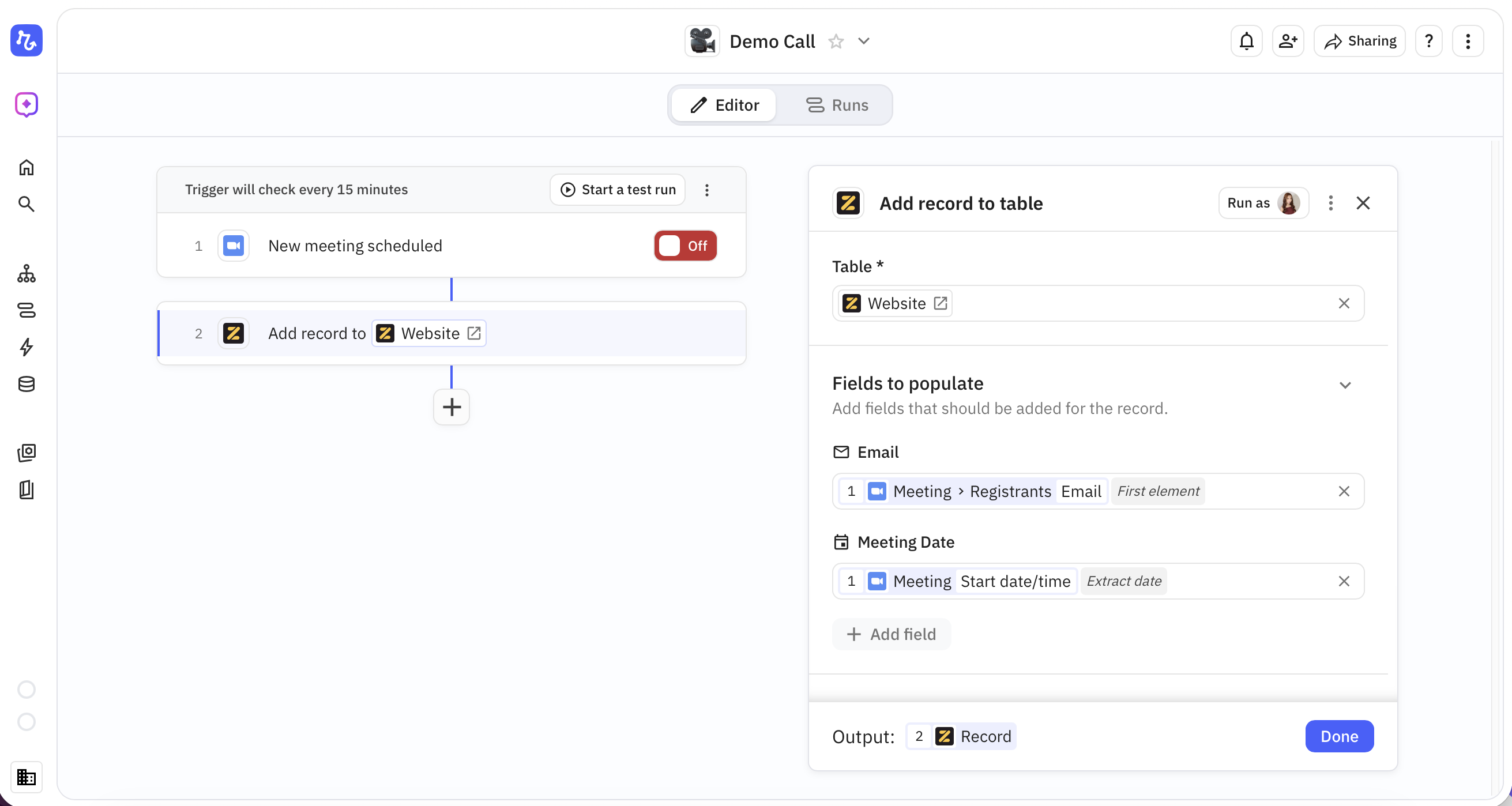 `Start a test run` first. When everything's working as intended, turn it `On`.
 ## Triggers
Start a workflow when something happens in Zite:
| Trigger | Description |
| --------------------------------- | ------------------------------------------------------ |
| **New record added** | Fires when a new record is created in a table |
| **Record changed** | Fires when an existing record is updated |
| **Record first meets conditions** | Fires when a record first matches specified conditions |
All triggers fire in real-time—no polling delays.
## Steps
Do something in Zite from another app:
| Action | Description |
| --------------------------- | ------------------------------------------------ |
| **Add record to table** | Creates a new record in a table |
| **Update record** | Updates an existing record |
| **Create or update record** | Creates a new record or updates an existing one |
| **Find record(s)** | Searches for records matching specified criteria |
## Common use cases
* **New record notification:** Get a Slack message when a new record is added
* **CRM sync:** Automatically create a Zite record when a new contact is added in your CRM
* **Form to database:** Store form submissions from any platform in Zite
* **Email automation:** Send an email when a record field reaches a certain status
* **Spreadsheet backup:** Copy new Zite records to Google Sheets for backup
Need inspiration? See everything that's possible with [Zite and Relay.app](https://www.relay.app/apps/zite/integrations).
## Triggers
Start a workflow when something happens in Zite:
| Trigger | Description |
| --------------------------------- | ------------------------------------------------------ |
| **New record added** | Fires when a new record is created in a table |
| **Record changed** | Fires when an existing record is updated |
| **Record first meets conditions** | Fires when a record first matches specified conditions |
All triggers fire in real-time—no polling delays.
## Steps
Do something in Zite from another app:
| Action | Description |
| --------------------------- | ------------------------------------------------ |
| **Add record to table** | Creates a new record in a table |
| **Update record** | Updates an existing record |
| **Create or update record** | Creates a new record or updates an existing one |
| **Find record(s)** | Searches for records matching specified criteria |
## Common use cases
* **New record notification:** Get a Slack message when a new record is added
* **CRM sync:** Automatically create a Zite record when a new contact is added in your CRM
* **Form to database:** Store form submissions from any platform in Zite
* **Email automation:** Send an email when a record field reaches a certain status
* **Spreadsheet backup:** Copy new Zite records to Google Sheets for backup
Need inspiration? See everything that's possible with [Zite and Relay.app](https://www.relay.app/apps/zite/integrations).
Related topics