


I tested Base44 and found that it works well for prototypes, but not for running apps in production. This Base44 review explains what it does well, what it struggles with, and who it's best for in 2026.
Quick verdict
Best for: Base44 is an AI app builder that’s great for quickly generating simple web apps from prompts.
Falls short for: Teams that need production-ready apps, advanced logic, or reliability at scale.
Bottom line: Base44 is fantastic for rapid prototyping. But once you need it to work for real at scale, prepare to spend time dealing with errors at extra costs.
What is Base44?
Base44 is an AI app builder that generates web apps from plain-English prompts. It sets up the UI, data model, and authentication for you. You don’t have to build databases, logins, or backend services.
You describe what you want, and Base44 generates a working prototype. This building process is popularly known as vibe coding.
Most vibe-coding tools, such as Lovable and Bolt, use other tools to store data and manage users. Base44 does this itself. It has built-in storage for your data, user authentication, and handles file uploads.
Key features of Base44
Below are the main features of Base44:
- Prompt-based generation: Describe your app, and Base44 builds UI and backend.
- Built-in database: Base44 creates tables automatically based on your prompts. You don’t need extra tools to store data or manage user logins, but you also can’t fully control how the data is organized.
- Idea library: Base44 has ready-made prompts for common apps like CRMs, task managers, and booking tools.
- Discussion mode: You can chat with the AI to plan or refine your app without using credits. This helps you think through what you want before building.
- Visual editor: After Base44 builds the app, you can click on components to change text, colors, and layout. This makes quick visual tweaks easy without re-generating the entire app.
Base44 pricing
Base44 uses a credit-based pricing model with two separate buckets:
- Message credits: You spend these when you ask the AI to build or change your app. Every time you send a message in the chat, you use these credits.
- Integration credits: Your app uses these credits when it sends or receives data, or calls an LLM.
You pay a flat monthly fee, but how far it goes depends on what you build. More complex prompts consume more message credits, and apps with more integrations use up integration credits faster.
These credits also don't roll over. If you don't use them by month’s end, they're gone. You also can't buy additional credits without upgrading your entire plan.
Below is what you get with each plan:
Base44 reviews
Most reviews say Base44 is good for testing app ideas, but not for long-term apps with real users.
What users like
- Fast initial builds: You can get a functional prototype in minutes. A single prompt can produce a dashboard, database structure, and login flows.
- All-in-one simplicity: Base44 bundles database, authentication, emails, and hosting into one platform. Users like not having to wire together Supabase, auth providers, and deployment just to test an idea.
- Clean visual output: The styling options produce professional-looking interfaces without CSS knowledge. Users consistently praise how polished the generated UI looks.
What frustrates users
- Hits a wall with complexity: This is the most common complaint. Reviews describe hitting points where the AI can’t reliably resolve logic issues or structural changes.
- Credits vanish fast: Many users underestimate how quickly credits run out, especially during debugging or iterative changes. Reviews often mention frustration with losing unused credits at the end of the month and needing to upgrade plans just to continue building.
- Support feels inconsistent: Paid users often mention slow response times from the support team when they hit blocking issues. For teams trying to ship on a deadline, this uncertainty becomes a serious concern.
- No custom login page styling: Base44 shows its own branding on login screens, and you can’t redesign that experience. This means users leave your flow and land on a Base44-branded page to sign in, which causes confusion and drop-off because users don’t recognize the brand.
My experience: Building an employee onboarding portal
I tested Base44 by building an employee onboarding portal for new hires. After describing the app, Base44 generated a clean layout with welcome screens, policy sections, and a team directory. It looked finished and ready to share.
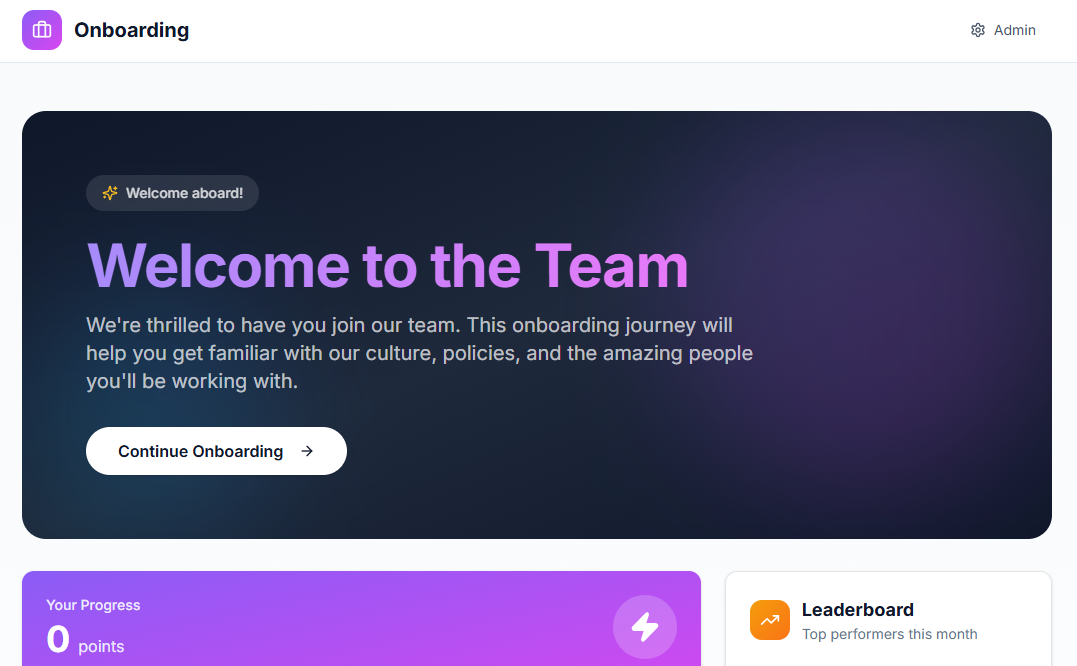
Problems started when I added more features. File uploads took several attempts, and each try consumed the message credits.
What this experience makes clear is the tradeoff you’re signing up for. Base44 excels at generating visual mockups fast, but reliability drops once you start iterating on functionality.
If you can code, you can fix some issues by editing the code instead of re-prompting the AI. You can also move the app elsewhere and continue development, but only the front-end exports. You still have to rebuild the backend and database yourself.
Is Base44 right for you?
Base44 is a good fit if you need a fast prototype and don’t expect the app to support real users over time.
Who might find it useful:
- Designers creating clickable prototypes for stakeholder presentations. The visual output is polished enough for demos.
- Founders validating ideas who need something to show investors before committing to real development. Get in, build fast, don't plan to scale it.
- Hobbyists experimenting who want to see what AI app builders can do without deploying to real users.
Who should skip it:
- Ops teams building internal tools that need to reliably handle real data, file uploads, and multiple users. The complexity wall will frustrate you.
- Orgs that need compliance guarantees since Base44 doesn’t offer SOC 2 or ISO 27001 certification.
- Builders who want predictable, flexible pricing and don’t want to lose unused credits or upgrade plans just to keep building.
The best Base44 alternative: Zite
I rebuilt the same employee portal in Zite and was able to finish it because Zite doesn’t trap you in a pure prompt-only or code workflow. I could freely switch to visual editing for both the frontend and backend, and fix issues directly.
On the frontend, the visual editing tools made it easy to restyle and resize my components. For backend logic, Zite’s flowchart‑style view let me see each step in the workflow, track how data moved through the system, and pinpoint exactly where runs were failing.
Where Zite handles what Base44 can't:
- Visual workflows: Zite shows backend logic as visual flowcharts (like n8n or Zapier), so you can reason about what happens and when. No need to dig through AI-generated code to debug. Base44's prompt-centric approach means once AI breaks your app, you're stuck reading code.
- Visual app editing: Edit your app directly like Figma or Webflow. You can resize and restyle your app directly. Base44's visual editor only handles basic text and color changes. Anything else requires re-prompting or editing code.
- Actually production-ready: Zite includes user authentication, secure hosting, access controls, SSO, and SOC 2 Type 2 certification.
- Branded logins: Base44 shows its own branding on login screens, and you can’t redesign that experience. Zite lets you brand the entire login flow from the start. When someone signs in, they see your product, not the platform behind it.
- Built-in database: Describe what you're building, and Zite auto-generates the data schema. No external database setup required. You can also connect your own data sources like Airtable or Google Sheets, so you're not locked into a proprietary system.
- Code access even on free: Zite lets you edit the generated code directly, even on the free plan. That means you can fix issues without looping endlessly through AI prompts. Base44 only unlocks code editing on paid plans starting at $20/month.
- Unlimited users and apps on all plans: Zite's pricing is predictable. All plans, including free, allow unlimited end-users and unlimited apps.
- Integrations at no extra cost: Zite connects with business tools like Airtable and Google Sheets at no additional charge. To integrate external tools in Base44, you’ll need backend functions, which only unlock on the $40 Builder plan. Even then, every external service interaction deducts from your monthly integration credit allowance.
Final verdict
Base44 generates impressive-looking apps fast. But for ops teams, support teams, and SMBs building employee portals, inventory trackers, CRMs, or other business software that need long-term stability, Zite provides the production-ready foundation that Base44 lacks.
Frequently Asked Questions
How much does Base44 cost?
Base44 costs $20 per month for the Starter plan. This plan includes 100 message credits and 2,000 integration credits each month. Higher plans include more credits and extra features like backend functions and custom domains.
Do Base44 credits roll over?
No, Base44 credits do not roll over. Any unused message or integration credits expire at the end of each billing cycle, and Base44 does not offer a way to buy extra credits without upgrading your plan.
Can I export my Base44 app?
No, you cannot fully export your Base44 app. Base44 only supports frontend code exports. Backend logic and database stay locked to Base44.
What are the disadvantages of Base44?
Base44’s main disadvantages are credits that reset every month, a lack of custom login branding, and limited portability of backend code or data.
Who owns Base44?
Wix owns Base44. Wix acquired Base44 for roughly $80 million in mid-2025.

