


Most agency teams burn hours every month on PDF reports that clients rarely open. A marketing agency client dashboard fixes that, and I've found three methods that consistently work.
What is a marketing agency client dashboard?
A marketing agency client dashboard is a single branded login that gives your clients real-time visibility into campaign performance, deliverables, and reports.
Most agencies use one to replace the monthly PDF reporting cycle. The dashboards typically save 4 to 8 hours per client per month and let clients spot performance issues as they happen, rather than weeks later in a review meeting.
Why your agency needs a client dashboard
Clients don’t want monthly PDF reports. They want to log in at any time and see what’s happening on their account. A marketing agency client dashboard solves three problems at once: it cuts the time your team spends building reports, it makes performance transparent so clients trust the work, and it gives you a place to surface narrative alongside numbers.
The agencies I've worked with that switched from PDF reports to client dashboards typically save 4 to 8 hours per client per month after the transition. Retention improves, too, as clients spot performance issues early rather than finding them buried in a monthly review.
Marketing agency client dashboard examples and templates
Here are three client dashboards I built with Zite for agencies in different service lines. Each came from a plain-language prompt that described the client's view, and Zite generated the database, dashboard layout, and role-based access from there.
PPC agency dashboard (built with Zite)
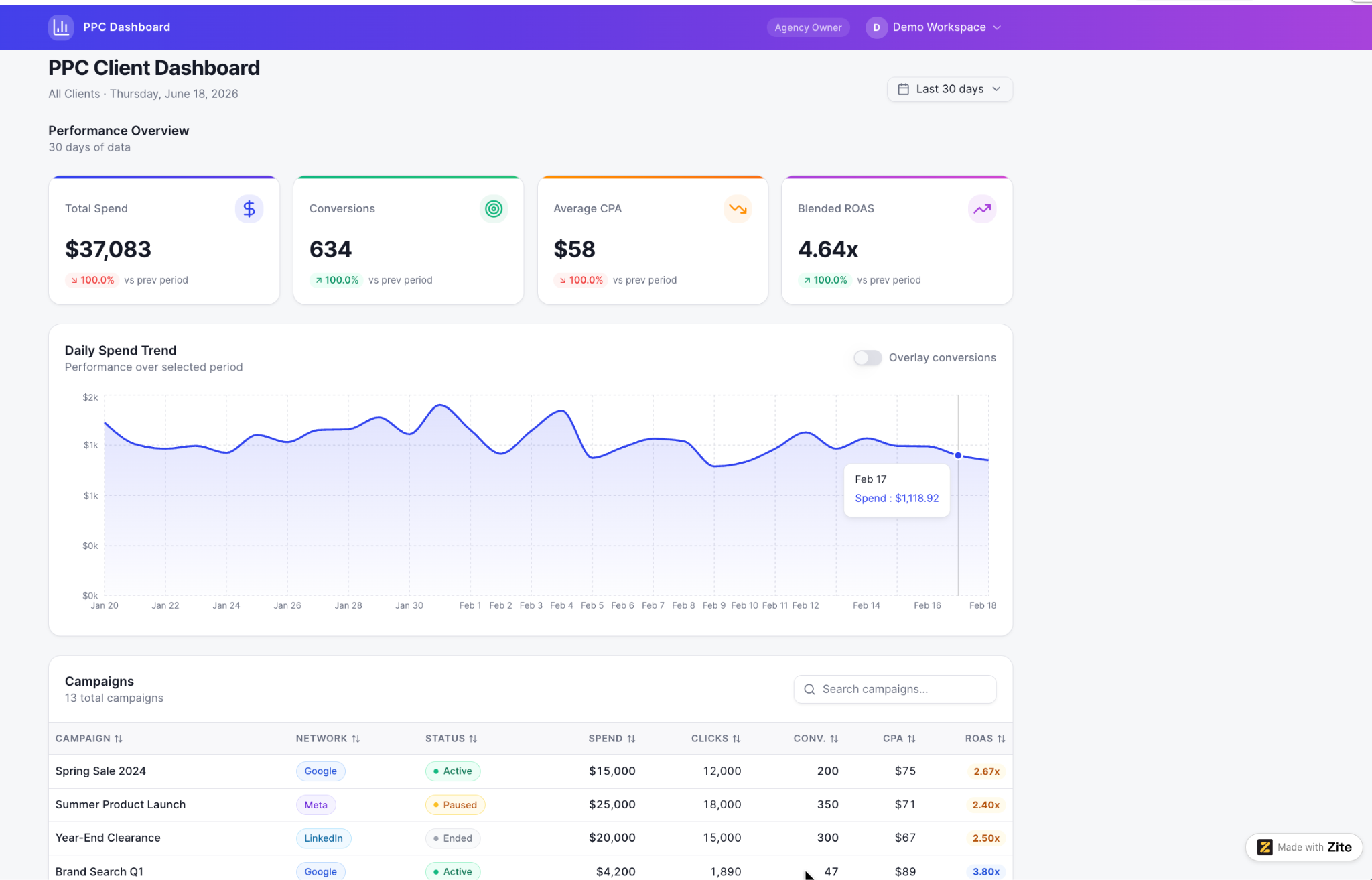
Best for: Paid media agencies tracking ad spend, ROAS, and conversions across Google Ads, Meta, and LinkedIn for retained clients.
The portal brings ad data from each platform into a single client view.
The ad platforms take some integration setup to connect (they are not pick-from-a-menu connectors like a dedicated reporting tool ships), but once wired up, spend pacing, ROAS by campaign, and conversion trends update on a schedule the agency controls, so clients see real numbers without monthly report assembly.
SEO retainer dashboard (built with Zite)
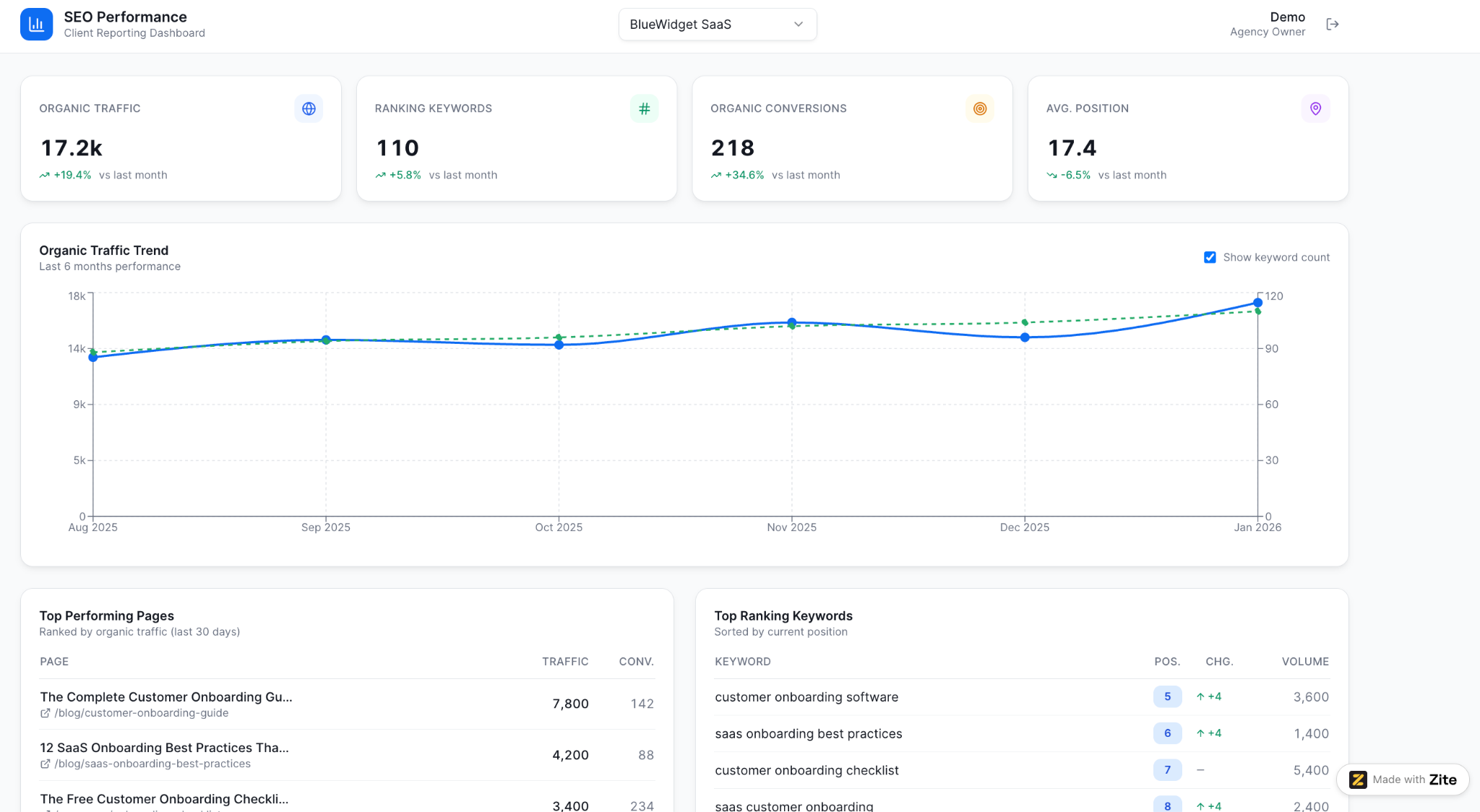
Best for: SEO agencies surfacing keyword rankings, organic traffic, and backlink growth for clients on monthly retainers.
The dashboard surfaces organic traffic, ranking keywords, organic conversions, and average position with month-over-month comparisons. Below the headline KPIs, top performing pages, and top ranking keywords give clients the trend and the content driving it side by side.
Email marketing client dashboard (built with Zite)

Best for: Email marketing agencies tracking campaign performance, list growth, and revenue across Klaviyo, Mailchimp, or Kit (formerly ConvertKit) for retained clients.
The portal combines total subscribers, average open rate, average click rate, and email revenue into one client view, with a subscriber growth trend over six months alongside revenue by campaign. A campaign performance table below shows per-send opens, clicks, revenue, and segment, so clients see both list health and what each send produced.
3 ways to build a marketing agency client dashboard
There are 3 main approaches in 2026, each with a different tradeoff between speed, flexibility, and how custom the experience feels to your client.
Method 1: Use a dedicated agency reporting tool
What it is: A purpose-built tool for marketing agencies with pre-configured integrations for Google Analytics, Google Ads, Facebook Ads, LinkedIn Ads, SEO tools, social platforms, and call tracking. Examples include AgencyAnalytics, Whatagraph, Databox, and ReportGarden.
How it works: You connect your client’s marketing accounts through pre-built integrations, pick from a library of templated dashboards (PPC, SEO, social, all-in-one), customize the branding, and share a link your client uses to log in. Data refreshes automatically on a schedule you control.
The strength is speed. You can have a working client dashboard live within an afternoon, especially if your client’s marketing accounts are standard (Google + Meta + a few SaaS tools). The weakness is the templated nature: you’re choosing from the vendor’s idea of what a marketing dashboard should look like.
When to use it: Your agency runs standard marketing services (paid ads, SEO, social), you have 10+ clients on similar workflows, and you need to ship dashboards quickly across your book.
Real example: A paid media shop with 15 staff moved from manual Data Studio templates to AgencyAnalytics, cutting monthly reporting time per client from 6 hours to 30 minutes. They lost some custom chart types during the switch, but the time savings more than paid for the tool 10x over.
Method 2: Build a custom dashboard with a generic data tool
What it is: A free or low-cost data visualization tool you configure manually to display marketing data. The most common is Data Studio (free from Google), but Tableau, Power BI, and Databox’s free tier also fit.
How it works: You connect data sources (Google Analytics, Google Ads, Sheets, Facebook Ads via third-party connectors) and build dashboards using charts, tables, and scorecards. You design the layout from scratch, choosing what metrics to show, how to group them, and what filters clients can use.
The strengths are flexibility and cost. Data Studio is free, and you can build custom dashboards that exactly match what your agency wants to show. The weakness is the manual work: marketing-specific integrations require third-party connectors (Supermetrics, Funnel.io) that incur monthly costs.
When to use it: You have a small client roster (under 10), you want maximum control over the dashboard design, and your budget is tight, so $0 to $60 in tooling matters.
Example: A small SEO team can run on Data Studio with Supermetrics connectors for the first year or two. Past a dozen clients, the maintenance overhead usually prompts a switch to a dedicated agency reporting tool.
Method 3: Build a custom client portal & dashboard with an app builder
What it is: An app builder you use to create a branded client portal that includes a marketing dashboard alongside other client interactions (file sharing, project status, document sign-offs, communication).
There are two app-building approaches to try:
- With no-code builders like Softr and Stacker, you assemble the portal yourself from components on top of existing data.
- With an AI app builder like Zite, you describe the portal in plain language, and the AI builds the database, dashboard, and client access in one pass.
Zite also keeps the structure inspectable, so non-technical staff can adjust the portal later without needing to write code.
How it works: You build a custom portal with a database that holds client data, a dashboard view that surfaces the metrics you want, role-based access so clients only see their own data, and any additional client interactions you want to include in the same login experience.
The strength is going beyond reporting: clients see your work, sign off on deliverables, share files, and view metrics all in one branded space. The weakness is more upfront setup than dedicated reporting tools, especially around marketing-specific data integration.
When to use it: Your agency does more than reporting (project management, deliverable sign-offs, document sharing), you want one branded portal that covers all client touchpoints, or your workflow is unusual enough that no dedicated tool fits cleanly.
Example: For a mid-sized full-service agency, one login can combine marketing KPIs with project milestones, deliverable approvals, and a shared file library, so clients are no longer sent to 4 different links per agency interaction.
Which method should you choose?
Each method fits a different agency profile. Before picking, look for these features across all three methods:
- Integrations: native connections to Google Ads, Meta Ads, Search Console, and other marketing data sources. Dedicated tools win here; Method 3 and client portals require manual integration setup.
- Real-time data: dashboards that refresh on a schedule so clients can see. All three methods support this; dedicated tools default to it.
- White-labeling: custom domain, logo, colors, and login screen. Methods 1 and 3 support full white-labeling; Method 2 (Data Studio) requires workarounds.
- Client (external) access: role-based logins, so clients see only their own accounts. Methods 1 and 3 support this natively; Method 2 needs careful permission setup.
- Predictable pricing: flat-rate plans that don't climb with client count. Method 3 wins here (Zite is flat $19/month with unlimited clients); dedicated tools are priced per client, and Data Studio stays free.
Then use the method-specific framework below.
Choose Method 1 (dedicated reporting tool) if:
- Your services are standard (paid ads, SEO, social, content) and consistent across clients.
- You have 10+ clients on similar workflows and need to ship quickly.
- You’re willing to pay $60 to $300 per month for the speed and pre-built integrations.
- Reporting is the main client touchpoint, and you don’t need additional portal features.
Choose Method 2 (generic data tool) if:
- Your client roster is small (under 10), and your budget is tight.
- You want maximum flexibility on chart types, layouts, and data sources.
- You’re comfortable doing manual integration setup and maintenance.
- White-label and client-facing polish aren’t deal-breakers.
Choose Method 3 (client portal from a no-code or AI app builder) if:
- You need more than reporting (project management, deliverables, file sharing).
- You want one branded portal that covers all client touchpoints
- Your workflow is unusual enough that no dedicated tool fits cleanly.
Zite makes building a marketing agency client dashboard easier
If you've picked Method 3, Zite removes the parts of portal-building that typically slow agencies down. The database (the tables and fields), the dashboard layout, and the client login system are all generated from a single plain-language prompt.
Here’s how Zite helps with each part:
- AI generates the portal and dashboard. Describe what you want to show clients (campaigns, KPIs, deliverables, files), and Zite builds the database, dashboard layout, and access rules in one pass.
- Role-based client access is built in. External clients log in with their own branded credentials and see only their account’s data.
- Visual workflows: Zite generates the logic from your prompt and shows it as a flowchart you and your clients can inspect and trace.
- No per-client fees, with unlimited clients. The Pro plan is a single rate of $19/month. The bill stays the same whether you onboard 5 clients or 50.
See agency-specific features at Zite for agencies, browse pre-built portal templates in the Zite marketplace, or compare Zite with Airtable and Lovable.
Start building with Zite if your agency needs a client portal that goes beyond reporting.
Frequently asked questions
How long does it take to build a marketing agency client dashboard?
Building a marketing agency client dashboard takes 1 to 8 hours, depending on the method used. Dedicated reporting tools get you live in 1 to 2 hours. Data Studio takes 3 to 6 hours of manual setup per client. Custom no-code portals take 4 to 8 hours but cover dashboard plus broader portal needs.
What metrics should a marketing agency client dashboard include?
A marketing agency client dashboard should include 4 to 6 core metrics tied to the client’s business goals. For paid media: spend, conversions, cost per acquisition, return on ad spend. For SEO: organic traffic, ranking keywords, and qualified leads. Always include period-over-period comparisons.
Do I need a dedicated reporting tool for clients?
You don’t need a dedicated reporting tool for clients. Free options like Data Studio work for agencies with fewer than 10 clients, and custom portals like Zite work when reporting is part of a broader client experience. Dedicated tools earn their keep at 10+ clients on similar workflows.
Can Zite be used as a marketing agency client dashboard?
Yes, Zite works well as a marketing agency client dashboard, especially when you want to combine metrics, deliverables, file sharing, and other client interactions into a single branded portal. Flat pricing ($19/month for Pro) applies regardless of how many clients log in.
What’s the difference between an agency dashboard and a reporting tool?
An agency dashboard is the client-facing view (the screen the client sees when they log in), while a reporting tool is the underlying software that pulls and visualizes the data. Some tools (AgencyAnalytics, Whatagraph) do both. Others separate them.
How much does a marketing agency client dashboard cost?
A marketing agency client dashboard costs $0 to $300 per month, depending on the method. Data Studio is free but requires manual setup. Dedicated tools like AgencyAnalytics start at $20 per client/month (billed annually). Custom portals like Zite start at $19/month flat with unlimited clients.

