> ## Documentation Index
> Fetch the complete documentation index at: https://zite.com/llms.txt
> Use this file to discover all available pages before exploring further.
# Creation permissions
> Choose who in your organization can create apps, forms, and workspaces.
## Overview
Everyone in your organization can create apps, forms, and workspaces by default. Admins can switch off any of these options for the whole organization, then allow selected [groups](/help/platform/access/user-groups) to use them.
This works well when you want to limit building to a pilot group or a trained team. Everyone else can still use the apps and forms they already have access to.
Creation permissions are available on **Enterprise** plans. [Contact us](https://www.zite.com/enterprise) to enable them for your organization.
## How it works
Creation permissions have two levels:
1. **Organization defaults:** what anyone in the organization can create.
2. **Group permissions:** exceptions for members of a specific group.
Group permissions can add access, but they can't remove it. If the organization allows an item, a group can't block it. To restrict an item, switch it off for the organization and then enable it for the groups that need it.
Admins can always create apps, forms, and workspaces, regardless of these settings.
## Set organization defaults
From the dashboard, click your `Account name` in the upper-left corner and select `Settings`. Open the [**Groups** tab](https://build.fillout.com/home/settings/groups).
Click the `All users` row at the top of the page, then switch to the `Advanced` tab.
Under **Users in the organization can create...**, toggle `Apps`, `Forms`, and `Workspaces` on or off, then click `Save`.
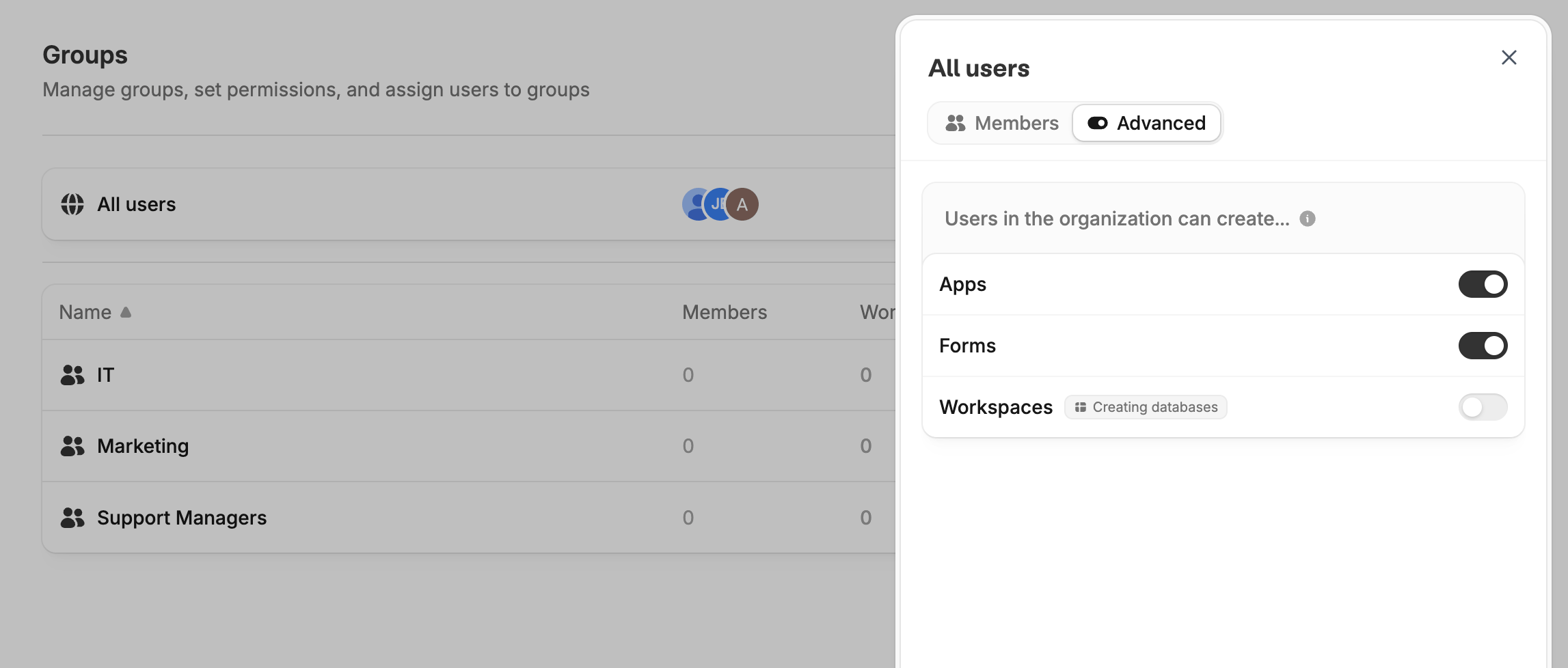 When you turn off a toggle, only admins and members of groups with explicit permission can create that item.
| Toggle | Controls |
| -------------- | --------------------------------------------------------------------------------------------------------- |
| **Apps** | New Zite apps, whether started from scratch, a prompt, a template, or a duplicate |
| **Forms** | New forms and quizzes, including duplicates and imports from Typeform, Jotform, SurveyMonkey, and Fillout |
| **Workspaces** | New workspaces and their databases |
The **Forms** toggle doesn't cover scheduling or payment forms. Users can still create them.
## Grant creation access to a group
If creation is disabled for the organization, you can enable it for one or more groups.
On the **Groups** tab, click the group you want to grant access to, then switch to the `Advanced` tab.
Under **Users in this group can create...**, turn on the items this group should be able to create, then click `Save`.
When you turn off a toggle, only admins and members of groups with explicit permission can create that item.
| Toggle | Controls |
| -------------- | --------------------------------------------------------------------------------------------------------- |
| **Apps** | New Zite apps, whether started from scratch, a prompt, a template, or a duplicate |
| **Forms** | New forms and quizzes, including duplicates and imports from Typeform, Jotform, SurveyMonkey, and Fillout |
| **Workspaces** | New workspaces and their databases |
The **Forms** toggle doesn't cover scheduling or payment forms. Users can still create them.
## Grant creation access to a group
If creation is disabled for the organization, you can enable it for one or more groups.
On the **Groups** tab, click the group you want to grant access to, then switch to the `Advanced` tab.
Under **Users in this group can create...**, turn on the items this group should be able to create, then click `Save`.
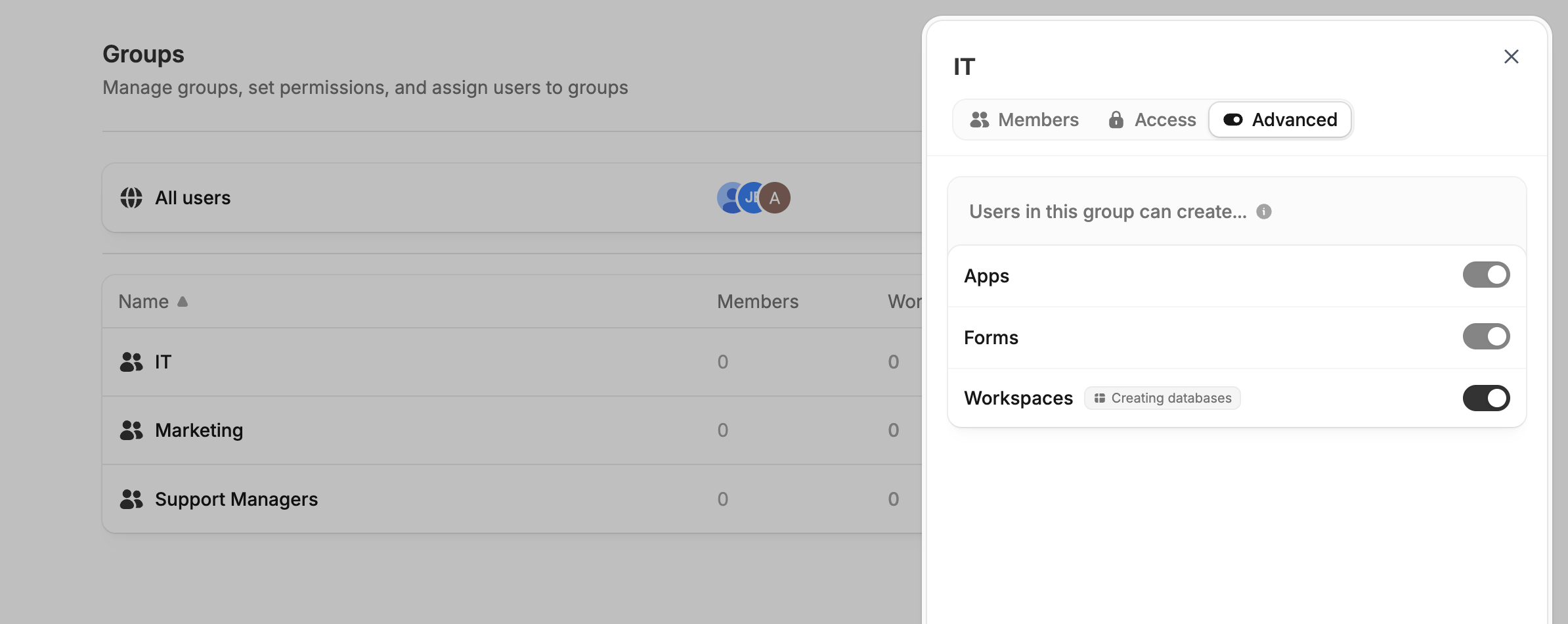 In the example above, workspace creation is disabled for the organization and enabled for the IT group. The `Apps` and `Forms` toggles are locked on because everyone can already create them.
If someone belongs to more than one group, their access adds up. A member can create apps if any of their groups allows it.
Zite saves a group's toggles even while they're locked. If you later turn off an item for the organization, groups that already had permission keep it.
## What restricted users see
Zite hides or disables creation buttons and menu items when someone lacks permission. A tooltip explains why. If they open a creation page directly, they see a message asking them to contact their organization admin.
Creation permissions only affect new items. Existing **Use** and **Edit** [permissions](/help/platform/access/user-groups) don't change, so members can keep using and editing anything they already have access to.
In the example above, workspace creation is disabled for the organization and enabled for the IT group. The `Apps` and `Forms` toggles are locked on because everyone can already create them.
If someone belongs to more than one group, their access adds up. A member can create apps if any of their groups allows it.
Zite saves a group's toggles even while they're locked. If you later turn off an item for the organization, groups that already had permission keep it.
## What restricted users see
Zite hides or disables creation buttons and menu items when someone lacks permission. A tooltip explains why. If they open a creation page directly, they see a message asking them to contact their organization admin.
Creation permissions only affect new items. Existing **Use** and **Edit** [permissions](/help/platform/access/user-groups) don't change, so members can keep using and editing anything they already have access to.
Related topics