> ## Documentation Index
> Fetch the complete documentation index at: https://zite.com/llms.txt
> Use this file to discover all available pages before exploring further.

# Zite User sync

> Automatically store details of Zite app users to a database table when they sign up or log in.

## Overview

User sync connects your app's authenticated users to a table in your database. When enabled, users are automatically added to the table when they sign up or log in. This is useful for building user profiles, tracking additional user data, and setting up row-level permissions.

User sync works for both internal apps and apps that are shared to the web.

**Prerequisites**

* Your app must have a connected database (Zite Database or Airtable)
* The database must have a table with at least one email field
* Your app must have a login page

## Enable user sync

<Steps>
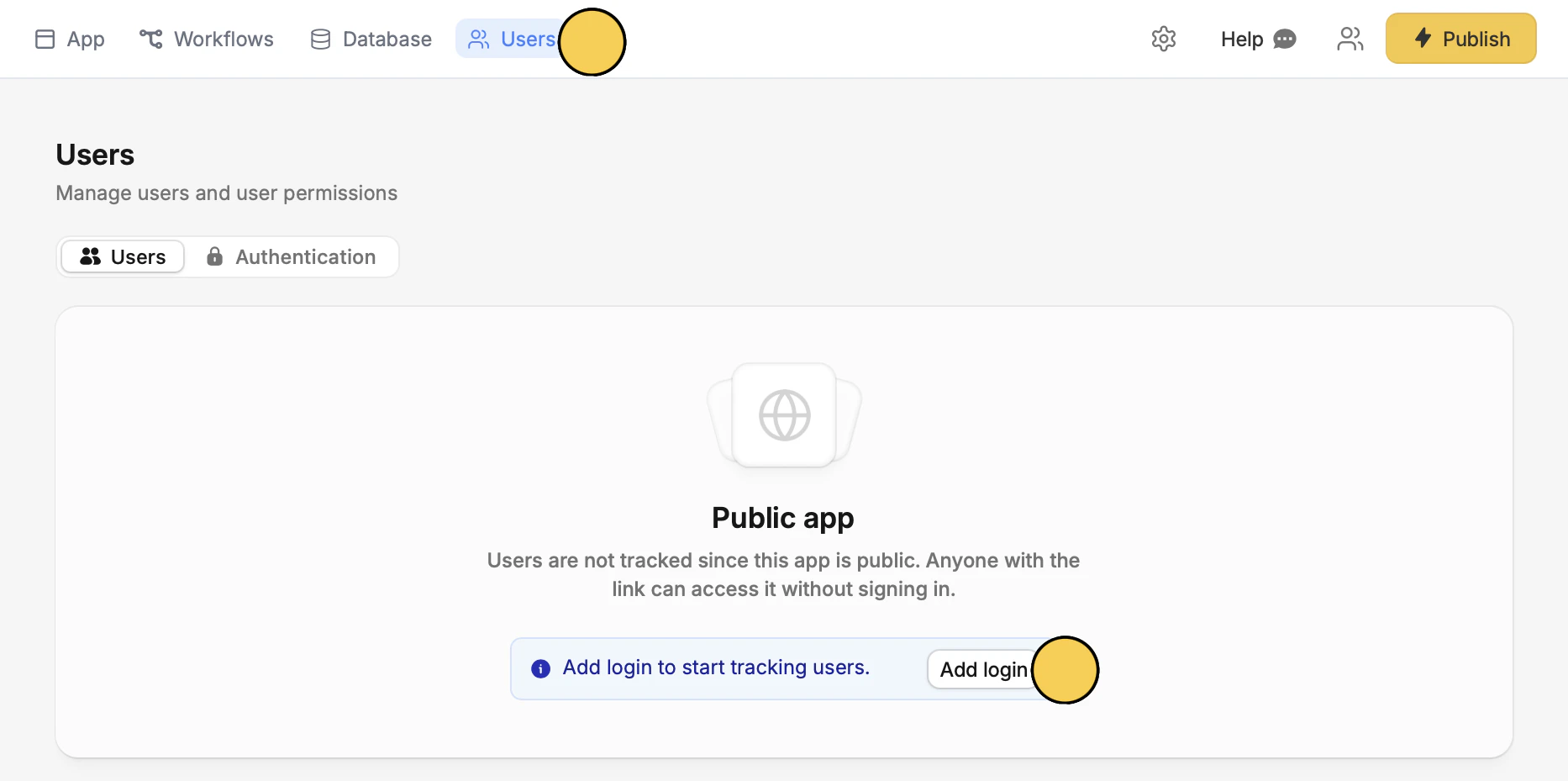
  <Step title="Add login">
    Navigate to `Users` to `Add login`.

    <img src="https://mintcdn.com/zite/KQ8qGBqeQVB6pPOl/help/images/Screenshot-2026-04-08-at-3.57.42-PM.png?fit=max&auto=format&n=KQ8qGBqeQVB6pPOl&q=85&s=c0e2e0a76f3ab412acd1e81994cd8e8c" alt="Screenshot 2026 04 08 At 3 57 42 PM" width="1866" height="929" data-path="help/images/Screenshot-2026-04-08-at-3.57.42-PM.png" />

    Then, click `Publish` in the upper right corner to reflect the change.
  </Step>

  <Step title="Configure sync settings">
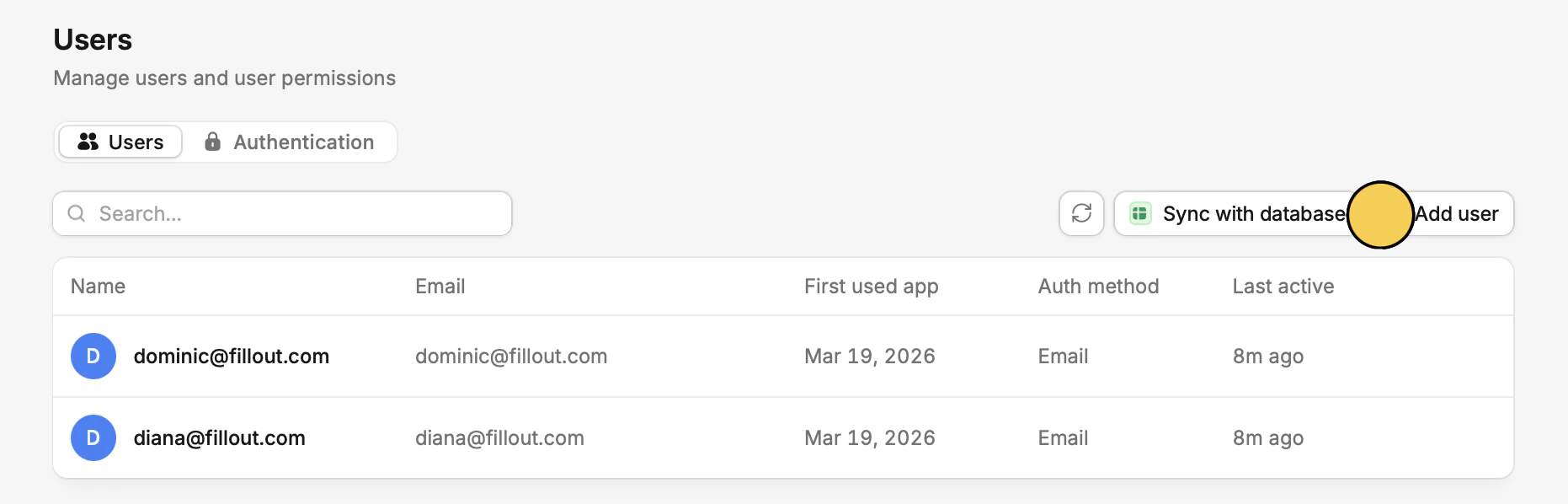
    Click `Sync with database`.

    <img src="https://mintcdn.com/zite/KQ8qGBqeQVB6pPOl/help/images/Screenshot-2026-04-08-at-4.02.33-PM.png?fit=max&auto=format&n=KQ8qGBqeQVB6pPOl&q=85&s=9b5fd450507f59234f12b8c8699ac62a" alt="Screenshot 2026 04 08 At 4 02 33 PM" width="1862" height="598" data-path="help/images/Screenshot-2026-04-08-at-4.02.33-PM.png" />

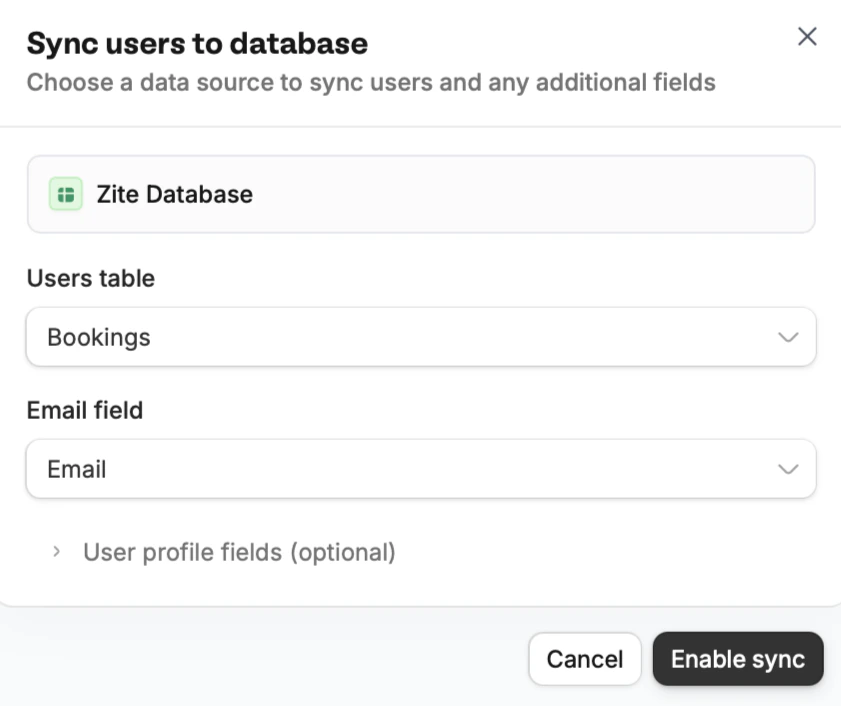
    Then, make your selections and `Enable sync`.
    <img src="https://mintcdn.com/zite/KQ8qGBqeQVB6pPOl/help/images/Screenshot-2026-04-08-at-4.04.14-PM.png?fit=max&auto=format&n=KQ8qGBqeQVB6pPOl&q=85&s=a54ceb941c91d53b99f51ead89a063b8" alt="Screenshot 2026 04 08 At 4 04 14 PM" title="Screenshot 2026 04 08 At 4 04 14 PM" style={{ width:"45%" }} width="841" height="706" data-path="help/images/Screenshot-2026-04-08-at-4.04.14-PM.png" />

    If no database is connected, click `Connect database` to set one up first.

    Click `> User profile fields`  to map first name and last name fields.

    That's it! Now user details will get stored in your database.

  </Step>
</Steps>

## Manage user sync

Once enabled, the section shows your connected table with a link to open it. Click `Edit` to change the table or field configuration, or `Remove` to disable user sync entirely.

<img src="https://mintcdn.com/zite/gF_N3ByhVWhGiZlx/help/images/Screenshot2026-02-16at6.04.46PM.png?fit=max&auto=format&n=gF_N3ByhVWhGiZlx&q=85&s=b71c56b952d3520284460bae4ea77a02" alt="Screenshot 2026 02 16 At 6 04 46 PM" title="Screenshot 2026 02 16 At 6 04 46 PM" style={{ width:"82%" }} width="1244" height="218" data-path="help/images/Screenshot2026-02-16at6.04.46PM.png" />

<Warning>
  If the connected database or selected table is removed, you'll see a warning. Either reconnect a database or disable user sync to resolve it.
</Warning>

<p className="zite-related-topics-heading">Related topics</p>

<div className="zite-related-topics">
  <a href="/help/platform/access/overview">Access & Sharing</a>
  <a href="/help/platform/access/authentication">Authentication</a>
</div>
