> ## Documentation Index
> Fetch the complete documentation index at: https://zite.com/llms.txt
> Use this file to discover all available pages before exploring further.
# Model selection
> Choose the right AI model tier for your task—Zite Mini, Zite Pro, or Zite Max.
## Overview
Zite offers three AI models, letting you choose the right balance of speed, intelligence, and cost for your tasks.
| Model | Speed | Intelligence | Credits | Best for |
| :------------ | :---: | :----------: | ------- | :--------------------------------- |
| **Zite Mini** | ★★★★★ | ★★★☆☆ | ★☆☆☆☆ | Quick, simple tasks |
| **Zite Pro** | ★★★★☆ | ★★★★☆ | ★★★☆☆ | Most tasks (default) |
| **Zite Max** | ★★☆☆☆ | ★★★★★ | ★★★★☆ | Complex work and persistent issues |
Different models consume credits at different rates based on their underlying AI costs. For more details on credits and usage, check out the [How credits work guide](/help/platform/getting-started/credits).
**Zite Mini** (*Powered by Anthropic's Claude Haiku 4.5)*
The **fastest and most cost-efficient** model. Great for quick, simple tasks like minor text changes, small style adjustments, and straightforward edits.
**Zite Pro** (*Powered by Anthropic's Claude Sonnet 4.5)*
The **default model** that offers the best balance of speed and intelligence. Recommended for most tasks, including adding features, fixing bugs, and updating designs.
**Zite Max** (*Powered by Anthropic's Claude Opus 4.5)*
The **most capable model** for maximum intelligence. Use Zite Max for complex work, multi-step reasoning, and persistent issues that other models struggle with.
Zite Max is available starting on the Business plan. Click [here](https://www.zite.com/pricing) to see our pricing plans.
## How to switch models
In the chat box, click followed by your preferred model.
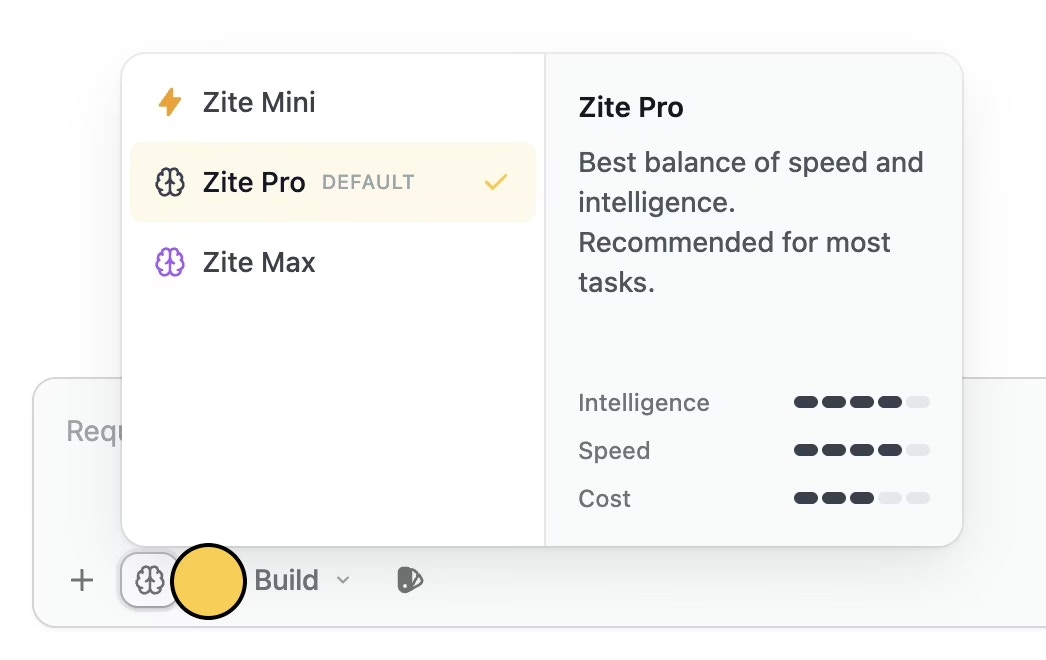 Alternatively, press `Cmd` + `/` or `Ctrl` + `/` on your keyboard to toggle the model selector.
Your model preference is saved automatically on your device.
## Mode-based model behavior
Certain editor modes automatically use **Zite Max** regardless of your saved or selected model:
| Mode | Model used |
| -------------- | -------------------- |
| **Build mode** | Your selected model |
| **Plan mode** | Always uses Zite Max |
| **Chat mode** | Always uses Zite Max |
This ensures that planning and conversational tasks benefit from the highest level of reasoning.
Alternatively, press `Cmd` + `/` or `Ctrl` + `/` on your keyboard to toggle the model selector.
Your model preference is saved automatically on your device.
## Mode-based model behavior
Certain editor modes automatically use **Zite Max** regardless of your saved or selected model:
| Mode | Model used |
| -------------- | -------------------- |
| **Build mode** | Your selected model |
| **Plan mode** | Always uses Zite Max |
| **Chat mode** | Always uses Zite Max |
This ensures that planning and conversational tasks benefit from the highest level of reasoning.
Related topics