
Documentation Index

Fetch the complete documentation index at: https://zite.com/llms.txt

Use this file to discover all available pages before exploring further.

Zite’s agent modes control what kind of work the agent does. Use them to decide whether Zite should build, plan, or answer questions before changing your project.

Choose the right mode

ModeBest forMakes changes?
Build modeCreating, updating, or fixing your appYes
Plan modeScoping and clarifying requirements before buildingNo, it creates a plan
Chat modeAsking questions or getting suggestionsNo
For large projects or unclear requirements, start in Plan mode. It helps clarify scope before Zite makes changes.

Switching modes

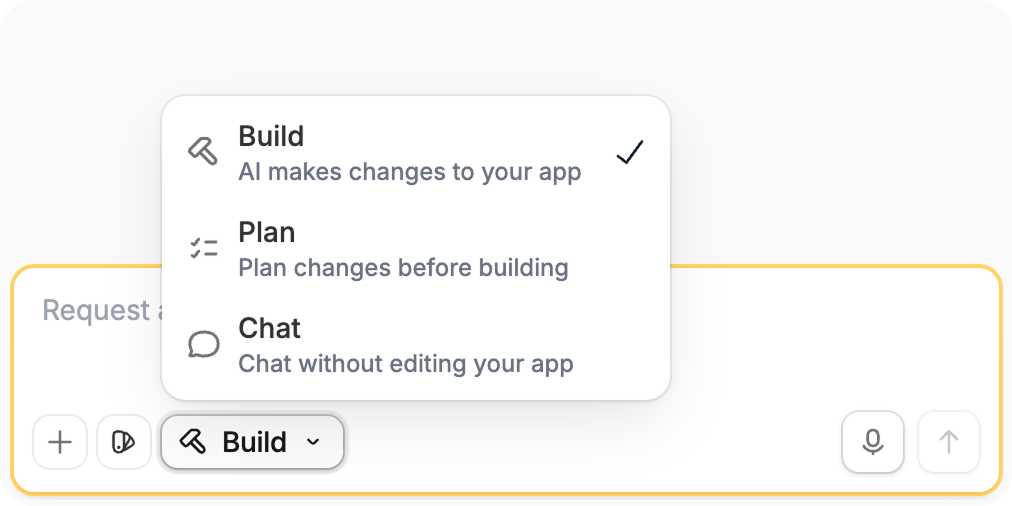
On the Zite app editor, click the Mode control on the lower left and choose the mode you want. You can also press Shift + Tab or Cmd/Ctrl + . on your keyboard. Mode selector showing Build, Plan, and Chat modes When you create a new app, you may also see:
  • Build it: start building immediately
  • Plan it: create and review a plan first, then build
New app screen showing Build it and Plan it options

Build mode

Ask Zite to make changes directly.

Plan mode

Scope the work before building.

Chat mode

Ask questions without changing your app.

Create an app

Start an app project with the right prompt, mode, and options.

Model Selection

Choose the right AI model for the task.