


I've been building with Bolt for the past few weeks, and the one thing that caught me off guard was how fast tokens disappear. That pushed me to dig into every pricing tier, figure out how Bolt AI pricing works, and which plan makes sense for different types of builders.
Bolt AI pricing plans: At a glance
Bolt’s pricing uses a token-based pricing system. Tokens are small pieces of text that AI uses to understand your messages and generate responses.
Most of your token usage comes from Bolt reading, understanding, and syncing your project files, not just your prompts. Larger projects burn more tokens, which is why costs can escalate quickly as your app grows.
Here's an overview of what each plan offers:
Bolt pricing plans breakdown
Bolt's pricing plans come with an allocated token allowance. Bolt’s Pro plan, for example, starts with 10 million tokens per month, while the Free plan gives you up to 1 million tokens monthly. That sounds generous, but tokens disappear very quickly as your app grows. One user mentioned that as their project got more complex, one or two prompts cost 1 million tokens.
Free plan: $0/month
The free plan is perfect for testing Bolt’s features and building a small-scale prototype.
What's included:
- 1M tokens per month (300K tokens daily limit)
- Public and private projects
- Bolt branding on websites
- 10MB file upload limit
- Website hosting
- Up to 333K web requests
- Unlimited databases
Best for: Curious builders who want to see how Bolt's AI code generation works before committing any money.
Pros:
- Zero cost to start, and you get access to the core AI builder, hosting, and databases.
- Private projects are included.
- 1M monthly tokens is generous enough to scaffold a basic app over a few days.
Cons:
- The 300K daily cap means you'll hit a wall mid-session on anything beyond a simple page.
- The 10MB file upload limit is tight if you're working with images or media.
Pro plan: Starting at $25/month, billed monthly
Pro removes the daily token cap, adds custom domains, and lets you scale your token allowance as your usage grows.
$25/month gets you 10M tokens. From there, Bolt offers higher Pro tiers for heavier usage. For example, the $50 pro plan gets you 26M tokens/month.
What's included:
- Everything in the Free plan
- No daily token limit
- No Bolt branding on websites
- Share sites privately
- 100MB file upload limit
- Website hosting with up to 1M web requests
- Unused tokens roll over to the next month
- Custom domain support
- SEO boosting
- Choice of database provider
- Image editing with AI
Best for: Solo developers, freelancers, and indie builders working on MVPs, client projects, or side projects.
Pros:
- Removing the daily cap makes a big difference. You can actually build in long sessions without getting cut off.
- Token rollover prevents waste if you have a light month (tokens stay valid for up to two months total).
- Custom domains and removed branding make it viable for client-facing work.
Cons:
- Token consumption is aggressive on larger projects. The base 10M can run out in under a week of heavy use.
- No built-in collaboration features.
Teams plan: Starting at $30/month per member, billed monthly
Teams adds collaboration and admin controls on top of the Pro feature set. Each member gets their own token allocation (tokens aren't shared between team members).
What's included:
- Everything in the Pro plan
- Centralized billing
- Team-level access management
- Granular admin controls and user provisioning
- Share with your organization
- Private NPM registries support
- Design System knowledge with per-package prompts
- Unused tokens roll over to next month
Best for: Small dev teams and startups that need shared workspaces, one billing account for the entire team, and access controls.
Pros:
- Aggregating charges into one subscription simplifies expense tracking for teams.
- Granular admin controls let you manage who can access and edit what.
- Design system knowledge is a useful feature if your team maintains a component library.
Cons:
- Tokens aren't pooled. If one team member barely uses their allocation while another burns through theirs, you can't redistribute.
- The per-member pricing makes it significantly more expensive than alternatives like Zite, where all plans support unlimited users.
Enterprise: Custom pricing
Enterprise is built for organizations that need security compliance and dedicated support.
What's included:
- Everything in the Pro plan
- Advanced security (SSO, audit logs, compliance support)
- Granular admin controls and user provisioning
- Dedicated account manager and 24/7 priority support
- Custom workflows, integrations, and SLAs
- Scalable for large teams and high-volume usage
- Flexible billing and procurement options
- Data governance and retention policies
- Hands-on onboarding and enterprise training
Best for: Large organizations with security, compliance, and governance requirements.
Pros:
- SSO and audit logs check the boxes most enterprise security teams require.
- A dedicated account manager reduces the internal cost of troubleshooting and onboarding.
Cons:
- No public pricing, so it's hard to budget before engaging with their team.
How tokens work in Bolt
Tokens are the currency behind every AI interaction in Bolt. Each time you send a prompt, generate code, or ask Bolt to fix something, it consumes tokens.
The key thing to understand is that token usage scales with your project size. Bolt syncs your entire project's file system to the AI with each message, so a 50-file app burns far more tokens per prompt than a 5-file landing page.
How to top up your tokens
If you hit your limit mid-project, you have two options:
- Upgrade to a higher-tier plan.
- Buy a token reload if you're already on the highest available plan (Pro or Teams with 1.2 billion tokens at $2,000/month).
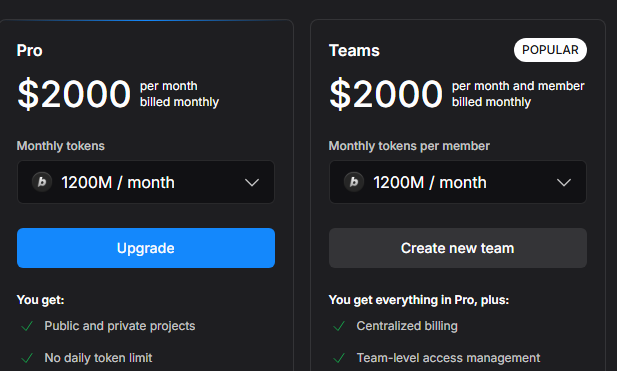
Reload tokens never expire as long as your subscription stays active.
What happens to unused tokens?
Unused tokens on Bolt’s paid plans roll over for one additional month, so you have up to two months to use them. You must keep an active subscription to retain access to rollover tokens.
If you cancel or your payment fails, you lose access to all token allocations (including rollover tokens) at the end of the billing cycle. However, if you resubscribe within the 2-month rollover window, you regain access to your unused tokens alongside your new monthly allocation.
Daily tokens on the free plan (300K/day) do not roll over. Use them or lose them.
Which Bolt plan should you choose?
Choose Free if you:
- Want to test whether Bolt's AI builder works for your use case
- Are building a small prototype or learning project without time pressure
Choose Pro if you:
- Need custom domains and no branding for client or professional work
- Build consistently, but can manage token usage across the month
- Want the flexibility to scale up to higher token tiers as projects grow
Choose Teams if you:
- Work with a team that needs shared workspaces and centralized billing
- Need admin controls over who can access and edit projects
Choose Enterprise if you:
- Require SSO, audit logs, and compliance support
- Have procurement and security review processes that require custom agreements
Is Bolt worth the cost?
After testing Bolt across several projects and going through developer community feedback, here's my honest take.
Bolt is worth it if you:
- Need to generate full-stack web or mobile apps from prompts.
- Want a browser-based development environment including the editor, AI, hosting, databases, and deployment.
Skip Bolt if you:
- Are building complex, production-grade apps.
- Need predictable monthly costs. The token system makes budgeting difficult, especially on larger projects.
Bolt alternatives and pricing comparison
If you like Bolt's prompt-to-app approach but want more predictable pricing, a no-code experience, or better support for specific use cases, here are strong alternatives worth considering:
Zite vs Bolt: Which should you choose?
Choose Zite if you want to build apps without writing or reading code. Whether it's custom CRMs, portals, dashboards, or client-facing tools, Zite handles the entire process visually.
Choose Bolt if you want to build web and mobile prototypes and are comfortable reading or editing code.
Zite generates your app logic plus visual workflows as flowcharts so you can verify what it built. You can also click any element in the UI to edit it directly, without re-prompting or touching code.
That’s what makes Zite perfect for non-technical teams. The logic is visible and inspectable, so you don’t need to understand code or blindly re-prompt the AI to troubleshoot. You can follow each step, see how data moves, replay the run to spot exactly where it failed, then ask Zite to fix it.
Bolt generates the code and offers AI-assisted debugging. However, for deeper troubleshooting, you’ll need to review and edit code manually.
On pricing: Zite starts at $19/month with no per-seat pricing, compared to Bolt's token-based model and $30/seat for teams. Zite also has a free plan with unlimited users and apps, so you can build and test before committing.
Use both if you want Bolt for rapid prototyping and custom frontend work, and Zite for production-ready apps that non-technical team members can build and maintain.
My bottom line on Bolt pricing
Bolt’s token system can feel unpredictable. As your project grows, each interaction tends to consume more tokens, and troubleshooting loops can drain your allowance faster than expected.
To keep costs under control, write highly specific prompts. Vague instructions usually lead to more back-and-forth, which increases token usage. Another approach is to use Bolt for the initial scaffolding, then move the project into a traditional IDE like Cursor to refine it outside the token system.
If you're building apps and don't want to code or hire developers to get your app production-ready, use Zite. The free plan supports unlimited users and offers enough credits to build your app and iterate through several changes.
Frequently asked questions
How many tokens do I get with Bolt's free plan?
You get up to 300K tokens per day and 1M tokens per month on Bolt's free plan. The daily limit resets each day, but unused daily tokens don't roll over.
What is a token in Bolt?
A token is a small unit of text that the AI processes. In Bolt, tokens are consumed every time you send a prompt, generate code, or ask it to fix mistakes.
Which is the best Bolt alternative for non-technical users?
Zite is the strongest option for non-technical users because, unlike Bolt, it displays app logic as visual flowcharts you can inspect to understand how the app works. No need to read code to troubleshoot.
Does Bolt offer annual billing discounts?
Yes, Bolt offers annual billing discounts. Switching to annual billing gives you 10% off any Bolt plan.

