


After testing many AI app builders, Zite stood out as the best option for teams that want to create a custom CRM they can trust. Your backend logic appears as flowcharts, and the database is transparent. You can see exactly how your data flows and verify its correctness, which is critical for CRMs handling sensitive info. Here’s how to build one step-by-step.
What is a custom CRM, and do you need one?
A custom CRM is a customer relationship management system built around how your team works, not how a vendor thinks you should work. It reflects your real sales process, support flow, and customer data, without forcing you into rigid fields or workflows.
You probably need a custom CRM if:
- Your team is working around limitations in your current tool by using notes, hacks, or manual steps to get things done.
- Your data lives in too many places, like spreadsheets, inboxes, and disconnected apps.
- Off-the-shelf CRMs feel bloated, and most features sit unused while the important ones are missing.
- You have compliance constraints, such as healthcare or finance, that off-the-shelf CRMs don’t handle cleanly.
You don't need one if your needs are straightforward enough that tools like HubSpot or Pipedrive work fine out of the box and you can afford them.
Your options for building a custom CRM
You can build a custom CRM by either:
- Traditional development
- No-code or low-code tools
- AI app builders
I strongly suggest not starting from raw code. You'll burn months building essentials such as auth, permissions, data validation, and UI components that app builders already provide.
Full custom development only makes sense if you have extremely specific security requirements, need deep integration with legacy systems, or plan to license your CRM to other businesses. For everyone else, a modern app builder is faster, cheaper, and easier to maintain.
For this guide, I'll walk through building a production-ready custom CRM in Zite.
What you'll need before starting
Prerequisites:
- App builder: Create an account in an AI app builder like Zite or log in to your existing account.
- Your sales process mapped out: Know your pipeline stages and what data you need to track for each contact.
- Technical requirements: All you need is a web browser and an internet connection. Zite runs entirely in the browser, so no special hardware or programming environment is necessary.
Time required: Approximately 60–90 minutes. AI app builders can generate the core CRM features in a few minutes. We'll spend the remaining time configuring your pipeline, setting up automations, and adding your branding.
How to create a custom CRM in an AI no-code builder: Step-by-step
There are several AI no-code builders on the market, but we recommend Zite for its ease of use and production-readiness.
Zite is an AI-powered no-code platform that lets you build custom business software (like CRMs) by describing what you want in plain language.
What actually sets Zite apart is that it's not a black box you prompt, get code, and hope it works.
It displays backend logic as visual flowcharts (similar to Zapier or n8n), the database is transparent with a spreadsheet-like interface, and you can edit the app visually. You can see how your app works, verify it's working as expected, and debug issues without needing to read or understand code.
Follow these steps to build a custom CRM:
Step 1: Define your core workflows
Before touching any software, note your answers to these questions:
- What information do you need to capture about each contact?
- What stages does a deal move through before closing?
- Who needs access to what data?
- What tasks happen repeatedly that could be automated?
Don't overcomplicate this. Most small businesses need contacts, companies, deals, activities, and maybe notes.
Pro tip: Talk to the people who will use the CRM daily. Their input will reveal workflows you've forgotten about.
Step 2: Start a new app and describe your CRM
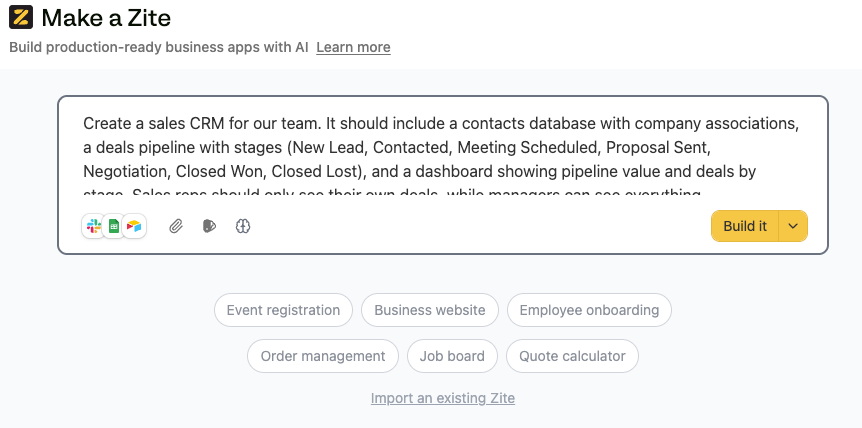
Log in to your Zite account and click Create, then select Zite from the dropdown. Zite will prompt you to describe your CRM in your own words. Its AI reads your instructions and builds app components around your requirements. No templates or code needed.
In the prompt box, type a description of your CRM. Be specific about the features you want.
For example, you might use:
"Create a sales CRM for our team. It should include a contacts database with company associations, a deals pipeline with stages (New Lead, Contacted, Meeting Scheduled, Proposal Sent, Negotiation, Closed Won, Closed Lost), and a dashboard showing pipeline value and deals by stage. Sales reps should only see their own deals, while managers can see everything."
Then click Build it.
Step 3: Set up your database structure
When Zite prompts you to connect a database, choose:
- New database: Zite instantly creates all necessary tables and fields based on your description. This is the easiest option for a new CRM. Zite auto-generates your data schema using its built-in database—no SQL required.
- Existing database: Connect an existing data source. Zite supports native integrations with Airtable and Google Sheets if you're migrating from spreadsheets.
Since we're building fresh, we'll use Zite's built-in database.
Review the tables Zite created. You should see tables like:
- Contacts: Names, emails, phone numbers, and company associations
- Companies: Organization details linked to contacts
- Deals: Deal name, stage, value, expected close date, and owner
If anything's missing, tell Zite to add a field to that specific table, and it will update the schema instantly. You can also directly edit the table from the database tab.
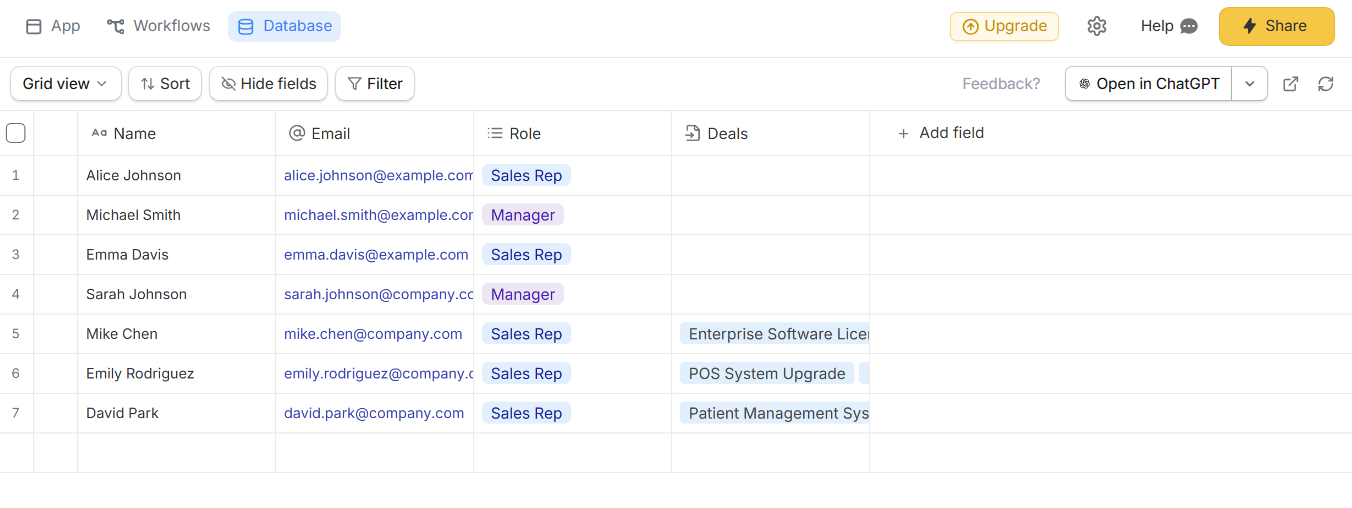
Step 4: Verify your sales pipeline works
The pipeline is the heart of your CRM. It gives you a visual snapshot of every deal and where it stands.
To start, open the Workflows tab to inspect the workflows Zite generated, and review past runs to understand how data moves through the pipeline. This lets you verify the logic and troubleshoot issues without reading code.
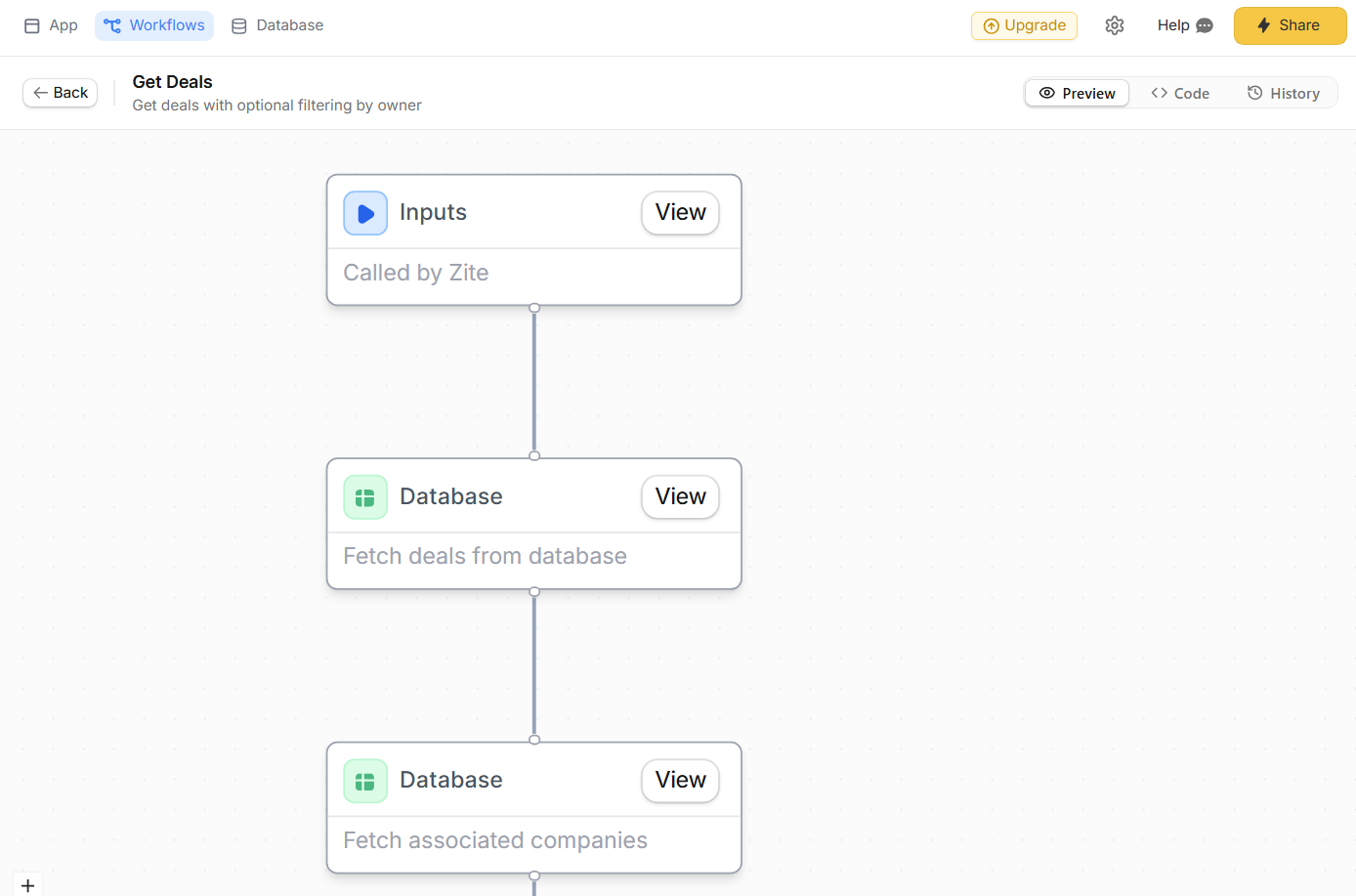
Step 5: Configure logins for external user access (optional)
Zite defaults to internal-only publishing, so your CRM is immediately available to your team, and you won’t need to configure any logins.
You only need to set up logins/signups if you want people outside your org to access your app, for example, if you’re building customer portals.
To add access for external users, ask Zite to add user authentication and then:
- Choose your user database: Select where user accounts should live. If you’re using Zite’s built-in database (which we are here), choose the default Users table that Zite creates automatically.
- Configure login methods: Zite supports passwordless Magic Link login and Google OAuth out of the box. If you’re on an enterprise plan, you can also enable SSO later.
- Decide who can sign up: Choose invite only, anyone, or only allowed domains.
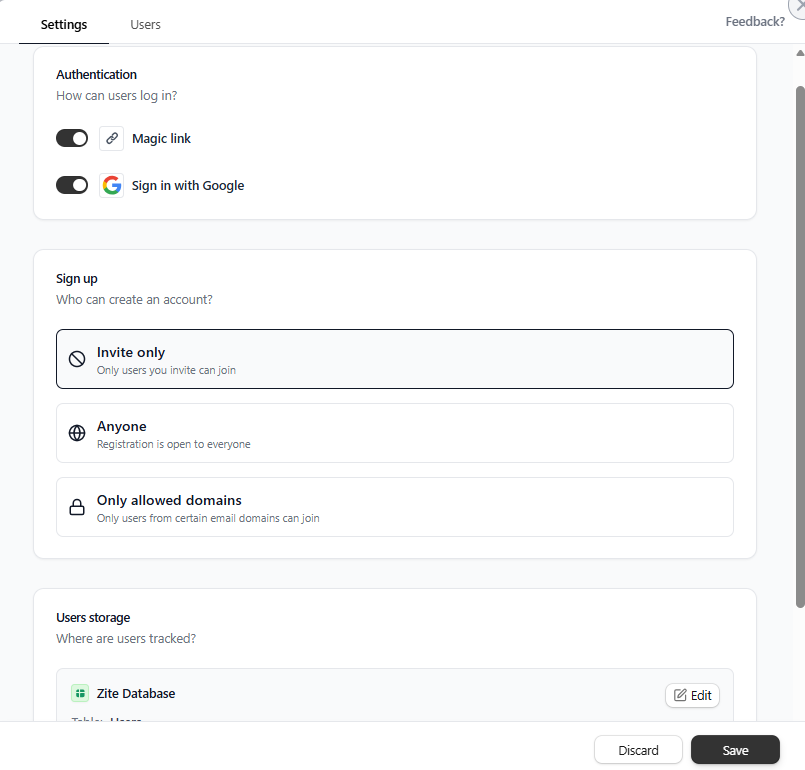
Step 6: Add automations
You can create workflows through prompts. Describe the automation you want, and Zite will build it. The workflows interface will let you see and verify the result.
Common CRM automations include:
- Follow-up reminders: Surface deals or contacts that haven’t been touched in a set number of days.
- Stage-based notifications: Notify the deal owner when a deal moves to a new stage.
- New lead alerts: Automatically assign new leads and notify the right person when they come in.
Step 7: Test and launch your CRM
Before rolling the CRM out to your team, test it from each role’s point of view. This is where small issues show up before they turn into daily annoyances.
Test as a sales rep, a manager, and an admin.
Fix anything that feels confusing or slow. Then publish the CRM. In the Zite builder, click Share or Publish to push the app live. You’ll get a shareable URL, usually in the format yourcrm.zite.so.
If you want a cleaner rollout, you can also connect a custom domain, such as crm.yourcompany.com.
Adding more features to your CRM
Once you've got the basics running smoothly, consider these upgrades:
- Lead scoring: Add a formula field that calculates a score based on company size, engagement level, and fit criteria. Use this to prioritize outreach.
- Email sequences: Set up automated follow-up sequences for new leads. Zite can trigger a series of emails based on time delays or contact behavior.
- AI-assisted features: Use Zite's OpenAI integration to draft email responses, summarize meeting notes, or suggest next steps based on deal history.
- Custom reports: Build views that answer specific business questions like the win rate by lead source, average deal cycle by rep, and revenue forecast by month.
Common mistakes to avoid when building a CRM
The biggest issues in custom CRMs usually come from how it’s set up and maintained.
Here are some common mistakes to watch out for:
- Skipping user input: If your sales team doesn’t help design the CRM, they won’t use it. Involve them before, during, and after building to shape fields, views, and workflows.
- Ignoring data hygiene: A CRM full of duplicates and outdated records quickly becomes untrustworthy. Define clear data entry rules and schedule regular cleanups.
- Having no clear owner: Someone should be responsible for the CRM. They’ll update fields, fix issues, and train new users. Without an owner, the system degrades fast.
- Overdoing notifications: If every status change sends a Slack ping, people will tune them out. Only notify on events that require action, like new high‑value deals, aging opportunities, or deals entering final stages.
Zite makes building your CRM easier
If the idea of building a custom CRM sounds appealing but you don't want to code or wrestle with complex no-code logic, Zite is built for exactly this.
Here's how Zite helps:
- Fast CRM generation with AI: Describe your CRM in plain language, and Zite generates the core app with pages, forms, database tables, and relationships. It often adds sections you'd otherwise forget.
- Visual workflows: View the AI-generated backend logic as a flowchart and inspect it to understand how it works.
- Visual app editing: Tailor the CRM to match your brand without touching CSS. Layout, colors, fonts, and navigation are all adjustable through the visual editing tool.
- Built-in database and integrations: No need to configure a database or write SQL. Zite's built-in database auto-generates your tables and their relationships. You can also connect existing tools like Airtable or Google Sheets.
- Production-ready security: Adding login is a single step. Zite handles authentication, user management, role-based permissions, and secure hosting by default. For teams with advanced security needs, higher tiers add features like SSO and audit logs, and the platform maintains SOC 2 Type II compliance.
- Cost-effective scaling: Zite allows you to add as many team members and build as many apps as you want, even on the free plan. Unlike competitors, Zite never charges per user. This is a major advantage for growing teams.
If you haven't already, sign up for Zite and start building your CRM today. Most features are available on the free tier, so you can prototype your system without commitment.
Frequently asked questions
How long does it take to create your own CRM?
It takes 60-90 minutes to create your own CRM using a no-code AI app builder like Zite. Traditional custom development usually ranges from 1 to 6 months, depending on how complex it is.
What's the hardest part of building a custom CRM?
The hardest part of building a custom CRM is nailing down what you actually need and not over‑engineering it. Most teams jump into building before they've mapped out their actual workflows.
Do I need programming skills to create a CRM in Zite?
No, you don't need any programming skills to create a CRM in Zite. Everything is handled through natural language prompts and a visual interface. If you can describe what you want, you can build it.
How much does it cost to build a custom CRM?
With no-code tools, it can cost between $15–$100/month and might scale as you add users and features. Full custom development typically costs $50,000–$700,000+, depending on complexity.

