> ## Documentation Index
> Fetch the complete documentation index at: https://zite.com/llms.txt
> Use this file to discover all available pages before exploring further.
# Stripe webhooks
> Use Stripe webhooks to keep Zite updated when checkout, invoices, and subscriptions change.
## How it works
Stripe events often happen after checkout. A payment can fail, an invoice can be paid, or a customer can cancel a subscription in Stripe. Use webhooks so Stripe can tell Zite when those changes happen.
In Zite, a webhook starts a workflow that can update your database, change access, send email, alert support, or refresh a dashboard.
 For the full webhook setup flow, see [Configuring Webhooks](/help/platform/how-to-build/webhooks).
## Set up Stripe webhooks
You can create the webhook from chat or from the Webhooks tab.
In chat, ask Zite to create a webhook workflow for Stripe subscription events.
```text theme={null}
Create a Stripe webhook for subscription lifecycle events. Update the
Stripe subscriptions table when checkout completes, a subscription changes
or is canceled, an invoice is paid, or payment fails.
```
You can also open `Workflows`, switch to `Webhooks`, describe the webhook you want, and click `Set it up`.
For the full webhook setup flow, see [Configuring Webhooks](/help/platform/how-to-build/webhooks).
## Set up Stripe webhooks
You can create the webhook from chat or from the Webhooks tab.
In chat, ask Zite to create a webhook workflow for Stripe subscription events.
```text theme={null}
Create a Stripe webhook for subscription lifecycle events. Update the
Stripe subscriptions table when checkout completes, a subscription changes
or is canceled, an invoice is paid, or payment fails.
```
You can also open `Workflows`, switch to `Webhooks`, describe the webhook you want, and click `Set it up`.
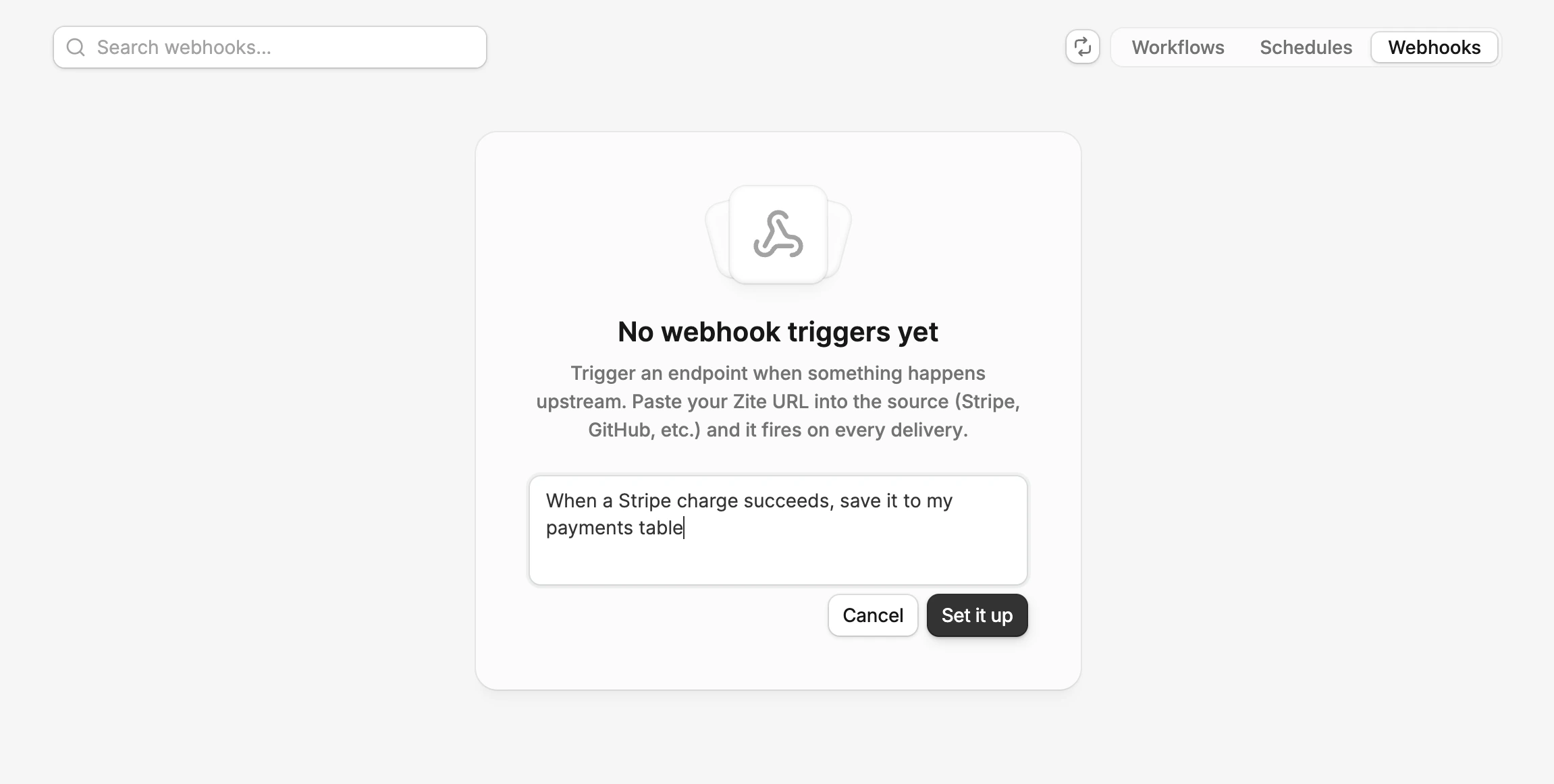 Zite creates a webhook-triggered workflow and shows a webhook URL when it is waiting for an event.
Copy the webhook URL from Zite. You can also find it later in `Workflows` -> `Webhooks`.
In Stripe, open `Workbench` -> `Webhooks` and create a new event destination.
Zite creates a webhook-triggered workflow and shows a webhook URL when it is waiting for an event.
Copy the webhook URL from Zite. You can also find it later in `Workflows` -> `Webhooks`.
In Stripe, open `Workbench` -> `Webhooks` and create a new event destination.
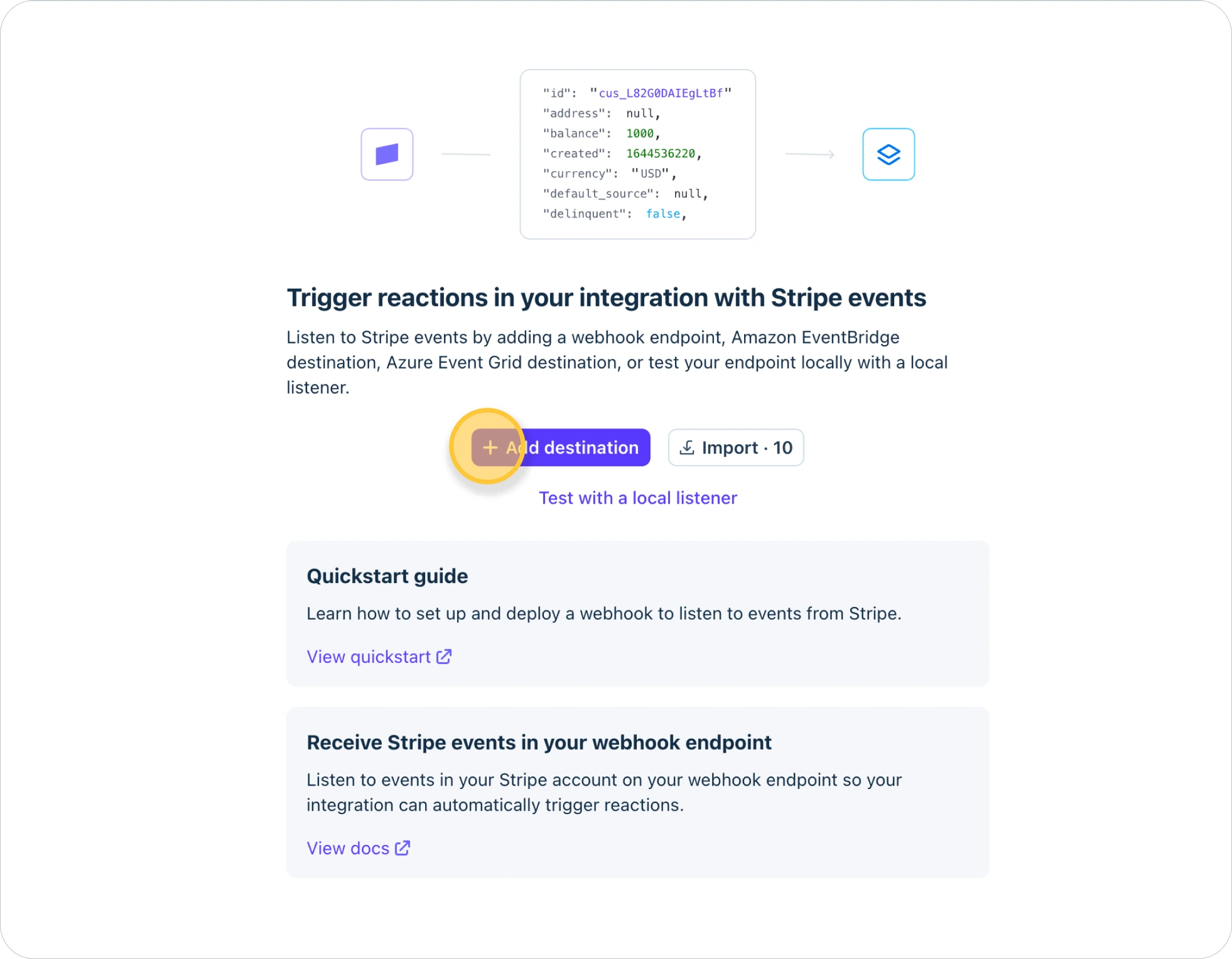 Select these five events:
* `checkout.session.completed`
* `customer.subscription.updated`
* `customer.subscription.deleted`
* `invoice.paid`
* `invoice.payment_failed`
Select these five events:
* `checkout.session.completed`
* `customer.subscription.updated`
* `customer.subscription.deleted`
* `invoice.paid`
* `invoice.payment_failed`
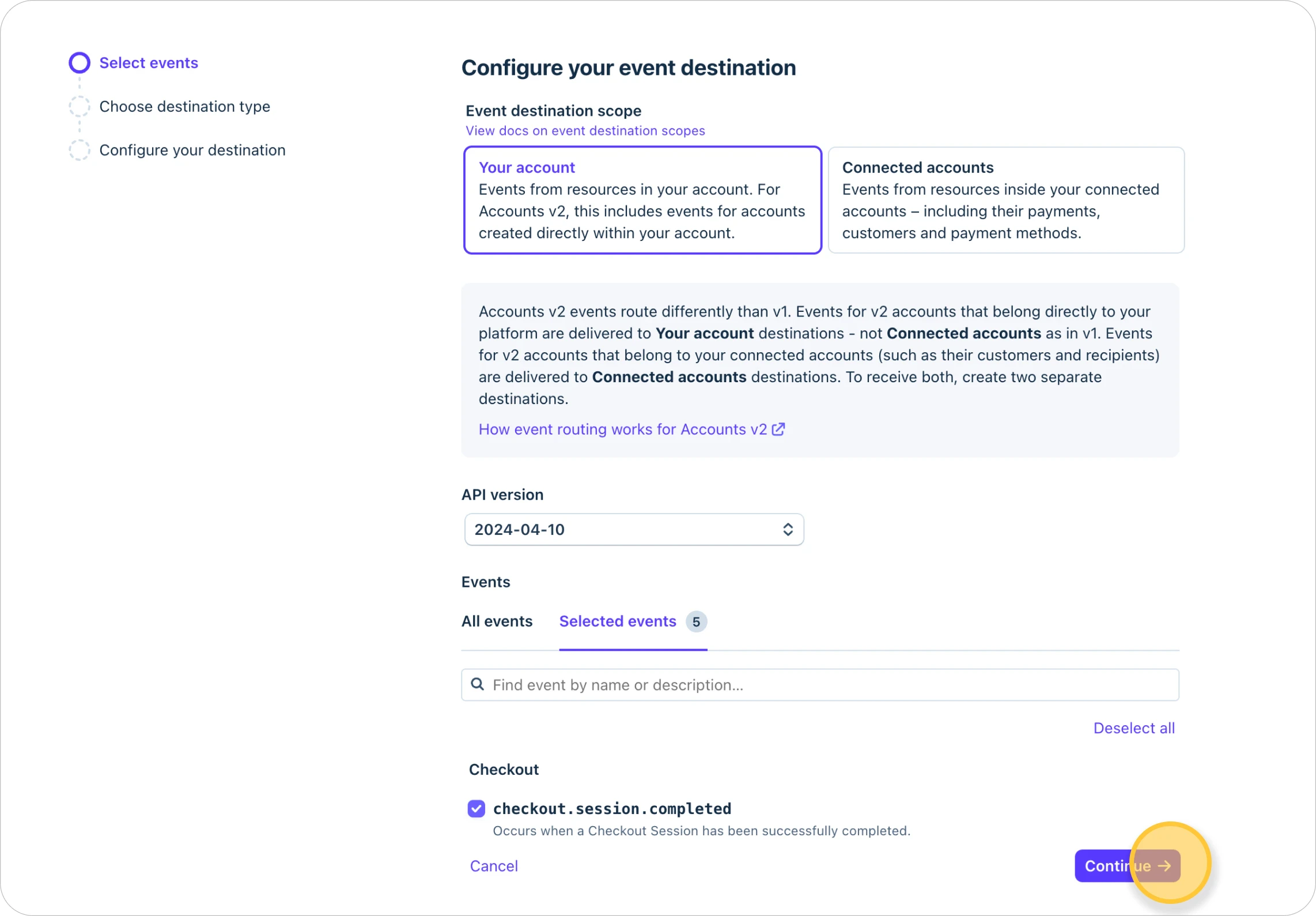 Choose `Webhook endpoint` as the destination type.
 Paste the Zite webhook URL into the endpoint URL field. Add a destination name for internal reference, and add a description if helpful. Choose `Your account` unless you operate a Stripe Connect platform and need connected-account events.
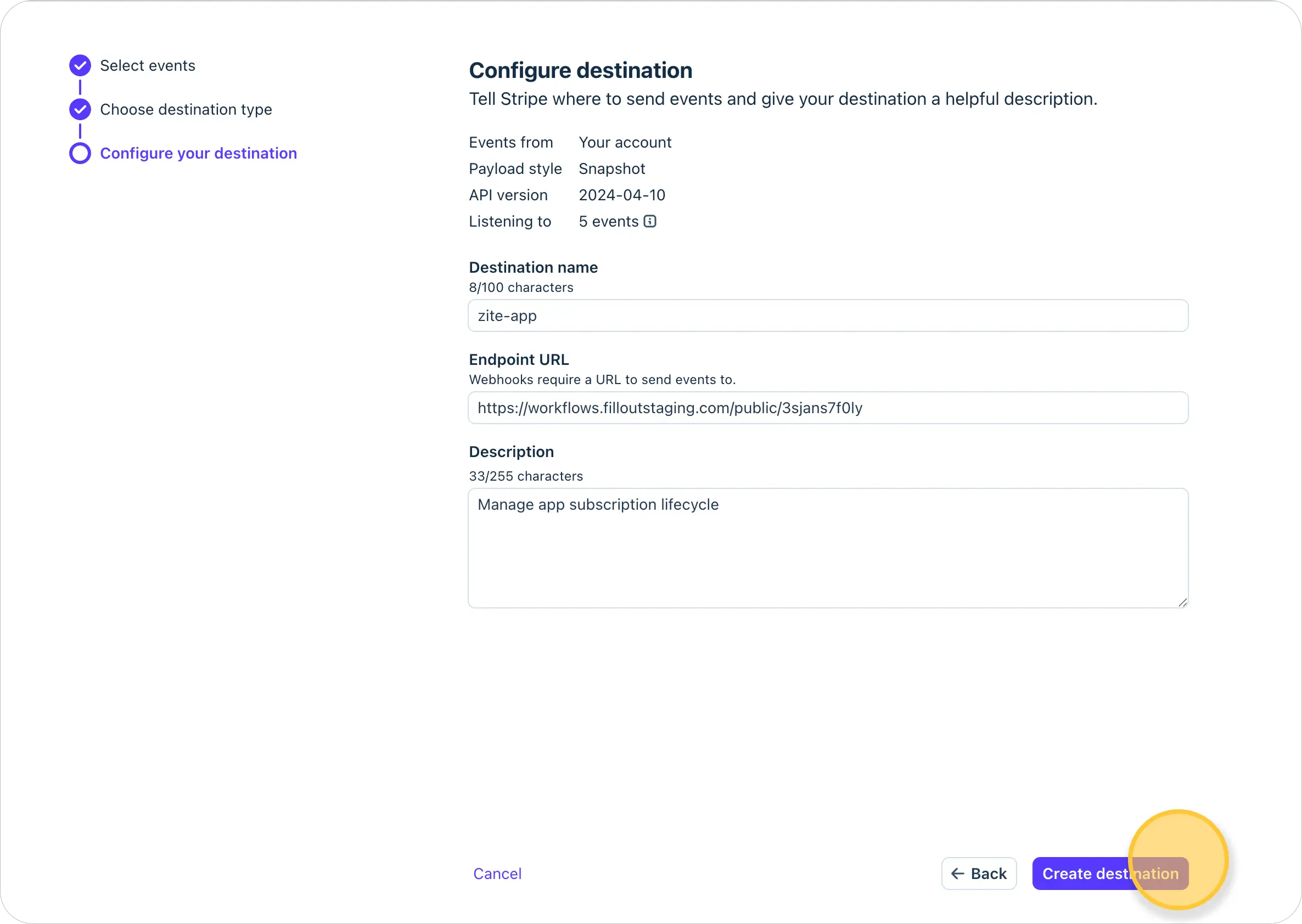 Stripe's Dashboard steps are documented in [Receive Stripe events in your webhook endpoint](https://docs.stripe.com/webhooks).
Open the workflow Zite created. Confirm that it updates the subscriptions table, saves the Stripe event ID, and handles duplicates.
Publish the app before relying on the webhook for live subscription changes.
## Subscription events to select
For subscription lifecycle updates, select these Stripe events.
| Stripe event | Use it in Zite to |
| ------------------------------- | -------------------------------------------------------------------------- |
| `checkout.session.completed` | Create the first customer or subscription record after checkout. |
| `customer.subscription.updated` | Update plan, quantity, trial, cancellation, current period, or status. |
| `customer.subscription.deleted` | Mark the subscription as canceled and update access. |
| `invoice.paid` | Mark the subscription as paid or active and keep access enabled. |
| `invoice.payment_failed` | Mark the subscription as past due, notify the customer, and alert support. |
For one-off payments, start with `checkout.session.completed` and add refund, dispute, or payment events only if your app needs to react after checkout.
Learn more in Stripe's guide to [using webhooks with subscriptions](https://docs.stripe.com/billing/subscriptions/webhooks).
Stripe can retry webhook events and send related events close together. Store the Stripe event ID so the same event is not processed twice.
Stripe's Dashboard steps are documented in [Receive Stripe events in your webhook endpoint](https://docs.stripe.com/webhooks).
Open the workflow Zite created. Confirm that it updates the subscriptions table, saves the Stripe event ID, and handles duplicates.
Publish the app before relying on the webhook for live subscription changes.
## Subscription events to select
For subscription lifecycle updates, select these Stripe events.
| Stripe event | Use it in Zite to |
| ------------------------------- | -------------------------------------------------------------------------- |
| `checkout.session.completed` | Create the first customer or subscription record after checkout. |
| `customer.subscription.updated` | Update plan, quantity, trial, cancellation, current period, or status. |
| `customer.subscription.deleted` | Mark the subscription as canceled and update access. |
| `invoice.paid` | Mark the subscription as paid or active and keep access enabled. |
| `invoice.payment_failed` | Mark the subscription as past due, notify the customer, and alert support. |
For one-off payments, start with `checkout.session.completed` and add refund, dispute, or payment events only if your app needs to react after checkout.
Learn more in Stripe's guide to [using webhooks with subscriptions](https://docs.stripe.com/billing/subscriptions/webhooks).
Stripe can retry webhook events and send related events close together. Store the Stripe event ID so the same event is not processed twice.
Related topics