> ## Documentation Index
> Fetch the complete documentation index at: https://zite.com/llms.txt
> Use this file to discover all available pages before exploring further.
# Subscription and Billing
> Manage your Zite subscription, compare usage limits, and review organization billing and usage.
## Subscription plans
Subscription plans control the limits and features available to your Zite organization. All plans include unlimited apps and databases, while plan tiers set monthly credits, database record limits, workflow runs, custom domains, and branding options.
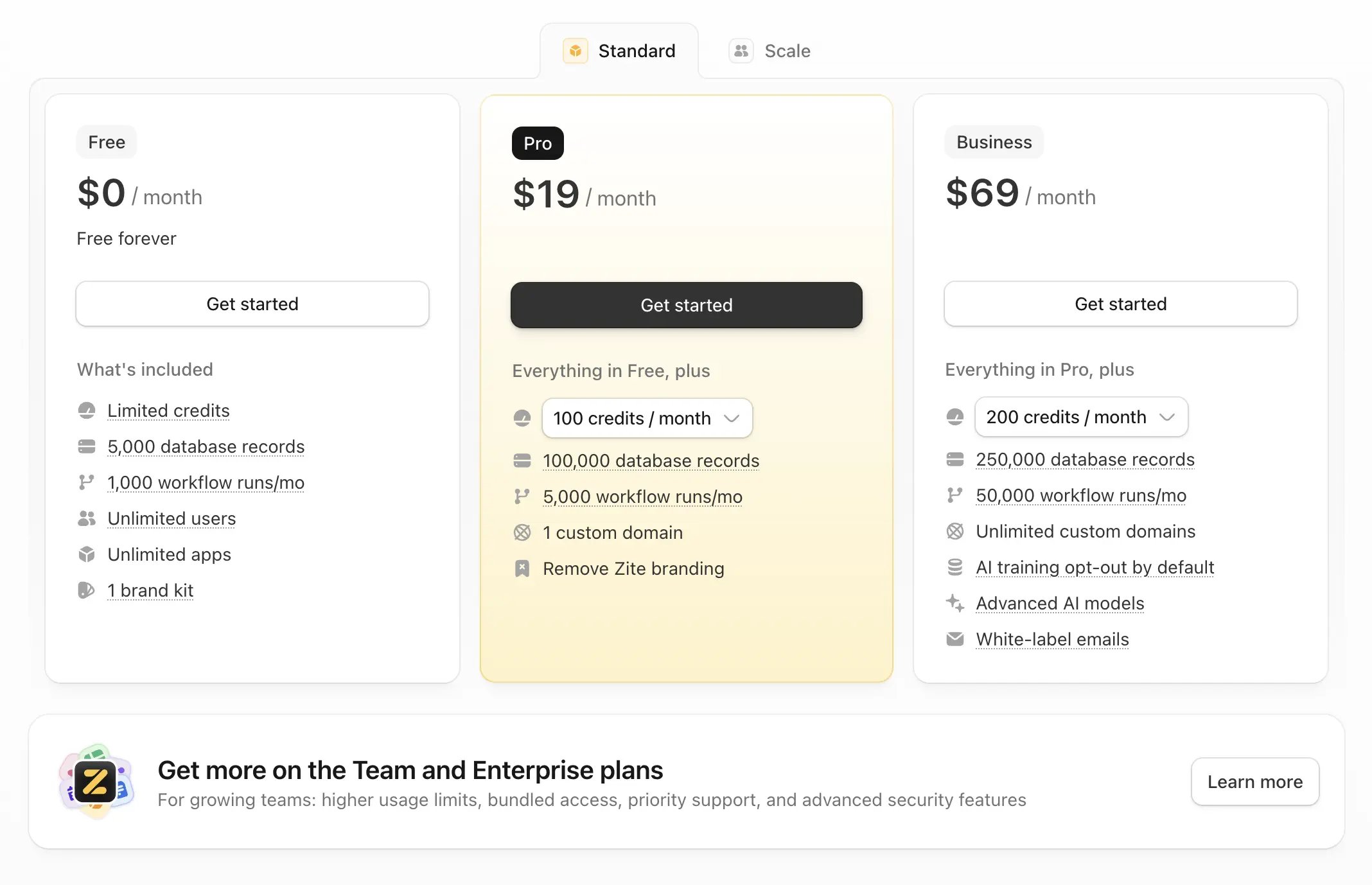 For the full feature comparison and current plan pricing, see the [Zite pricing page](https://www.zite.com/pricing).
## Scale subscriptions
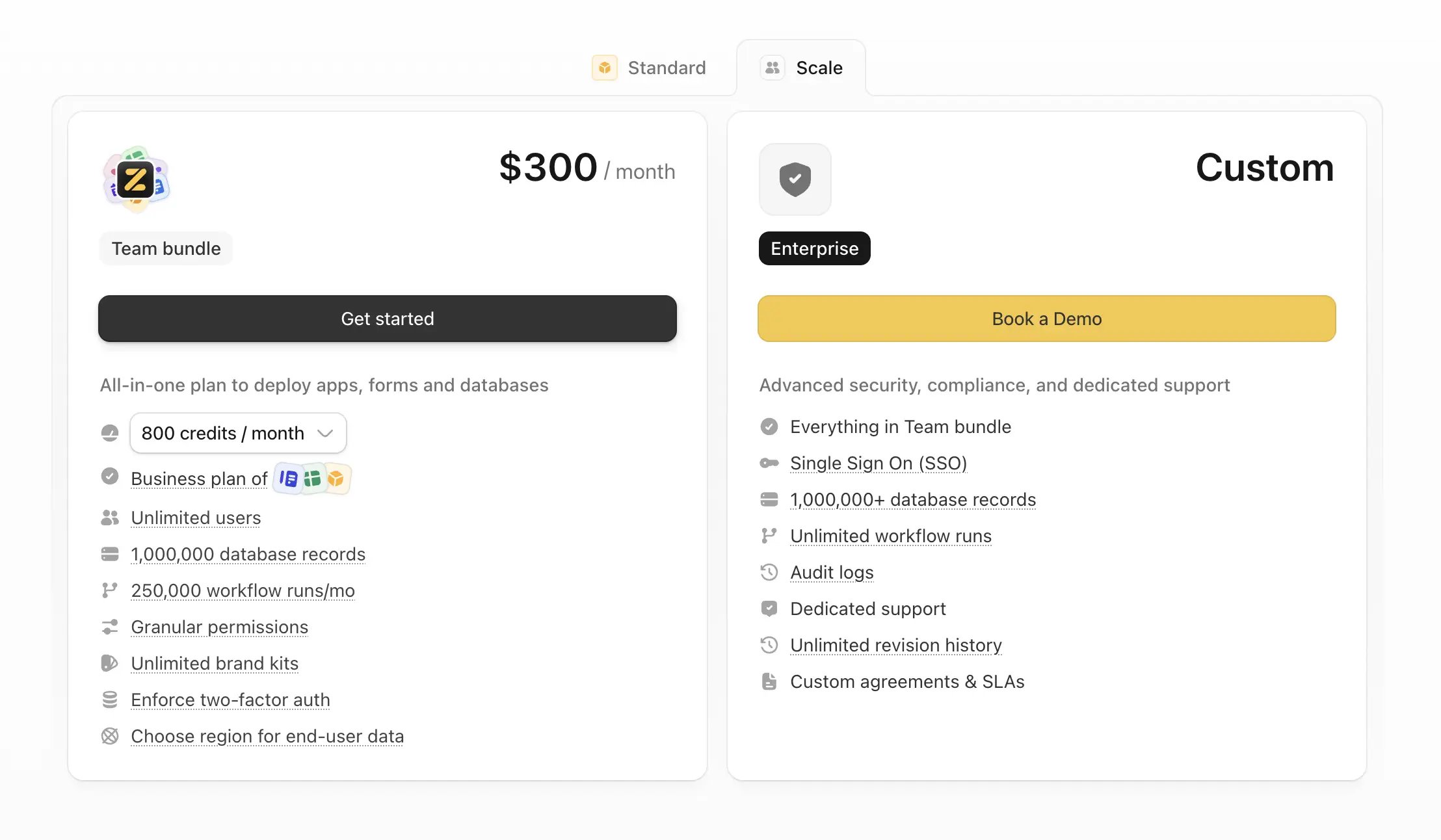
Scale subscriptions are designed for larger teams that need higher usage limits, bundled access across apps, forms, and databases, and advanced controls such as granular permissions, enforced two-factor authentication, audit logs, dedicated support, and custom agreements.
For the full feature comparison and current plan pricing, see the [Zite pricing page](https://www.zite.com/pricing).
## Scale subscriptions
Scale subscriptions are designed for larger teams that need higher usage limits, bundled access across apps, forms, and databases, and advanced controls such as granular permissions, enforced two-factor authentication, audit logs, dedicated support, and custom agreements.
 ## Usage limits by plan
These tables include usage limits only. Rows where every plan has the same `Unlimited` value are skipped.
### Standard plans
| Usage limit | Free | Pro | Business |
| ------------------- | ----- | ------- | -------- |
| Monthly credits | 50 | 100+ | 200+ |
| Database records | 5,000 | 100,000 | 250,000 |
| Workflow runs/month | 1,000 | 5,000 | 50,000 |
| Attachment storage | 1 GB | 10 GB | 100 GB |
Databases have a record limit that is tied to your Apps plan. This limit controls the total number of records you can store across all Zite databases in your organization.
### Scale plans
| Usage limit | Team | Enterprise |
| ------------------- | --------- | ---------- |
| Monthly credits | 800+ | Custom |
| Database records | 1,000,000 | 1,000,000+ |
| Workflow runs/month | 250,000 | Unlimited |
| Attachment storage | 100 GB | 1 TB+ |
## Cancel your plan
You can [cancel your Zite Apps plan](/help/platform/account/cancel-account) without canceling your Fillout Forms plan.
## FAQs
Choose the plan that matches the usage limits and features your organization needs. For current pricing and the full feature comparison, see the [Zite pricing page](https://www.zite.com/pricing).
Yes. All plans include unlimited apps and databases. Plan tiers set limits for monthly credits, database records, workflow runs, attachment storage, and selected features.
Your current plan remains active until the end of the billing period, then your account moves to the Free tier. See [Cancel subscription](/help/platform/account/cancel-account) for cancellation details.
No. You can cancel your Zite Apps plan without canceling your Fillout Forms plan.
## Billing & usage
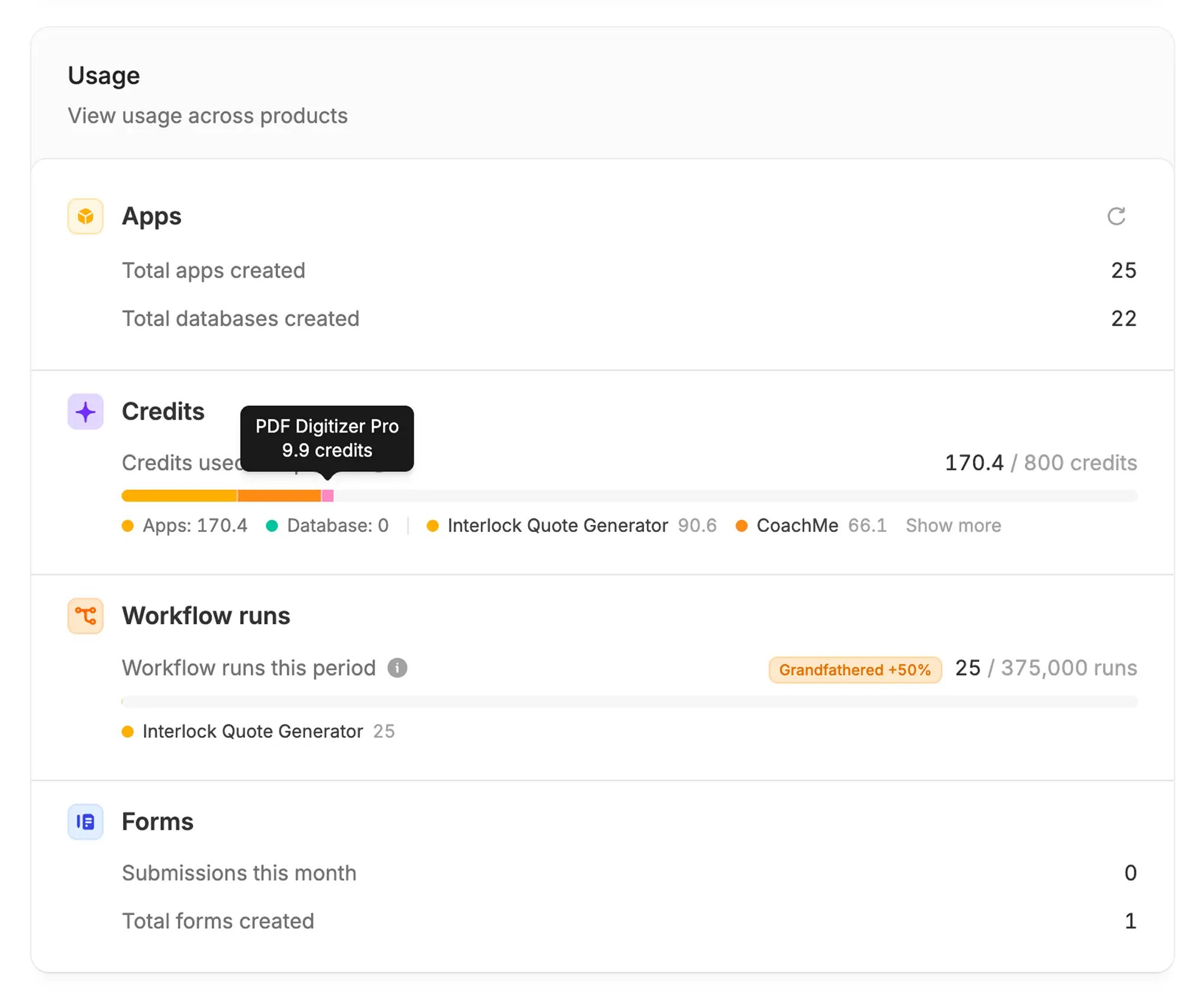
Billing and usage are managed at the organization level. Org admins can open [**Billing & usage**](https://build.fillout.com/home/settings/billing) to review usage across the organization.
The Usage section shows activity across products, including:
* Apps and databases created
* Credits used during the current billing period
* Credit consumption across all apps
* Workflow runs used during the current billing period
* Forms usage
## Usage limits by plan
These tables include usage limits only. Rows where every plan has the same `Unlimited` value are skipped.
### Standard plans
| Usage limit | Free | Pro | Business |
| ------------------- | ----- | ------- | -------- |
| Monthly credits | 50 | 100+ | 200+ |
| Database records | 5,000 | 100,000 | 250,000 |
| Workflow runs/month | 1,000 | 5,000 | 50,000 |
| Attachment storage | 1 GB | 10 GB | 100 GB |
Databases have a record limit that is tied to your Apps plan. This limit controls the total number of records you can store across all Zite databases in your organization.
### Scale plans
| Usage limit | Team | Enterprise |
| ------------------- | --------- | ---------- |
| Monthly credits | 800+ | Custom |
| Database records | 1,000,000 | 1,000,000+ |
| Workflow runs/month | 250,000 | Unlimited |
| Attachment storage | 100 GB | 1 TB+ |
## Cancel your plan
You can [cancel your Zite Apps plan](/help/platform/account/cancel-account) without canceling your Fillout Forms plan.
## FAQs
Choose the plan that matches the usage limits and features your organization needs. For current pricing and the full feature comparison, see the [Zite pricing page](https://www.zite.com/pricing).
Yes. All plans include unlimited apps and databases. Plan tiers set limits for monthly credits, database records, workflow runs, attachment storage, and selected features.
Your current plan remains active until the end of the billing period, then your account moves to the Free tier. See [Cancel subscription](/help/platform/account/cancel-account) for cancellation details.
No. You can cancel your Zite Apps plan without canceling your Fillout Forms plan.
## Billing & usage
Billing and usage are managed at the organization level. Org admins can open [**Billing & usage**](https://build.fillout.com/home/settings/billing) to review usage across the organization.
The Usage section shows activity across products, including:
* Apps and databases created
* Credits used during the current billing period
* Credit consumption across all apps
* Workflow runs used during the current billing period
* Forms usage
 ## Understand credits and workflow runs
Credits and workflow runs are tracked separately. Credits cover AI work. Workflow runs cover successful workflow executions from published apps.
See what uses credits, what does not, how credits reset, and where to check usage.
Learn how workflow runs are counted and how they differ from credits.
## Credit resets and plan changes
Credits reset every month, at the exact day and time you first subscribed to your paid Apps plan. Annual plans are billed once per year, but credits still refresh monthly on the original subscription day and time. Unused credits do not roll over.
| Plan change | What happens |
| ----------------------- | ----------------------------------------------------------------------------------------------------------------------------------------------------------------------------------------------------------------------------------------------------------------------------------------------- |
| Upgrading from Free | You get the new plan's full monthly credit allowance immediately. For example, moving from Free to a 100-credit plan gives you access to 100 credits right away, and that upgrade time becomes your new billing and credit reset time. |
| Upgrading a paid plan | Your monthly credit limit increases immediately, but your credits do not reset. For example, moving from 100 credits/month to 200 credits/month raises your current cycle limit to 200 credits, while your reset date stays the same. |
| Downgrading a paid plan | The change takes effect at the end of your current billing cycle. For example, if you downgrade from 200 credits/month to 100 credits/month, you keep the 200-credit limit until the cycle ends. On your next billing date, your limit becomes 100 credits and credits reset for the new cycle. |
## FAQs
Open [Billing & usage](https://build.fillout.com/home/settings/billing). Usage is shown at the organization level, and org admins can see credit consumption across apps.
Credits cover usage-based actions such as AI building, the Database Agent, AI fields, generated documents, and some app actions. See [How credits work](/help/platform/getting-started/credits) for the full breakdown.
A workflow run is one successful execution of a workflow from a published app. Editor runs do not count toward the monthly workflow run limit. Learn more in [App Usage](/help/platform/getting-started/usage#workflow-runs).
Yes. Upgrade to a higher Apps plan from [Billing & usage](https://build.fillout.com/home/settings/billing). If you upgrade from Free, you receive the paid plan's full monthly allowance immediately. If you upgrade an existing paid plan, your current cycle limit increases, but your reset date stays the same.
No. Credits reset every month and unused monthly credits do not roll over. Annual plans are billed once per year, but credits still refresh monthly on the original subscription day and time. See [How credits reset](/help/platform/getting-started/credits#how-credits-reset).
Open [Billing & usage](https://build.fillout.com/home/settings/billing), click `Browse plans` or `Modify` for the subscription you want to update, then toggle `Billed annually` on or off.
Billing dates cannot be edited directly. To change your billing date, [downgrade your plan](/help/platform/account/subscription), then upgrade again on your preferred billing date.
Invoices are available from your [Zite billing settings](https://build.fillout.com/home/settings/billing).
See the [refund policy](/help/platform/account/refund-policy) for plan changes, renewals, refunds, and billing policy details.
## Understand credits and workflow runs
Credits and workflow runs are tracked separately. Credits cover AI work. Workflow runs cover successful workflow executions from published apps.
See what uses credits, what does not, how credits reset, and where to check usage.
Learn how workflow runs are counted and how they differ from credits.
## Credit resets and plan changes
Credits reset every month, at the exact day and time you first subscribed to your paid Apps plan. Annual plans are billed once per year, but credits still refresh monthly on the original subscription day and time. Unused credits do not roll over.
| Plan change | What happens |
| ----------------------- | ----------------------------------------------------------------------------------------------------------------------------------------------------------------------------------------------------------------------------------------------------------------------------------------------- |
| Upgrading from Free | You get the new plan's full monthly credit allowance immediately. For example, moving from Free to a 100-credit plan gives you access to 100 credits right away, and that upgrade time becomes your new billing and credit reset time. |
| Upgrading a paid plan | Your monthly credit limit increases immediately, but your credits do not reset. For example, moving from 100 credits/month to 200 credits/month raises your current cycle limit to 200 credits, while your reset date stays the same. |
| Downgrading a paid plan | The change takes effect at the end of your current billing cycle. For example, if you downgrade from 200 credits/month to 100 credits/month, you keep the 200-credit limit until the cycle ends. On your next billing date, your limit becomes 100 credits and credits reset for the new cycle. |
## FAQs
Open [Billing & usage](https://build.fillout.com/home/settings/billing). Usage is shown at the organization level, and org admins can see credit consumption across apps.
Credits cover usage-based actions such as AI building, the Database Agent, AI fields, generated documents, and some app actions. See [How credits work](/help/platform/getting-started/credits) for the full breakdown.
A workflow run is one successful execution of a workflow from a published app. Editor runs do not count toward the monthly workflow run limit. Learn more in [App Usage](/help/platform/getting-started/usage#workflow-runs).
Yes. Upgrade to a higher Apps plan from [Billing & usage](https://build.fillout.com/home/settings/billing). If you upgrade from Free, you receive the paid plan's full monthly allowance immediately. If you upgrade an existing paid plan, your current cycle limit increases, but your reset date stays the same.
No. Credits reset every month and unused monthly credits do not roll over. Annual plans are billed once per year, but credits still refresh monthly on the original subscription day and time. See [How credits reset](/help/platform/getting-started/credits#how-credits-reset).
Open [Billing & usage](https://build.fillout.com/home/settings/billing), click `Browse plans` or `Modify` for the subscription you want to update, then toggle `Billed annually` on or off.
Billing dates cannot be edited directly. To change your billing date, [downgrade your plan](/help/platform/account/subscription), then upgrade again on your preferred billing date.
Invoices are available from your [Zite billing settings](https://build.fillout.com/home/settings/billing).
See the [refund policy](/help/platform/account/refund-policy) for plan changes, renewals, refunds, and billing policy details.