


Bolt turns a prompt into a live, deployed web app faster than any tool I have tested. It also burns tokens fast enough that a single debugging loop can eat a week of budget.
This Bolt AI review breakdown comes from building three apps in it, reading through Trustpilot and G2, and tracking what happens once a project outgrows a prototype.
Here is where Bolt wins, what the token model costs you on a real project, and how it fits in 2026.
Quick verdict
Bolt (Bolt.new, by StackBlitz) turns a prompt into a working full-stack web app in the browser, with full code access. It is the fastest prototyping tool of its kind.
Token costs climb hard on complex projects, and the AI loses the thread once an app grows past a dozen or so components. Bolt suits developers and technical founders who ship prototypes fast and read code when the AI breaks something.
What is Bolt AI?
Bolt (Bolt.new) is an AI-powered app builder from StackBlitz that generates full-stack web apps from plain-language prompts. It runs entirely in the browser through WebContainers, a real Node.js environment inside your browser tab.
You describe an app, and Bolt writes the code, runs it in a live preview, and deploys it. It serves developers, indie hackers, and technical founders who prototype fast without local setup.
Features
Bolt takes you from a prompt to a deployed app in one browser tab. Here is what it includes and where the limits are:
- AI app generation: Describe an app in plain language, and Bolt writes the full-stack code and runs it live in the browser. It performs best on prototypes and MVPs.
- In-browser development: WebContainers spin up a real Node.js environment with no local setup, so you can build and preview in a single window.
- Full code access: Edit the generated code directly, export to GitHub, and work in any framework. You own what Bolt builds.
- One-click deploy: Publish to Netlify or a Bolt URL with built-in integrations for Supabase, Stripe, and GitHub.
- Framework flexibility: React, Vue, Svelte, Remix, and Astro all work, which separates Bolt from React-only tools like v0.
- Known limits: Token pricing that scales with project size, weaker performance on large projects, and having to read the code yourself when the AI breaks something.
Bolt AI reviews: what real users are saying
Bolt scores 4.3 out of 5 on G2 based on a small sample of 70+ reviews, while Trustpilot sits at 1.4 out of 5 across 197+ reviews. Two platforms, an almost-three-point spread.
The gap comes down to who is reviewing. Trustpilot draws complaints from non-developers who expected a no-code tool and found a code generator. The sentiment is split on whether you can read the code Bolt writes.
Pros
- Fastest prototype-to-live app in this category. Reviewers describe going from an idea to a deployed app in a single session.
- Full code control and ownership, with a WebContainers environment and GitHub export. Bolt handles packages, installations, and stack management for Next.js and Supabase well.
- Zero setup and framework freedom, since everything runs in the browser and Bolt works across React, Vue, Svelte, Remix, and Astro.
Cons
- Token costs burn fast, the number one complaint everywhere. Reviewers describe the AI as rewriting an entire file to fix a small bug, spending tokens, and missing the fix.
- Context loss on bigger projects, where reviewers report the AI losing track past roughly a dozen or so components and falling into error-fixing loops.
- Prototype-grade output, where the generated code needs real engineering before it holds up as a production app.
- Billing and support friction, with reviewers reporting lost token balances and slow support responses. This drives much of the Trustpilot score.
What users say
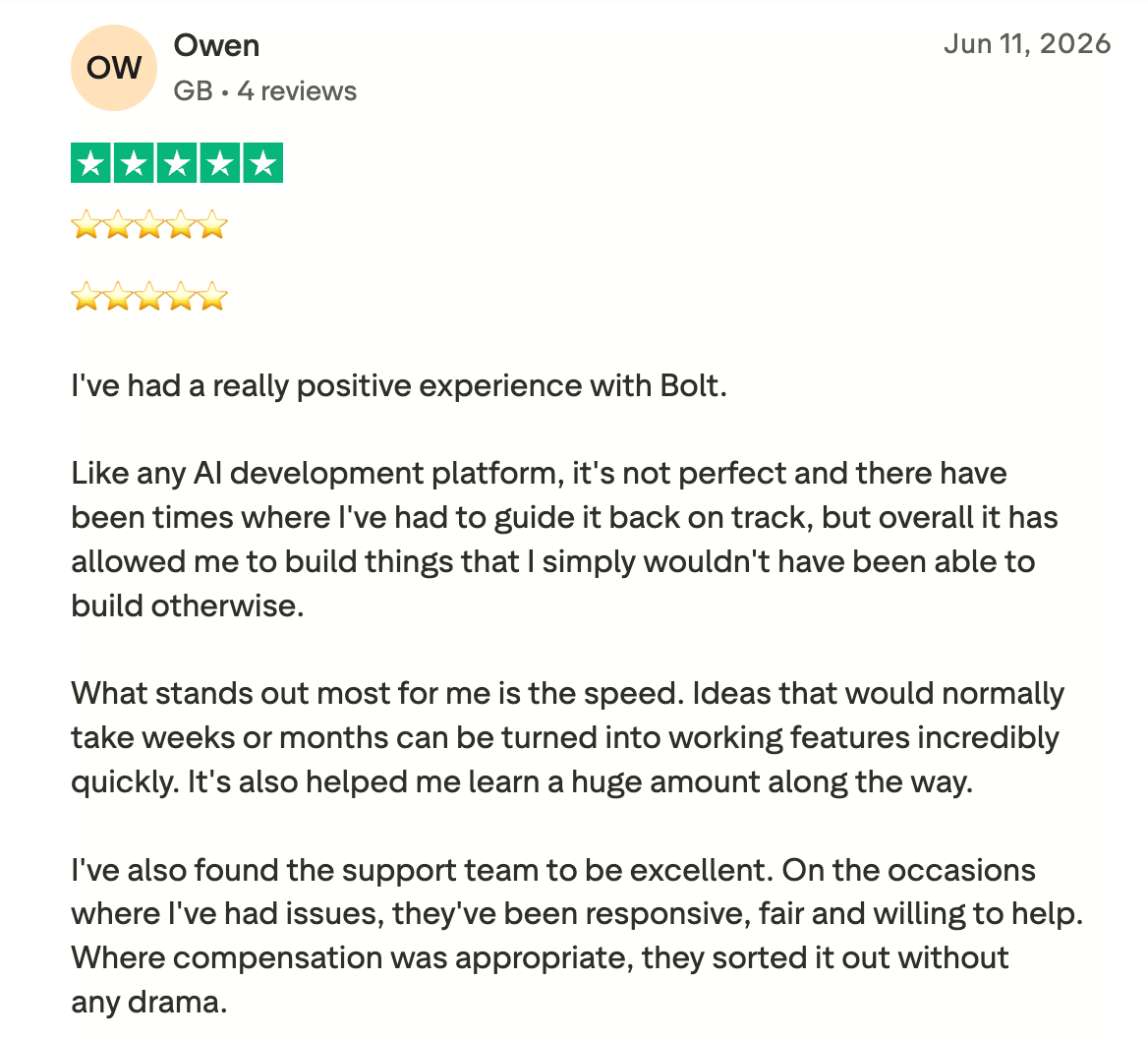
“What stands out most for me is the speed. Ideas that would normally take weeks or months to turn into working features can be turned into working features incredibly quickly.” Owen, Trustpilot
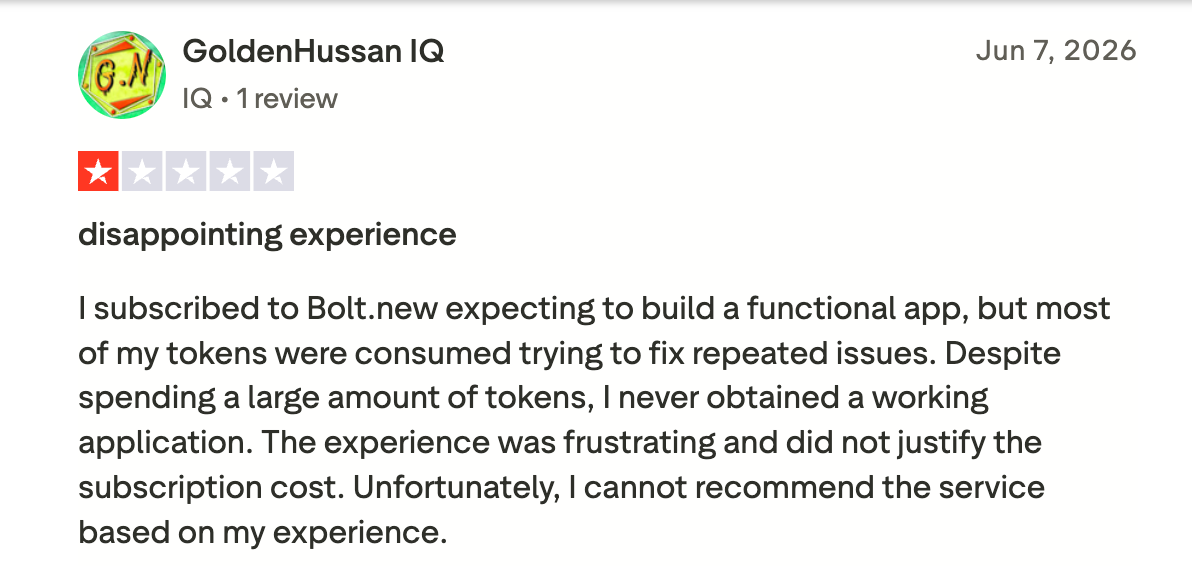
“Most of my tokens were consumed trying to fix repeated issues.” Hussan, Trustpilot

“One thing I dislike about Bolt.new is that it sometimes generates code that still needs manual adjustments, especially on more complex projects.” Javan T, G2
Users praise Bolt’s speed and code control. The same reviews name token costs and reliability on larger projects as the barriers that send people looking elsewhere.
My personal take on Bolt AI
I built a landing page, then a small internal tool, then attempted a multi-page app with user accounts. The first two took minutes, and the third exposed every limit.
The speed impressed me. The landing page went live in under 15 minutes, the browser environment needed zero setup, and the code was clean enough to read and edit. Nothing I have tested beats it on a fast prototype.
The multi-page app broke it. Past a dozen components, the AI started wrecking working features while fixing others, and each debugging loop ate tokens. I watched the meter drop faster than the app improved. This breakdown of Bolt's token costs shows how fast that adds up on a real project.
Bolt is outstanding for shipping a fast prototype, and the developer consensus agrees. A break sends you to the code or into another round of prompting, and a non-technical builder has no third option.
Is Bolt AI right for you?
Who will love Bolt AI:
- Developers and technical founders who want the fastest path from prompt to a live, editable prototype.
- Indie hackers and hackathon builders shipping MVPs where speed matters more than polish.
- Anyone who wants code ownership, since Bolt exports to GitHub and works across frameworks.
Who should avoid Bolt AI:
- Non-technical teams who would rather skip reading code when the AI breaks something.
- Teams that need predictable pricing, since token costs climb with project size.
- Anyone building a complex production app where Bolt struggles to get past the prototype stage.
The best Bolt AI alternative: Zite
Zite addresses the two dealbreakers Bolt users most often cite: the token math and the need to read code, and it gets you from a prompt to a working app just as fast. It stays fast afterward, too, because changing something doesn't trigger another round of error-fixing.
Bolt hands you code to debug and charges by the token as your project grows. With Zite, you get an app you can see and edit visually, with the database, screens, and logic all in one tool, where Bolt spreads them across code files and Supabase settings, with no single screen that shows you how they fit together.
Four advantages stand out for teams leaving Bolt:
- Edits that don't spend credits or break things: In Bolt, fixing a text or color detail means another prompt, which spends tokens and can wreck something that already worked. In Zite, you click the element and change its properties directly, with no prompt, so those edits cost nothing and leave the working app alone.
- Visible database with tables and fields: Bolt keeps your data in code and Supabase config, while Zite gives you a spreadsheet-style database with linked records and AI Fields, editable without SQL.
- Visual workflows you can read and trace: a break in Bolt sends you to the code, while Zite shows app logic as a flowchart you read and trace, and you change its logic by prompting.
- Unlimited users at a predictable price: Bolt charges per token and per member on Teams, and its bill climbs with project size. Zite runs on monthly credits like Bolt's tokens, but includes unlimited users on every tier at a set rate, with a free plan and Pro at $19/month.
Customers like Bombas and Domino's build business apps this way, from internal trackers to client-facing portals. The Zite pricing page has the full breakdown.
Start building with Zite for free and build your first app today.
Final verdict
Bolt earns its place for a developer who wants the fastest prototype available and reads code comfortably. Nothing else gets you from prompt to deployed app this quickly.
Zite is the better choice for a non-technical team that wants an app that's quick to build, easy to understand afterward, and that you can keep changing without code or a climbing bill.
Frequently asked questions
Is Bolt AI worth it in 2026?
Yes, Bolt AI is worth it in 2026 for developers and technical founders who ship prototypes fast, especially if you read code comfortably. It costs more than it looks on paper, since token consumption climbs quickly on complex projects.
Why is Bolt AI so expensive?
Bolt AI feels expensive because its token model scales with project size, and Bolt syncs your project files to the AI with each prompt. Debugging loops, where the AI rewrites files to fix one bug, spend tokens fast on large projects.
What do users most often complain about in Bolt AI reviews?
The most common complaints in Bolt AI reviews are aggressive token consumption, context loss that reviewers report once a project passes roughly a dozen or so components, prototype-grade output that needs hardening for production, and billing or support friction.
How much does Bolt AI cost?
Bolt AI costs nothing for up to 1 million tokens a month, with a 300K daily cap. Pro costs $25/month for 10 million tokens, and unused tokens roll over for up to two months before they expire, and Teams costs $30 per member per month with tokens allocated per person. Enterprise pricing is custom.
Is Bolt AI good for non-technical users?
No, Bolt AI is a poor fit for non-technical users, since it hands you code to debug. You can build a prototype from a prompt, and fixing anything the AI breaks means opening the files and editing them yourself.
What is the best Bolt AI alternative?
The best Bolt AI alternative depends on what you build. Zite leads for non-technical teams building business apps with a visible database; Cursor suits developers seeking deeper control over code; and Lovable produces clean React prototypes.
Can Bolt AI build production apps?
Yes, Bolt AI builds production apps for simple cases like landing pages, tools, and dashboards. Reviewers report that it struggles with complex apps that have many components and real user loads, so most prototypes are built in Bolt, and then the exported code is hardened elsewhere.

