


Your listings live in one place, your contacts in another, your deals in a spreadsheet, and nothing is connected, so you end up holding it all together in your head. A real estate database fixes that by putting your properties, contacts, and deals in one system where every record links to the ones it belongs with.
This guide shows you how to build one with no developer and no code, in seven steps.
What is a real estate database?
A real estate database is a structured store of your properties, contacts, and transactions, with the links between them kept intact. A spreadsheet holds rows. A database holds records that connect, so one property links to its owner, its showings, and the offer on the table.
Those links do the work. When a listing goes under contract, the linked buyer, agent, and deadline all move with it. One address change updates every linked record at once, and you can see at a glance who's still waiting to hear back.
This guide builds a real database, the kind with connected records that a flat contact list can never give you. You will map what you track, structure it into linked tables, bring in the people and properties you already work with, and turn it into a working app that your team can log in to. It works for a solo agent tracking 40 contacts and a team managing 400 properties.
Bring your people in first
Contacts are usually the data you already have on hand, so they are the easiest place to begin filling the database once it is built. Before you get there, take stock of who is already in your world.
Your contacts fall into three groups:
- Your sphere of influence: Friends, family, neighbors, and anyone who would take your call. Most agents underestimate this list by half.
- Past clients: Everyone you have closed a deal with. These are your highest-probability referral sources.
- Your professional network: Lenders, inspectors, attorneys, contractors, and other agents who send business your way.
Pull them from your phone, your email, your closing files, and your social accounts. Do not filter yet. Get all the names in one place first.
Then tier them. Sort each contact into A, B, or C based on how likely they are to refer business to you or transact with you in the next year. A-tier gets a personal touch every month. B-tier gets a quarterly check-in. C-tier stays on your list and hears from you a few times a year.
That tier becomes a field in your contacts table, and it drives every follow-up decision you make from here.
Pro tip: Do not build the perfect list before you build the system. Get 50 names in, structure them properly, and add the rest as you go.
What you’ll need before starting
You need only three things:
- A clear picture of your workflow: How a lead becomes a client and becomes a closed deal, in your own words.
- Your existing data: Whatever you already have in spreadsheets, on your phone, or in a CRM export.
- A place to build it: A no-code app builder. The steps ahead build a real database with linked records, an interface, and roles, which a spreadsheet can't do (a spreadsheet only gets you through Step 2). The spreadsheet-versus-database trade-off is covered in full later on.
Time required: About 2 to 3 hours for a working first version, less if your data is already tidy.
A note on MLS data: This guide covers your own data, your properties, your contacts, and your deals. MLS listing feeds are a separate thing with their own licensing, so you would import that data or set up a connection to it rather than get a live feed out of the box.
How to build a real estate database step by step
Step 1: Map what you actually track
Before you touch a tool, write down the things your business revolves around. For most agents, that list is short, usually properties, contacts, and deals. Teams often add agents and showings.
Skip the template fields and start with your own questions. If you regularly ask which listings expire this month, or which buyers are still waiting on a second showing, those questions tell you what the database has to store and connect.
Pro tip: Keep this to a single page. Aim for clarity on the handful of things you track, and leave the full list of fields for the next step.
Step 2: Turn each item into a table
Each item from Step 1 becomes a table. A table is a set of records of the same type, so all your properties live in one table, and all your contacts in another.
Here is a starting structure that fits most real estate work:
- Properties: Address, type, status, list price, square footage, bedrooms, listing date.
- Contacts: Name, phone, email, type (buyer, seller, past client, referral), source, tier.
- Deals: Linked property, linked contact, stage, offer amount, key dates, assigned agent.
Give every table a few fields to start. You can add more once real data is in and you spot what is missing.
In an AI app builder, this step is a prompt. You describe your properties, contacts, and deals in plain language, along with their fields and how they connect, and the tool proposes a database for you to approve before it builds.
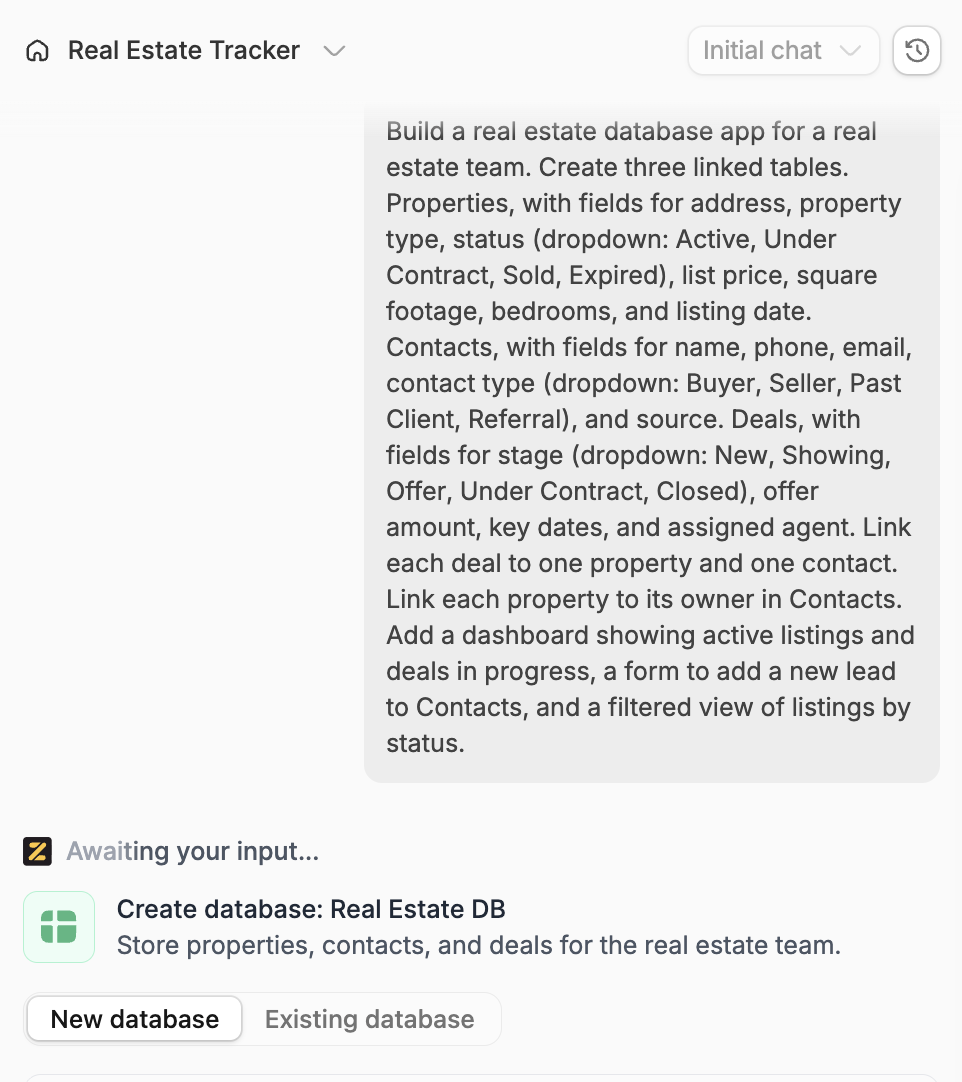
Once it builds, open the Database tab to check the tables. Each one holds the fields you asked for, and fixed-option fields like Status become dropdowns on their own, so Active, Under Contract, and Sold stay consistent across every record.
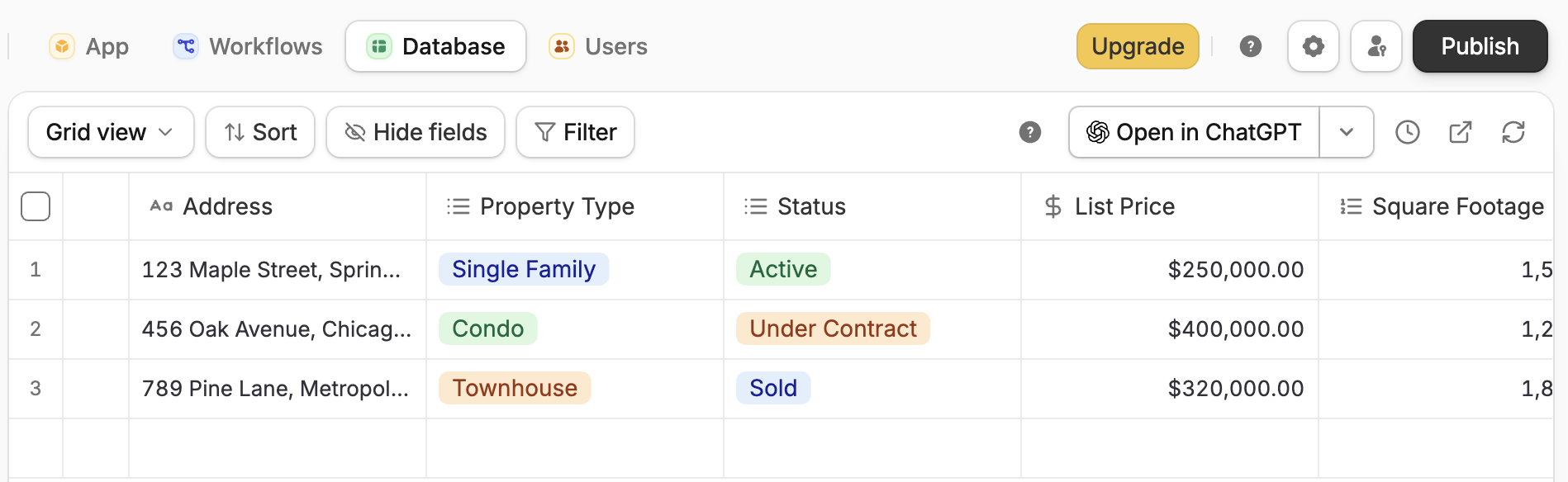
Pro tip: A field with a fixed set of options, like property status or deal stage, should use a dropdown and not free text, so "Active" and "active" never split into two things.
Step 3: Link the tables together
This step turns a set of lists into a database. A linked record connects a row in one table to a row in another, so a deal points to the exact property and the exact contact it involves.
Set up the core links first:
- A deal links to one property and one contact.
- A property links to its owner in the contacts table.
- For teams, a deal and a property both link to an assigned agent.
Once these are in place, opening a property record shows its owner, active deal, and history in a single view. That is the difference between a database and a spreadsheet. With a spreadsheet, you have to hunt for related rows yourself; the database pulls them together for you.
Step 4: Bring in your existing data
You almost never start from zero. Pull together what you have, whether that is a contacts export from your phone, past client lists, a property spreadsheet, or a CRM export if you are switching from one.
Clean it before it goes in. Remove duplicates, fill in missing phone numbers and email addresses where you can, and standardize the obvious things so that states are all "TX" rather than a mix of "TX" and "Texas." A quick pass now saves hours of confusion later.
Then import. Most tools let you upload a CSV and map its columns to your fields. Import contacts first, then properties, then deals, so the links in Step 3 point to real records. Add the tier you assigned earlier as a field, so your A, B, and C groups carry into the system.
Step 5: Build an interface on top of the data
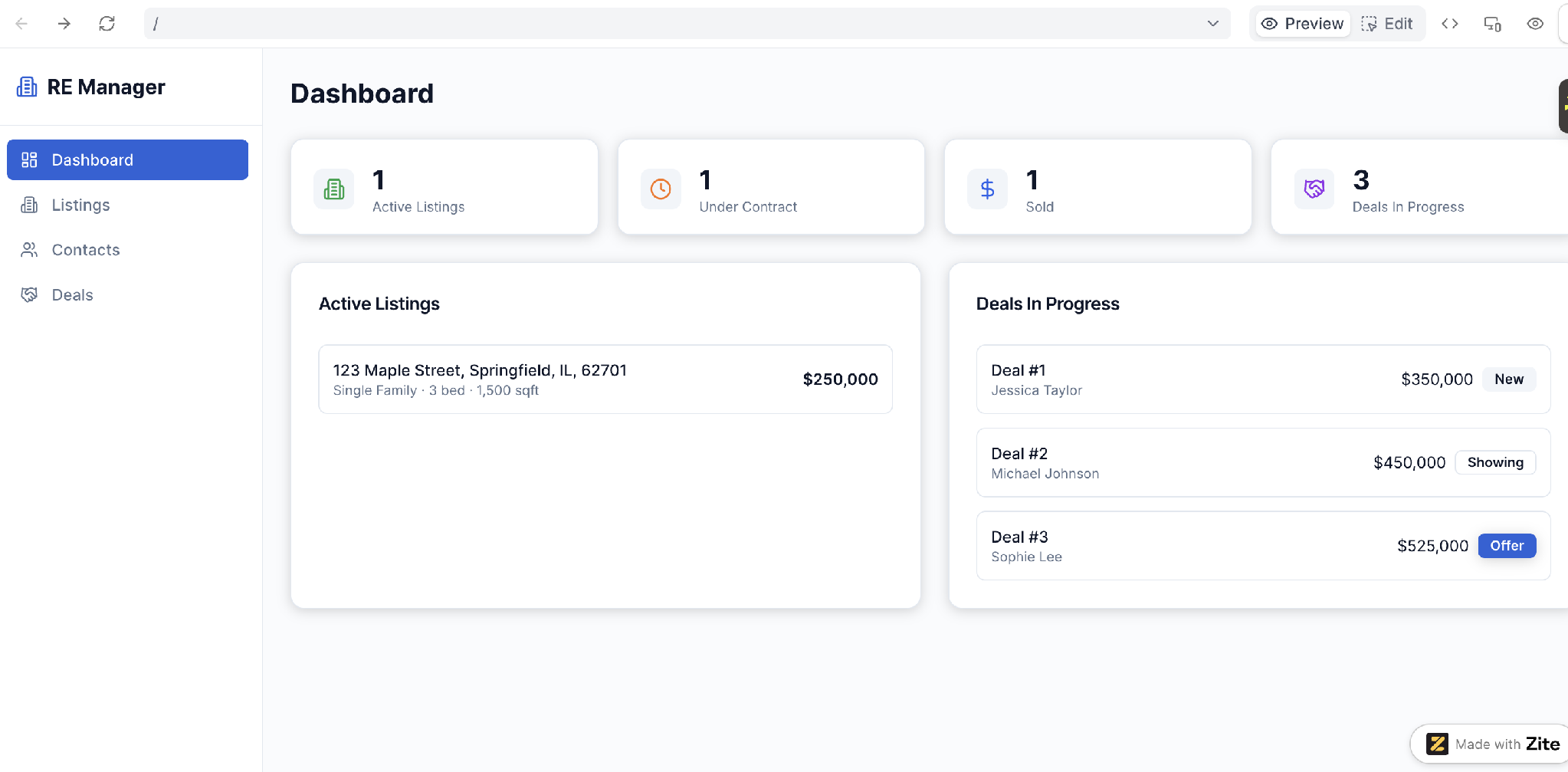
A raw table is fine for you, but a teammate updating a showing from their phone needs something simpler to work with. This is a step a spreadsheet can't match, because you put a usable interface on top of the same data.
An interface is the screen people work on. A dashboard of this week's showings, a simple form to add a new lead, and a filtered view of active listings by agent. The data underneath stays the same, and everyone sees the slice that fits their job.
You can build this by hand in a no-code tool, or describe what you want to an AI app builder and let it generate the interface, database, and workflows in one pass. Either way, no one has to scroll through a raw table to get their work done. For a broader view of that build process, see Zite's guide to making an app.
Step 6: Add the workflows that keep it current
A database is only useful if it stays accurate, and the way to keep it accurate is to automate the updates people forget to make. These are your workflows, the rules that fire when something changes.
A few that earn their keep in real estate:
- When a deal stage changes to “Under Contract,” notify the assigned agent and start the closing checklist.
- When a listing passes its expiration date, flag it for follow-up.
- When a new lead comes in through a web form, add it to contacts and assign it.
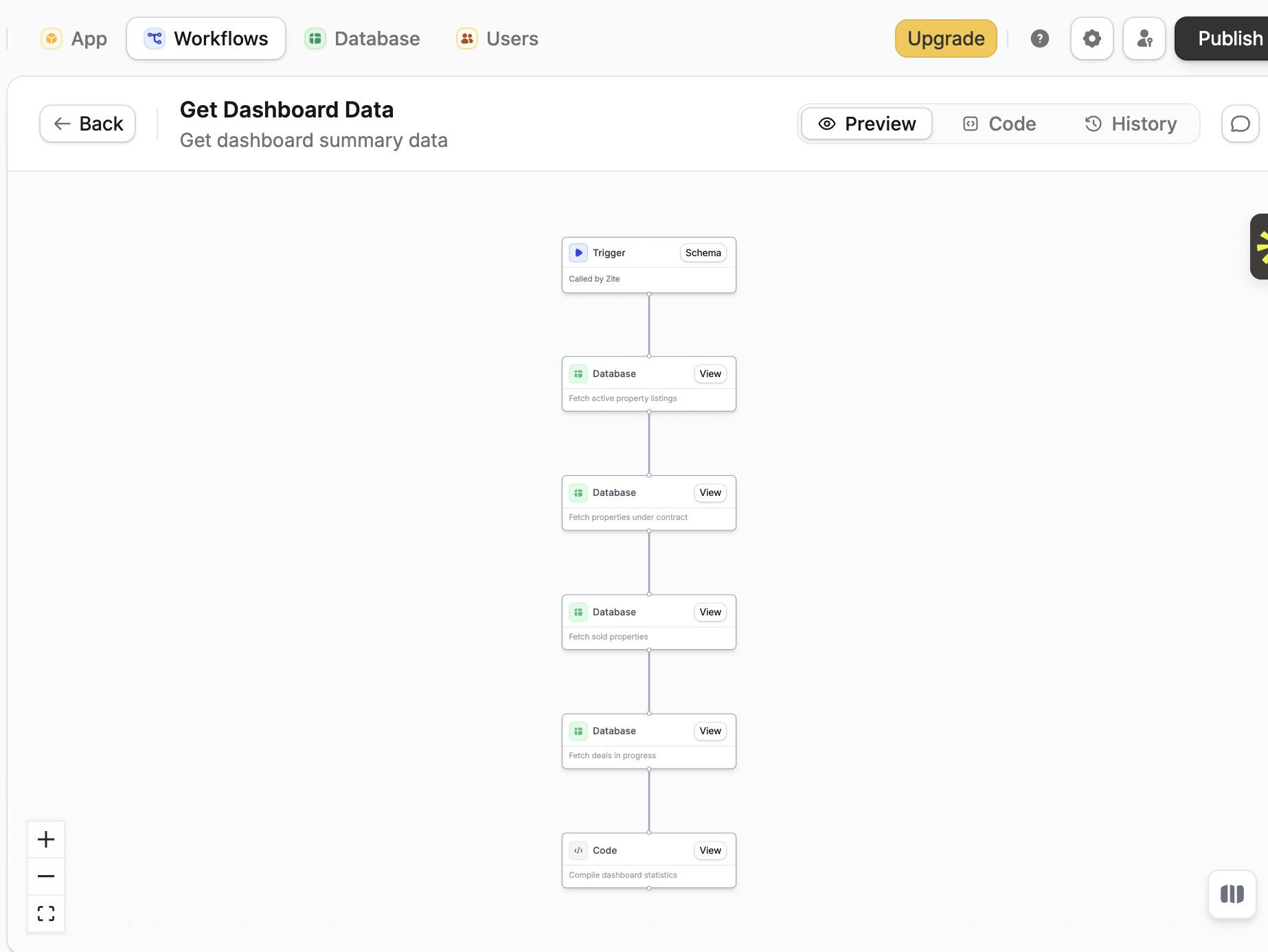
In an AI app builder, you describe these rules in plain language, and the tool builds them. The logic is shown as a flowchart you can read and trace, so nothing runs without you seeing it. To change a rule, you prompt for the change, and the tool updates the workflow.
Step 7: Set access and go live
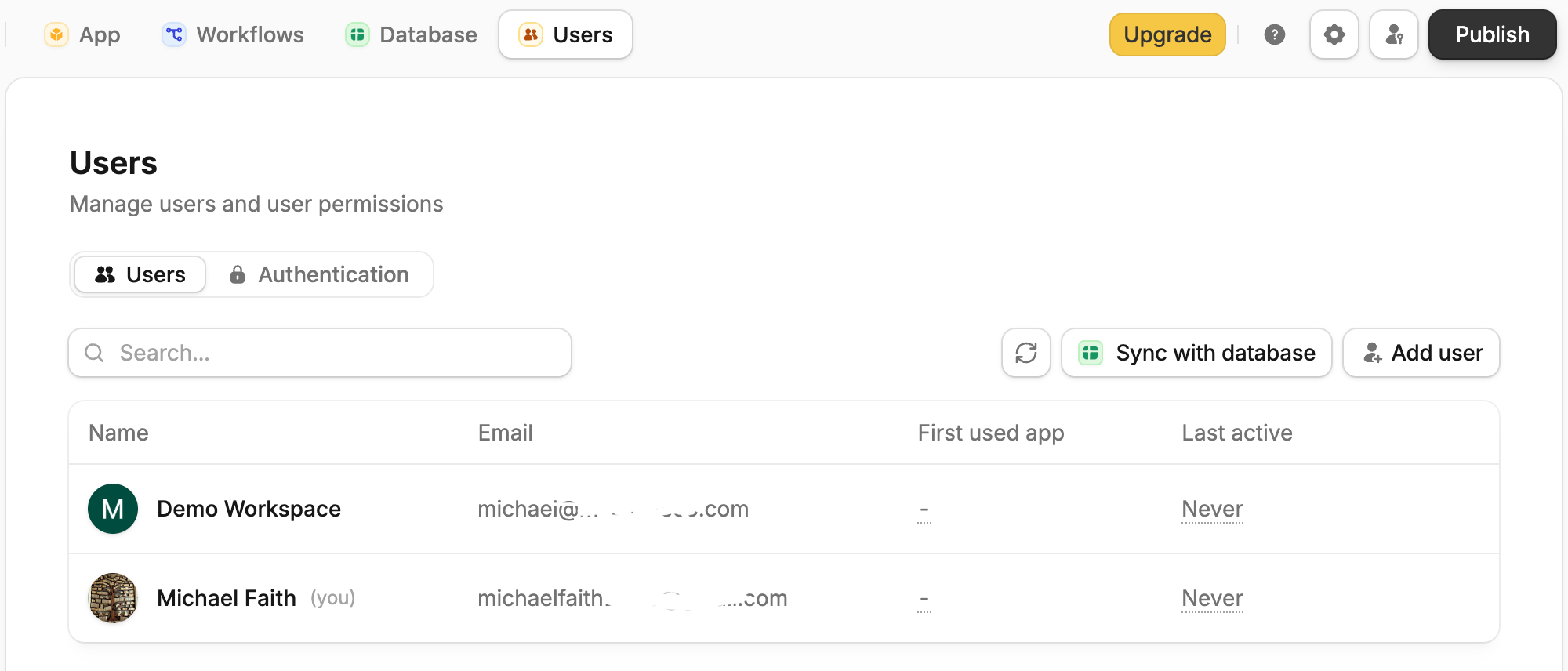
The last step is deciding who sees what, and there are two cases. For a team-only database, apps are internal by default, so everyone in your organization already has access and there is nothing to configure. For an outside client who should see only their own transaction, you publish to the web with invite-only access and set roles so each person lands on the right view.
Either way, a good no-code system runs in the browser, so there is no app store approval to wait on, and updates go live the moment you make them. Agents can add it to their phone's home screen for quick access in the field.
Where real estate databases go wrong
- Cramming everything into one giant table: Properties, contacts, and deals in a single sheet is the mistake a real database exists to fix. Separate tables, then link them.
- Starting with too many fields: A field you never fill is noise. Begin with the essentials and add more once you see what you reach for.
- Free text where a dropdown belongs: Typing statuses by hand guarantees "Pending," "pending," and "PENDING" are three different things. Use fixed options for anything you filter on.
- Never cleaning the data: A database full of dead numbers and duplicate contacts is worse than no database at all, because you trust it and it is wrong. Schedule a monthly cleanup.
Spreadsheet vs CRM vs building your own database
You have three real paths, and they differ in one thing: how much the system bends to your workflow versus how much you bend to it. A spreadsheet does neither well; a CRM fits you to its model, and building your own shapes the system around how you work.
A spreadsheet is free and familiar, and it works for a solo agent with a short contact list. It breaks once you need linked records, multiple users, or an interface, because it was never built to connect data or control who sees it.
A dedicated real estate CRM (like Follow Up Boss or BoldTrail, formerly kvCORE) comes ready to use with contact management, lead nurturing, and drip campaigns you would otherwise build yourself. If working your sphere of influence is the job, it is the strongest option because that is exactly what it is built for.
The trade-off is that you fit your business to its fixed model, so tracking properties and deals beyond contacts gets awkward.
Building your own database gives you a system shaped to how you actually work, with your own tables, fields, and workflows. It used to mean hiring a developer. A no-code AI app builder now lets you describe the system and have it built, with no coding required.
How Zite makes building a real estate database easier
If you want a database shaped to your business without hiring a developer, Zite generates the tables, fields, links, and interface from a plain-language description of what you track.
Here is how Zite helps with a real estate database:
- Real built-in database: Linked records, AI Fields, and real capacity, 5,000 records on the free plan, 100,000 on Pro, and 250,000 on Business, in tables as easy to work with as a spreadsheet.
You can import your existing property and contact data, or connect your existing Google Sheets and Airtable data, so you're not starting from scratch.
- An interface generated for you: Dashboards, forms, and filtered views for agents, managers, and clients, all built from the same prompt as the database.
- Visual workflows you can trace: Alerts, stage changes, and follow-up rules are shown as a flowchart you can read and follow, so you can see how each one runs before you trust it.
- Free for a solo agent, with room for the whole team: A solo agent with 400 properties and a few thousand contacts fits on the free plan, and because every plan has unlimited users, you can add your whole team without the per-agent-per-month fees a real estate CRM charges.
Zite Pro runs $19/month, and Business runs $69/month, both billed monthly, with unlimited users on every plan, including the free one.
For pure sphere-of-influence contact nurturing, a dedicated real estate CRM may still be a better fit. Zite is the stronger choice when you want a single system that tracks properties, contacts, and deals.
Start building with Zite if you want a real estate database shaped to how your team actually works.
Frequently asked questions
How long does it take to build a real estate database?
Building a real estate database takes about 2 to 3 hours for a working first version, assuming your data is reasonably clean. Mapping your tables and links is quick; cleaning and importing existing data is usually the part that takes the longest.
What’s the hardest part of building a real estate database?
The hardest part of building a real estate database is getting the structure right. Deciding what becomes its own table and how the tables link takes the most thought. Once that structure holds, adding data and building views go quickly.
Do I need coding skills to build a real estate database?
No, you do not need coding skills to build a real estate database. A spreadsheet requires none, and a no-code AI app builder generates the tables, links, and interface from a plain-language description, so a non-technical agent can build a real system.
Do I need a developer to build a real estate database?
No, you do not need a developer to build a real estate database. A no-code AI app builder handles the structure for you, so you describe the system and the tool builds it. The exception is live MLS listing feeds, which have their own licensing and setup, but your own properties, contacts, and deals need no developer at all.
Can Zite help me build a real estate database?
Yes, Zite can build a real estate database from a plain-language prompt. It generates the connected tables, the interface your team works in, and the workflows that keep it up to date, then lets you import your existing property and contact data.
What should a real estate database include?
A real estate database should include separate tables for properties, contacts, and deals, linked so each deal points to its property and contact. Teams should add agents and showings. Start with essential fields and expand once real data reveals what is missing.

