> ## Documentation Index
> Fetch the complete documentation index at: https://zite.com/llms.txt
> Use this file to discover all available pages before exploring further.
# How credits work
> Credits power the usage-based features in your Zite workspace, including building apps with AI, the database agent, and AI fields in databases.
## What uses credits
Credits power the usage-based features in your Zite workspace: building and modifying apps with AI, the database agent, and AI fields in databases.
These features use credits based on how much work they do:
* Building with AI in Chat, Plan, or Build mode
* Using the Database Agent
* AI fields in databases
* Apps using AI with the Zite API key
* Generating documents
Database syncs and app agents may use credits in the future. We will update this guide before those features start consuming credits.
## What does not use credits
Some actions do not consume credits:
* Manual edits, such as changing text, colors, spacing, or layout directly
* Applying a theme from the design panel
* Zite Database storage and standard database operations
* Users visiting your published apps
* Workflow runs from the editor
* Fixing app errors with `Fix it for me`
Zite Apps credits are **separate from any other platform allowances** (like [Fillout Forms submissions](https://www.fillout.com/help/view-responses)) and only reflect what you can use within Zite Apps AI tasks.
## How building uses credits
When you build with AI, the number of credits used depends on how much work Zite needs to do. Simple edits usually use fewer credits, while broad changes, new screens, databases, workflows, or advanced logic use more.
Credit usage can depend on:
* The complexity of your prompt
* The model used
* The size of your app
* How many files, screens, or database tables Zite needs to inspect
* How many changes Zite needs to make
| Sample request | What it does | Credit estimate |
| ------------------------------------ | ------------------------------------------- | --------------- |
| Edit colors, spacing, or font | Small visual or style updates | 0.5 - 0.7 |
| Reposition elements | Moves or resizes components within a screen | 0.6 - 1.0 |
| Change navigation or page branching | Updates flow between screens | 1.0 - 1.5 |
| Add a new page or view | Creates a new screen with elements | 1.5 - 2.25 |
| Modify app layout | Updates structure across a screen | 1.5 - 2.5 |
| Create a database | Sets up a database with tables and fields | 2.0 - 3.0 |
| Change design from an uploaded photo | Analyzes a photo and updates app styling | 2.0 - 3.5 |
| Add user authentication | Creates flows, logic, and UI | 2.5 - 3.5 |
These are estimates. Actual usage can vary based on the size and complexity of your app.
## Check credit usage
You can check how many credits a request used by clicking the `brain icon` at the bottom of a message. This opens a details panel showing the model used, time worked, actions taken, files modified, and credits used.
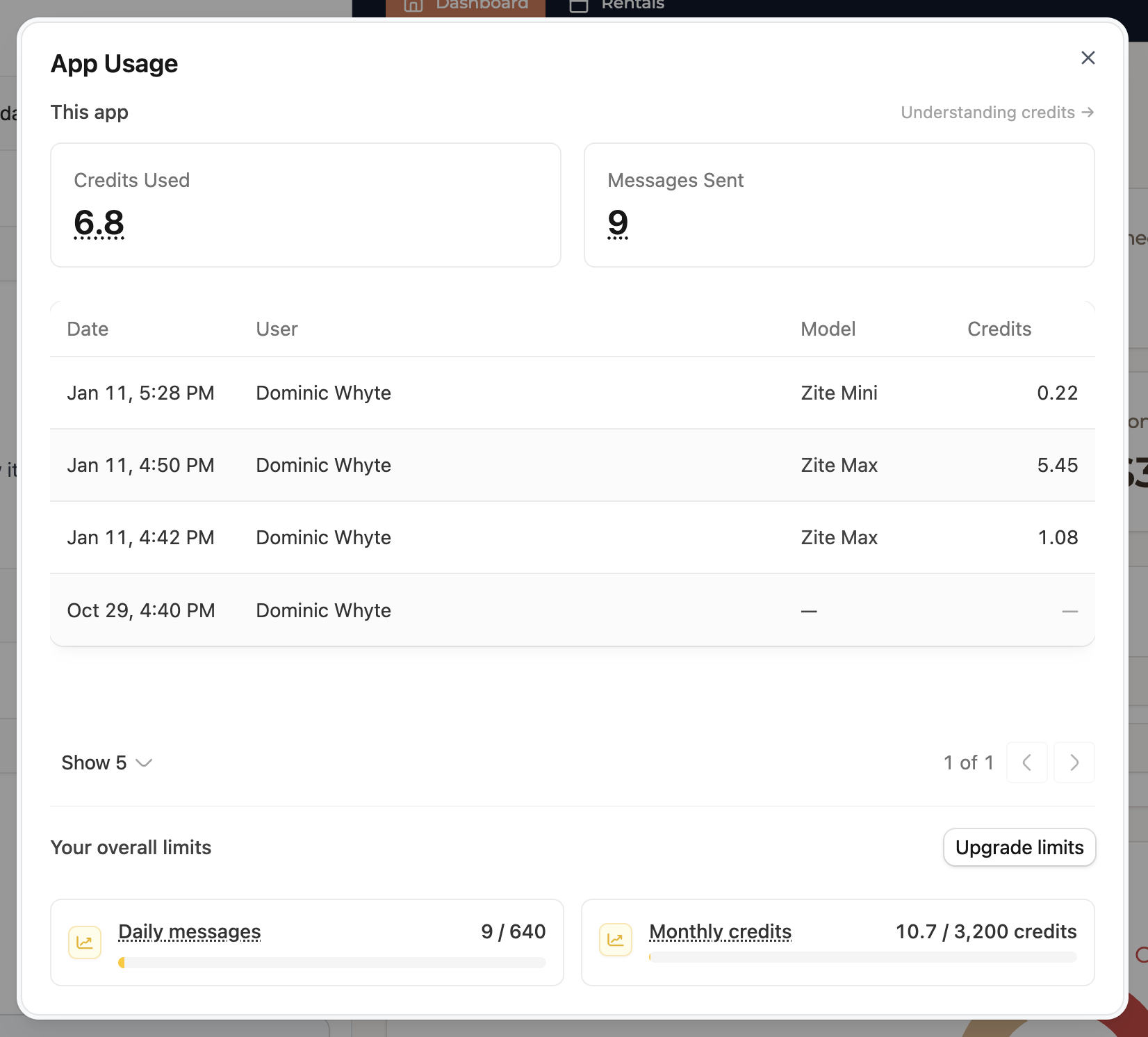
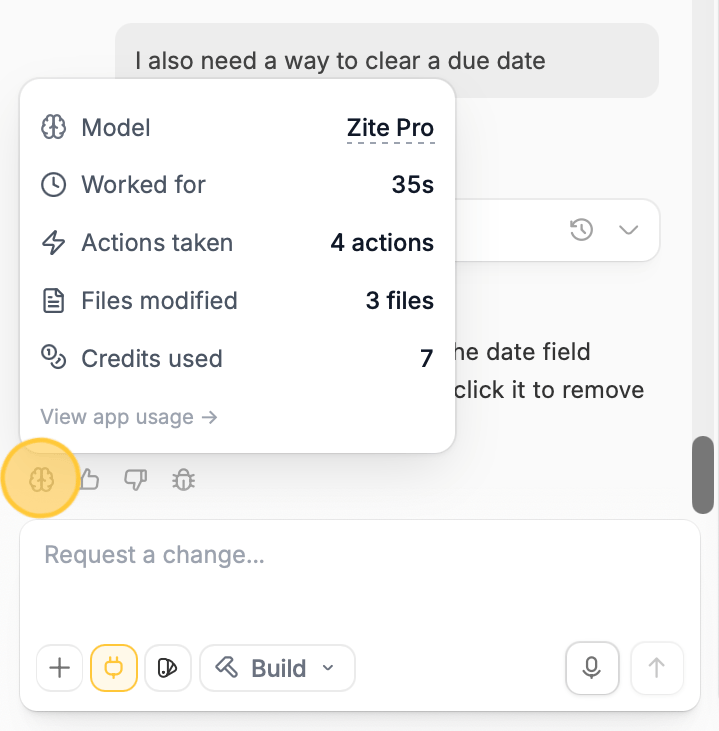 To view total usage for an app, click `View app usage` underneath the message details.
 To see your account-level credit usage and remaining balance, open [Billing & Usage](https://build.fillout.com/home/settings/billing).
## How credits reset
Credits reset every month based on the exact day and time you first subscribed to your paid Apps plan. For example, if you subscribed on July 13 at 5:15 PM, your credits will reset on August 13 at 5:15 PM.
Annual plans are billed once per year, but their credits still reset monthly on the same subscription day and time. For example, if an annual plan started on July 13 at 5:15 PM, credits reset on August 13 at 5:15 PM, September 13 at 5:15 PM, and so on. Unused monthly credits do not roll over.
If you upgrade to a higher plan during a billing cycle, your total credit limit is set to the new plan's limit for that cycle.
## Workflow runs are tracked separately
Running workflows from your published apps—to read and write data, connect to integrations, and call third-party APIs—is metered through **workflow runs**, not credits. Each plan includes a monthly workflow run allowance alongside its credit allowance.
Learn more in [Workflow runs and your monthly limit](/help/platform/workflows/overview#workflow-runs-and-your-monthly-limit).
## Add more credits
If you need more credits, you can [upgrade your Apps plan](/help/platform/account/subscription). Higher plans include higher monthly credit limits.
## Free plan limits
The Free plan includes a monthly credit allowance and a daily message limit. Paid plans include higher monthly credit limits and unlimited daily messages.
## Downgrading after deployment
If you upgrade to a paid plan to create an app and then downgrade after your app is fully built and published:
* Zite will continue to host your app on the Free plan as long as you're not using a custom domain.
* The app creator and app users can still access the app free of charge.
* Zite branding will reappear if you go back to the Free Zite plan.
To see your account-level credit usage and remaining balance, open [Billing & Usage](https://build.fillout.com/home/settings/billing).
## How credits reset
Credits reset every month based on the exact day and time you first subscribed to your paid Apps plan. For example, if you subscribed on July 13 at 5:15 PM, your credits will reset on August 13 at 5:15 PM.
Annual plans are billed once per year, but their credits still reset monthly on the same subscription day and time. For example, if an annual plan started on July 13 at 5:15 PM, credits reset on August 13 at 5:15 PM, September 13 at 5:15 PM, and so on. Unused monthly credits do not roll over.
If you upgrade to a higher plan during a billing cycle, your total credit limit is set to the new plan's limit for that cycle.
## Workflow runs are tracked separately
Running workflows from your published apps—to read and write data, connect to integrations, and call third-party APIs—is metered through **workflow runs**, not credits. Each plan includes a monthly workflow run allowance alongside its credit allowance.
Learn more in [Workflow runs and your monthly limit](/help/platform/workflows/overview#workflow-runs-and-your-monthly-limit).
## Add more credits
If you need more credits, you can [upgrade your Apps plan](/help/platform/account/subscription). Higher plans include higher monthly credit limits.
## Free plan limits
The Free plan includes a monthly credit allowance and a daily message limit. Paid plans include higher monthly credit limits and unlimited daily messages.
## Downgrading after deployment
If you upgrade to a paid plan to create an app and then downgrade after your app is fully built and published:
* Zite will continue to host your app on the Free plan as long as you're not using a custom domain.
* The app creator and app users can still access the app free of charge.
* Zite branding will reappear if you go back to the Free Zite plan.