> ## Documentation Index
> Fetch the complete documentation index at: https://zite.com/llms.txt
> Use this file to discover all available pages before exploring further.
# Chat mode
> Use Chat mode to ask questions and get suggestions without changing your app.
Chat mode is a **read-only** conversation with Zite. It can inspect your app's structure, generated logic, workflows, and code to explain how your app works or why something is happening, **without making any changes**.
## When to use Chat mode
* Understand how a page, workflow, or setting works
* Ask why something is behaving a certain way
* Explore improvement ideas before committing to changes
* Get options for a future feature or workflow
Chat mode uses [Zite Max](/help/platform/basics/model-selection). It still consumes credits, but it generally uses fewer than Build mode because it focuses on analyzing and explaining.
Click the `Mode` control and choose `Chat`, or press `Shift` + `Tab` until you reach Chat mode.
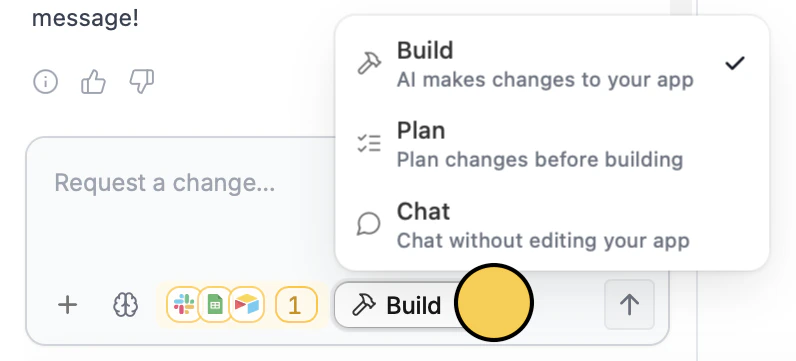 Enter your question in the chat box. For example:
* "Why is the dashboard loading slowly?"
* "What happens after a user submits this form?"
* "How do I change the wording on the login screen?"
If you like a suggestion from Chat mode, switch to [Build mode](/help/platform/how-to-build/agent-modes/build-mode) and ask Zite to make that specific change.
Enter your question in the chat box. For example:
* "Why is the dashboard loading slowly?"
* "What happens after a user submits this form?"
* "How do I change the wording on the login screen?"
If you like a suggestion from Chat mode, switch to [Build mode](/help/platform/how-to-build/agent-modes/build-mode) and ask Zite to make that specific change.