> ## Documentation Index
> Fetch the complete documentation index at: https://zite.com/llms.txt
> Use this file to discover all available pages before exploring further.
# Troubleshoot your app
> Diagnose common app, workflow, database, and building issues in Zite.
Most issues are easier to fix when you can identify what changed, where the issue appears, and what should happen instead. Start with the Zite tools below before trying to rewrite the same prompt.
## Start here
| If this is happening | Use this first |
| ------------------------------------- | -------------------------------------------------------------------------------------------------------------------------- |
| Zite detected an error | Click `Fix it for me` in the toast or chat message. |
| You want Zite to inspect the app | Open `Improve my app` and choose `Review`. |
| The app works but needs visual polish | Open `Improve my app` and choose `Designer`. |
| You are not sure what is wrong | Switch to [Chat mode](/help/platform/how-to-build/agent-modes/chat-mode) and ask Zite to explain before changing anything. |
| The fix is large or unclear | Use [Plan mode](/help/platform/how-to-build/agent-modes/plan-mode) to break the work into steps. |
| A recent edit broke the app | Restore a working version from [history](/help/platform/basics/history). |
`Fix it for me` is free and does not consume [credits](/help/platform/getting-started/credits). For app-specific questions or unexpected behavior, start with [**Chat mode**](/help/platform/how-to-build/agent-modes/chat-mode) to understand what's happening before making changes.
## Zite-specific issues
Click `Fix it for me` first. Zite will use the error details it already detected to diagnose and repair the issue.
If the same error appears again, switch to Chat mode and ask:
```text theme={null}
The automatic fix did not resolve this. Explain what is still failing and suggest the smallest next fix before changing anything.
```
Use `Improve my app` when the problem is broader than one obvious error.
* `Review` scans the app for common issues and fixes them.
* `Designer` explores the running app, captures screenshots, and polishes the look and feel. It can take longer.
Use `Review` for broken behavior, missing states, and general quality checks. Use `Designer` when the app works but feels visually inconsistent.
Try these in order:
1. Refresh the page.
2. Re-open the app from your dashboard.
3. Try a private or incognito browser window.
4. Disable browser extensions that may block scripts.
5. If this started after a recent edit, restore a previous version from [history](/help/platform/basics/history).
6. If there is an error message, paste it into Chat mode and ask Zite to investigate.
If the issue only happens in the published app, test from another browser or device to rule out local caching.
`No app created yet` is usually a temporary connection or creation issue.
* Refresh the page.
* Go back to your dashboard and re-open the app.
* If the app still does not load, start a new prompt or contact support.
`Too many requests` and `Timeout` errors usually mean too many changes were requested in a short time, or an external service took too long to respond.
* Wait a few minutes and try again.
* Re-open the app.
* Break the request into smaller steps.
* Check whether the error came from Zite or an external integration.
Retry the build or refresh the page. Changes made before the error are automatically saved, so you will not lose edits that were already applied.
This can happen because of a third-party sandbox provider issue. The Zite team is working on ways to reduce the impact of this error.
Use [history](/help/platform/basics/history) to restore a working version, then make the next fix in a smaller step.
Before rebuilding, ask Zite:
```text theme={null}
This worked before the last change. Compare the current version with the previous working version and explain the likely cause before making a fix.
```
## Common building issues
Upload a screenshot and describe the exact issue. If possible, use [Selective Edits](/help/platform/basics/selective-edits) to highlight the element before asking Zite to change it.
Keep the request small: one section, one page, or one interaction at a time.
```text theme={null}
On the Orders page, the Submit button is too low and overlaps the footer on mobile. Fix only this button layout and keep the rest of the page unchanged.
```
Tell Zite what you clicked, what happened, and what should happen instead.
```text theme={null}
On the Orders page, the Submit button should save the form and show a success message. Right now, clicking it does nothing. Inspect the button and save flow, then explain the issue before fixing it.
```
Large prompts are more likely to produce partial results.
1. Ask Zite to summarize what it changed.
2. List what is still missing.
3. Ask for one remaining change at a time.
4. Use Plan mode for larger updates before building.
```text theme={null}
Only update the customer detail page. Add a status badge next to the customer name and make sure it uses the Status field from the Customers table. Do not change the dashboard or navigation.
```
Start with [workflow run history](/help/platform/workflows/workflow-run-history). It shows the trigger, inputs, steps, outputs, and errors.
Useful prompts:
```text theme={null}
Look at the latest failed run for this workflow and explain which step failed and why.
```
```text theme={null}
This workflow should create a customer record and send a Slack message. It creates the record but does not send Slack. Check the run history and suggest the smallest fix.
```
Check the app is connected to the right [Zite Database](/help/database/overview), table, and fields.
Also check:
* field names and field types match what the app expects
* imported data columns were mapped correctly
* workflows writing to the database have the expected inputs
* AI fields with failed cells show clear regenerate errors from the field header
Zite's built-in database can make app behavior easier for the agent to understand and can reduce errors from external data sources.
First identify whether the issue is in Zite or the connected service.
Check:
* the connected account is still authorized
* the workflow step has the required input values
* the external service is available
* any required API key, token, or secret is still valid
* the run history shows the exact failed step
If the same workflow works with Zite Database but fails with an external service, the issue is usually in the integration setup, account permissions, or external service response.
## Build with a repeatable process
A better process leads to fewer errors, lower credit usage, and better app outcomes. Plan the change before asking Zite to build it.
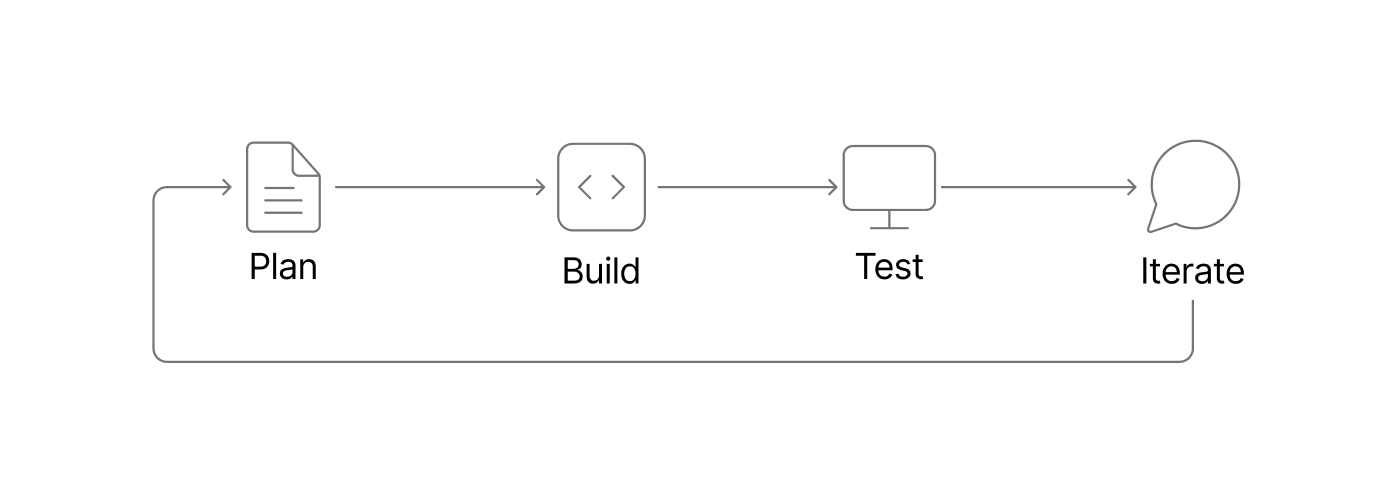 Think of each feature as a cycle: plan the goal, build the smallest useful version, test the result, then iterate with focused follow-up requests.
### 1. Start a new chat per feature
Start a new chat when you begin a distinct feature, workflow, page, or integration. A fresh chat gives Zite more targeted context and helps avoid carrying old assumptions into the next build.
For example, if you are building a client portal, use one chat to create the customer dashboard, another chat to add invoice payments, and another chat to add support ticket submission. This keeps each conversation focused and can reduce token usage because Zite does not need to reason through unrelated history.
### 2. Back up your database before schema changes
Make a [database backup](/help/database/manage-data/backup-and-restore) before asking Zite to make significant schema changes, such as adding linked records, changing field types, importing a large CSV, or restructuring tables.
For example, before turning a simple Leads table into a full CRM with Companies, Contacts, Deals, and Activities tables, create a backup. If the database structure or data mapping does not work as expected, you can roll back the database to the previous version.
Database backups only restore database data and schema. They do not roll back app UI changes.
### 3. Use history for UI and logic changes
For app UI and logic changes, use [history](/help/platform/basics/history) to restore a previous version of your app if a build goes in the wrong direction.
For example, if you ask Zite to redesign an approvals dashboard and the new layout hides important filters, restore the previous working version before trying again with a smaller prompt. History is especially useful for navigation changes, page redesigns, conditional logic, and workflow wiring.
### 4. Use Plan mode before building new features
Use [Plan mode](/help/platform/how-to-build/agent-modes/plan-mode) before building features with multiple screens, workflows, roles, permissions, or database changes. Plan mode helps you review the structure before credits are spent on implementation.
For example, before building a field service app, ask Zite to plan the technician schedule, job detail page, customer record, parts inventory, and completion workflow. Review the plan, remove anything unnecessary, and confirm the database tables before moving into build.
### 5. Use Chat mode to talk through implementation
Use [Chat mode](/help/platform/how-to-build/agent-modes/chat-mode) when you are not ready for Zite to make changes yet. It is useful for exploring tradeoffs, clarifying data models, or deciding whether a feature should be a page, workflow, database table, or integration.
For example, before adding Google Calendar to a booking app, ask Zite how it would handle availability, time zones, cancellation rules, and confirmation emails. Once the implementation plan is clear, switch to Plan mode or Build mode with a more precise request.
## Prompting tips
* Name the exact page, section, database table, workflow, or integration.
* Include screenshots for UI problems.
* Include error messages and workflow run details when available.
* Ask Zite to explain before fixing when the cause is unclear.
* Keep fixes small: one issue, one area, or one workflow at a time.
* Avoid repeating the same fix prompt if it did not work. Switch to Chat mode or Plan mode and ask for a different approach.
## Need more help?
Still stuck? Try this:
1. Use [Plan mode](/help/platform/how-to-build/agent-modes/plan-mode) and ask Zite for a step-by-step fix plan.
2. If the issue started after a UI or feature change, revert to a stable version from [history](/help/platform/basics/history).
3. If you need support, contact [support@zite.com](mailto:support@zite.com) or start a chat from the help bubble.
Include the app link, what you were trying to do, the exact error message, screenshots or a screen recording, and what changed before the issue started.
Think of each feature as a cycle: plan the goal, build the smallest useful version, test the result, then iterate with focused follow-up requests.
### 1. Start a new chat per feature
Start a new chat when you begin a distinct feature, workflow, page, or integration. A fresh chat gives Zite more targeted context and helps avoid carrying old assumptions into the next build.
For example, if you are building a client portal, use one chat to create the customer dashboard, another chat to add invoice payments, and another chat to add support ticket submission. This keeps each conversation focused and can reduce token usage because Zite does not need to reason through unrelated history.
### 2. Back up your database before schema changes
Make a [database backup](/help/database/manage-data/backup-and-restore) before asking Zite to make significant schema changes, such as adding linked records, changing field types, importing a large CSV, or restructuring tables.
For example, before turning a simple Leads table into a full CRM with Companies, Contacts, Deals, and Activities tables, create a backup. If the database structure or data mapping does not work as expected, you can roll back the database to the previous version.
Database backups only restore database data and schema. They do not roll back app UI changes.
### 3. Use history for UI and logic changes
For app UI and logic changes, use [history](/help/platform/basics/history) to restore a previous version of your app if a build goes in the wrong direction.
For example, if you ask Zite to redesign an approvals dashboard and the new layout hides important filters, restore the previous working version before trying again with a smaller prompt. History is especially useful for navigation changes, page redesigns, conditional logic, and workflow wiring.
### 4. Use Plan mode before building new features
Use [Plan mode](/help/platform/how-to-build/agent-modes/plan-mode) before building features with multiple screens, workflows, roles, permissions, or database changes. Plan mode helps you review the structure before credits are spent on implementation.
For example, before building a field service app, ask Zite to plan the technician schedule, job detail page, customer record, parts inventory, and completion workflow. Review the plan, remove anything unnecessary, and confirm the database tables before moving into build.
### 5. Use Chat mode to talk through implementation
Use [Chat mode](/help/platform/how-to-build/agent-modes/chat-mode) when you are not ready for Zite to make changes yet. It is useful for exploring tradeoffs, clarifying data models, or deciding whether a feature should be a page, workflow, database table, or integration.
For example, before adding Google Calendar to a booking app, ask Zite how it would handle availability, time zones, cancellation rules, and confirmation emails. Once the implementation plan is clear, switch to Plan mode or Build mode with a more precise request.
## Prompting tips
* Name the exact page, section, database table, workflow, or integration.
* Include screenshots for UI problems.
* Include error messages and workflow run details when available.
* Ask Zite to explain before fixing when the cause is unclear.
* Keep fixes small: one issue, one area, or one workflow at a time.
* Avoid repeating the same fix prompt if it did not work. Switch to Chat mode or Plan mode and ask for a different approach.
## Need more help?
Still stuck? Try this:
1. Use [Plan mode](/help/platform/how-to-build/agent-modes/plan-mode) and ask Zite for a step-by-step fix plan.
2. If the issue started after a UI or feature change, revert to a stable version from [history](/help/platform/basics/history).
3. If you need support, contact [support@zite.com](mailto:support@zite.com) or start a chat from the help bubble.
Include the app link, what you were trying to do, the exact error message, screenshots or a screen recording, and what changed before the issue started.