
AI lead scoring uses machine learning to rank prospects by how likely they are to become customers. The model learns from your closed-won deals, meaning the leads that turned into customers.
A lead who requests a demo and views the pricing page twice scores high. A lead who reads one blog post scores low.
This guide explains how the score works and compares five tools that offer it. It also shows how to build your own scoring app in Zite, with AI fields handling the judgment calls.
What is AI lead scoring? The 30-second answer
AI lead scoring is a method that predicts which leads are most likely to buy, using historical data and current behavior, as Demandbase puts it. The result is a score, typically between 0 and 100, that tells sales who to contact first.
The practical difference from traditional scoring is where the weights come from. A weight is the number of points a signal earns. A traditional score uses point values someone typed in by hand, and an AI model learns its weights from deals you've already won.
Predictive lead scoring is the narrower term. Demandbase calls it a subset of AI scoring, with AI scoring adding current intent data and continuous updates.
What goes into the score
Here are the two kinds of signals:
-
Fit signals: Who the lead is, such as job title, company size, industry, and location.
-
Behavior signals: What the lead does, such as website visits, content downloads, email clicks, and webinar attendance.
How AI lead scoring works in 3 phases
Three phases take raw lead data to a live score.
Phase 1: Data integration
The model starts by pulling data from your CRM, your website activity, and an enrichment source that fills in company details. Demandbase lists CRMs, marketing automation tools, website interactions, and email campaigns among the usual sources.
Two kinds of data feed the score. First-party data comes from your own CRM and website, such as deal history and page visits. Third-party data comes from outside providers, such as buyer intent and company details.
The model learns from whatever data it gets, so clean the data first. Remove duplicate leads, fill gaps, and standardize formats such as job titles and country names. Demandbase and Creatio both say to clean the data before it reaches the model.
If your leads have no central home yet, a CRM comes first, and this CRM tutorial covers that step.
Phase 2: Pattern recognition
The model compares leads that became customers with leads that didn't, and it learns which traits and behaviors separate the two.
HubSpot's AI scoring shows the setup. You choose a lifecycle-stage change that counts as success, such as Subscriber to Sales Qualified Lead, plus a timeframe such as 90 days. HubSpot then evaluates the contacts that made that move and recommends criteria and points. The evaluation can take up to an hour.
Phase 3: A live 0-100 score
Every new lead gets a score based on how closely it resembles past buyers, and the score changes as the lead does more. Demandbase gives one example of how teams read the number. A score of 95 and above is highly likely, 50 to 94 is likely, and under 50 is unlikely.
As outcomes are tracked, the model adjusts its predictions. Retrain it periodically as new data comes in, as Demandbase advises.
AI lead scoring vs traditional lead scoring: what's the difference?
Traditional scoring is rule-based. Someone assigns points for criteria such as job title or a form submission, and the points stay the same until someone edits the rules. AI scoring replaces those hand-set points with weights learned from history.
Here's how the two compare:
| Traditional scoring | AI lead scoring | |
|---|---|---|
| Setup | You write the rules and assign points by hand | The model proposes criteria and weights from your history |
| Adaptability | Stays the same until someone edits the rules | The model adjusts as new outcomes arrive |
| Many signals at once | Practical for a short list of rules | Can weigh many signals and how they interact |
| Data needed | A clear picture of your ideal customer | Enough closed deals for patterns to show |
| Explainability | Every point is visible and editable | Depends on the tool |
AI scoring wins once you have enough closed deals and many signals to weigh. Traditional scoring fits a business with only a handful of closed deals. A model has little to learn, and readable rules are easier to trust.
The benefits of AI lead scoring
Here are four ways a score helps a sales team:
-
Faster routing: When a score crosses a threshold, the lead goes straight to a rep or triggers an alert. A demo request skips the shared queue and lands with a rep.
-
Fewer wasted rep hours: Reps work from the top of a ranked list and skip leads with no buying signals. More of their time goes to deals that can close.
-
Better MQL-to-SQL conversion: Marketing hands a lead to sales when its score matches what past buyers looked like, so fewer marketing-qualified leads reach sales before they're ready.
-
One definition of a good lead: Sales and marketing read the same number, so they stop arguing over lead quality.
Vendors publish their own results. 6sense reports a 13% higher win rate and an 18% higher average opportunity value for opportunities from its qualified accounts. It compares them with opportunities from other accounts, using 2025 customer data. These are one vendor's numbers, so test the effect on your own pipeline.
5 AI lead scoring tools and who each one fits
Here are five tools that offer AI lead scoring, with the situation each one suits:
-
HubSpot AI scoring: Best for teams on Marketing Hub Enterprise that want a score trained on their own contact data. HubSpot's documentation lists that subscription as the one that includes AI-built scores.
-
Salesforce Einstein Lead Scoring: Best for teams already on Salesforce that want predictive scoring inside their CRM. Salesforce's help page says it comes with Sales Cloud Einstein, which is included in the Performance and Unlimited editions and costs extra in the Enterprise edition.
-
6sense: Best for B2B teams that sell to accounts and want buyer-intent data behind the score. Its predictive models use historical CRM, marketing automation, first-party, and third-party intent data to estimate which accounts are most likely to buy.
-
Clay: Best for outbound teams that research prospects and score them with AI prompts. Clay's guide describes Claygent, an AI researcher that can check a prospect's LinkedIn profile and assign a score.
-
Warmly: Best for scoring website visitors by live intent. Warmly says its AI identifies anonymous visitors at the person level and sorts every account into Tier 1, Tier 2, or not a fit.
How to choose between them
Salesforce and Clay each publish a checklist for picking a scoring tool. The questions below draw on both.
Here are five questions to ask before you pick one:
-
Scoring mode: Does the tool score with manual rules, predictions, or AI assistance?
-
Training data: Does it learn from your own leads, or from outside data until yours builds up?
-
Transparency: Can you see which factors drive each score?
-
Data preparation: Does the tool clean your data, or do you?
-
Cost: Is scoring built into a platform you already pay for, or does it cost extra?
Salesforce's guide notes that a built-in add-on can cost more than a standalone scoring tool when you'd use little of the wider platform.
To pick the CRM that will hold the score, compare these small business CRM options. If none of these tools fit your data or budget, the build section below shows how to create a scoring model you control.
What works and what falls short
- Weights come from evidence, so nobody has to guess whether a webinar matters more than a job title.
- Scores stay current as a lead's behavior changes, so an inactive lead drops and an active one rises.
- Less rule upkeep, since the team reviews results instead of rewriting point tables.
- A model needs history, and one with few closed deals has little to learn from. A weak model can score worse than a simple rule.
- A learned score is hard to explain to a rep, who can read a point rule but not a model's weights.
- Past bias carries forward when earlier wins skew toward one type of customer, so the model favors lookalikes and can miss a new segment.
Should you use AI lead scoring? My take
AI lead scoring pays off once your history is deep enough for patterns to show. Until then, a simple weighted score is the better first step.
AI lead scoring is perfect for
Here are three groups that gain the most:
-
Teams with steady inbound lead volume and a CRM that tracks which leads became customers.
-
Sales teams where reps can't work every lead and need a ranked list.
-
Marketing teams that want a clear score cutoff for handing leads to sales.
Skip it if you
Here are three signs to wait:
-
You close few deals a year, which leaves too little data to train on.
-
You have no CRM yet, in which case start with this no-code CRM guide.
-
You can't say which past leads became customers.
How to build AI lead scoring without a data team
The scoring app below is a weighted score. Formula fields add up the points, and an AI field handles the judgment calls. It follows rules you can read, so you can trace every score to its points. The weights stay fixed until you change them. Once enough deals close, compare your weights against which leads were bought and adjust them.
These steps use Zite's formula fields and AI fields. The same logic works in any database that supports them.
Step 1: Study your closed-won deals
If you already score leads, review your current criteria first. Note which signals reps ignore and which data you don't collect yet.
Pull the deals your team won recently from your CRM or spreadsheet. List what they share, such as job titles, company sizes, industries, and what they did before buying. Do the same for leads that stalled or were lost. The gap between the two lists becomes your scoring criteria.
If your past leads are already in Zite, or once you've imported them in Step 2, you can hand this comparison to the Database Agent. Ask something like "Compare our won and lost leads and tell me which titles, company sizes, and actions separate them." Treat its answer as a starting point for the weights in Step 3.
Step 2: Choose the fields to collect
Leads already in Google Sheets or Airtable can come with you. Zite imports both into a Zite table, where the formula and AI fields below can score them. Otherwise, start a new leads table.
Here are the three groups of fields to collect:
| Group | Fields |
|---|---|
| Fit | Seniority, employee count, industry, country |
| Behavior | Demo requested, pricing page views, email clicks, webinar attended, last activity date |
| Source | Email address, lead source |
Give seniority and industry a fixed set of values, so the formulas match every lead. A free-text title such as "VP Ops" won't match "Director or above" on its own. Add a deal outcome field with the values Won, Lost, and Open too, so Zite can compare won and lost leads later.
A lead form can capture the fit fields when someone signs up, and these lead form examples show forms that feed a CRM. For company details you'd rather not ask for, Zite's Apollo integration can add headcount and industry to a contact. It spends credits on your own Apollo account and needs a paid Apollo plan.
Step 3: Weight fit against behavior
Split 100 points between who the lead is and what the lead does. A 50/50 split is a reasonable start, and you can move toward behavior if sales says demo requests matter more than titles.
Here are the points for each signal:
| Signal | Condition | Points |
|---|---|---|
| Seniority | Director or above | 20 |
| Seniority | Manager | 12 |
| Seniority | Any other title | 4 |
| Employees | 50 to 500 | 15 |
| Employees | 11 to 49, or 501 to 2,000 | 8 |
| Employees | Any other size | 2 |
| Industry | Target | 15 |
| Industry | Adjacent | 7 |
| Industry | Other | 0 |
| Demo requested | Yes | 25 |
| Pricing page views | Two or more | 15 |
| Pricing page views | One | 8 |
| Email clicked | In the last 14 days | 5 |
| Webinar | Attended | 5 |
Fit tops out at 50 points and behavior at 50. In a Zite formula field, you reference other fields in curly braces. The seniority and company size points look like this.
IF({Seniority} = "Director or above", 20, IF({Seniority} = "Manager", 12, 4))
IF(AND({Employees}>=50, {Employees}<=500), 15, IF(OR(AND({Employees}>=11, {Employees}<=49), AND({Employees}>=501, {Employees}<=2000)), 8, 2))
You can write these by hand, or describe the calculation in plain English and let Zite generate a formula for you to review.
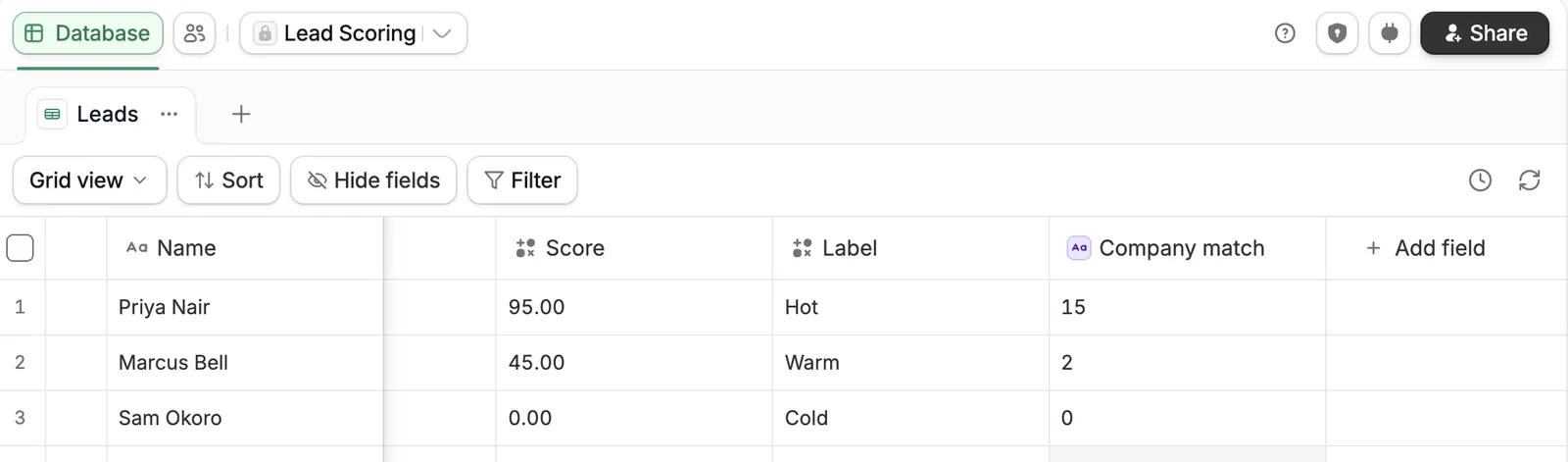
The total score adds the fit and behavior points, subtracts the penalties, and keeps the result between 0 and 100.
MAX(0, MIN(100, {FitPoints} + {BehaviorPoints} - {Penalties}))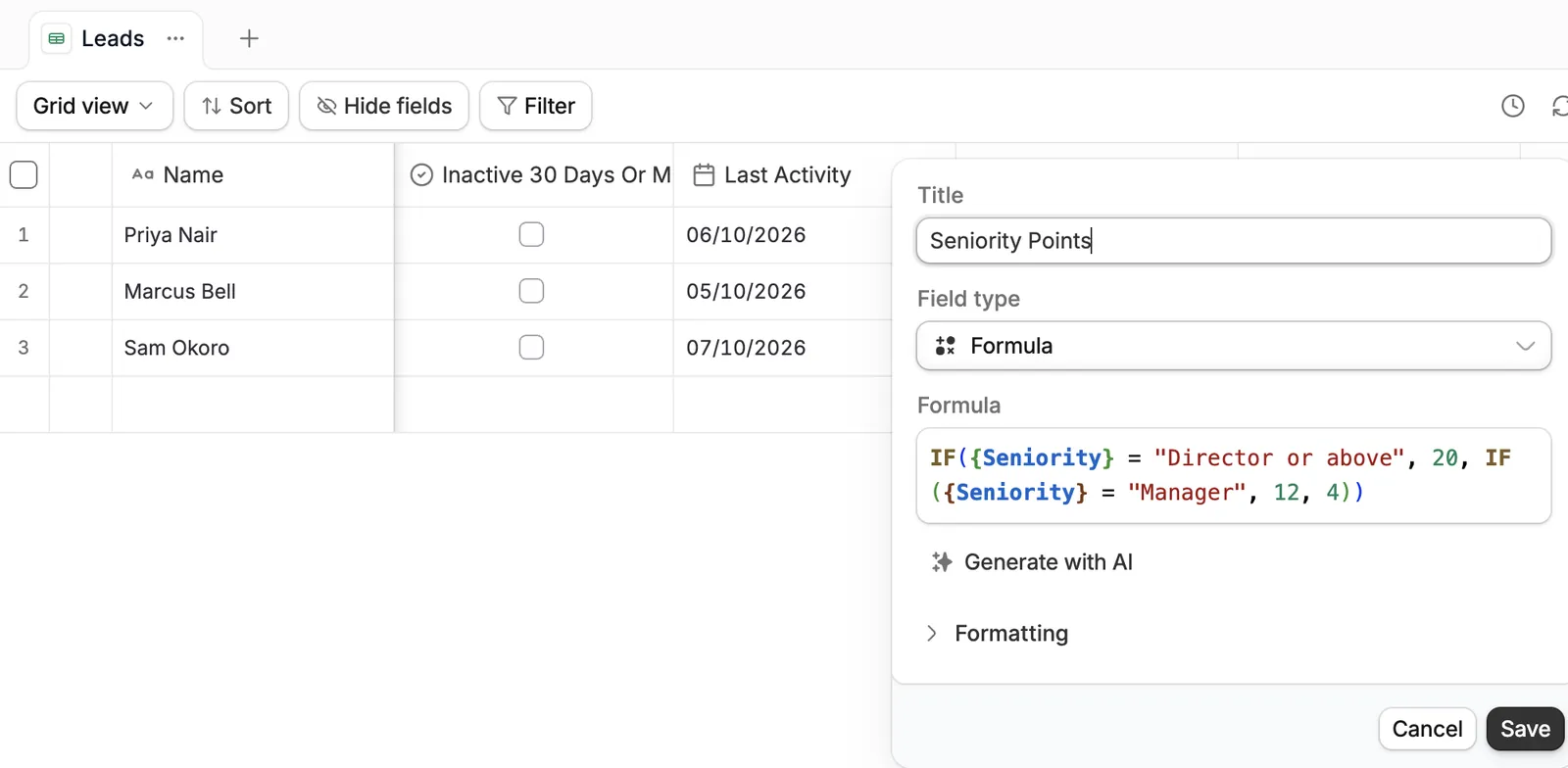
Step 4: Add negative scoring
Negative scoring subtracts points for signals that predict a lead won't buy.
Here are the five penalties:
| Penalty signal | Points removed |
|---|---|
| Competitor email domain | 50 |
| Unsubscribed from emails | 30 |
| Student or intern title | 20 |
| No activity in 30 days | 15 |
| Personal email domain | 10 |
To catch email domains, add a field that extracts the domain from the address, then test it in the penalty formula.
REGEX_EXTRACT({Email}, "[^@]+$")
IF(OR({EmailDomain}="gmail.com", {EmailDomain}="yahoo.com"), 10, 0)The inactivity penalty needs a daily recheck. In Zite, that's a scheduled workflow, which is available on Business, Team, and Enterprise plans.
Step 5: Add an AI field for judgment calls
Rules can't read a free-text answer or judge whether a company resembles your best customers. Zite's AI fields can. You write a plain-language prompt that points to other fields with the @ symbol, and the field fills itself in. Here's a prompt for a leads table.
Based on @CompanyDescription, rate from 0 to 15 how closely this company matches our best customers, which are mid-sized logistics firms.
Use this field in place of the Industry points from Step 3, so fit still tops out at 50. The worked example below uses the manual Industry points. Set the field type to Number so the formulas can add it up. Turn on Run automatically so each new record is scored the moment it arrives. Turn on Skip if manually edited so a rep's override stays put. AI fields use credits, so check your plan's monthly credits on the pricing page.
An AI field reads text well but can't see your win history, so keep its points small, as the 0 to 15 range does here. A language model can also rate the same company differently on another run, so review its numbers before a rep acts on them.
Step 6: Route the score and review it monthly
Label leads with one more formula, using Hot at 70 and above, Warm from 40 to 69, and Cold below 40.
IF({Score}>=70, "Hot", IF({Score}>=40, "Warm", "Cold"))Then send hot leads where reps will see them. Zite's HubSpot integration lets your team edit contacts and update deal stages from a Zite app, and changes sync back to HubSpot. The Slack integration can send a message when a lead needs attention. Email goes out through Zite's built-in sender, Gmail, or Outlook.
If the CRM lives in Zite too, the score is one more field on the contact record. Zite's custom CRM guide adds a score the same way.
Finally, ask Zite for a dashboard page that shows the average score by lead source, the conversion rate by source, and how scores are spread across Hot, Warm, and Cold. Salesforce's Einstein dashboard shows similar views.
Review the model every month. Compare the average score of won deals with lost ones, then adjust any weight that doesn't match what happened. You can ask the Database Agent to work out those averages for you.
A worked example
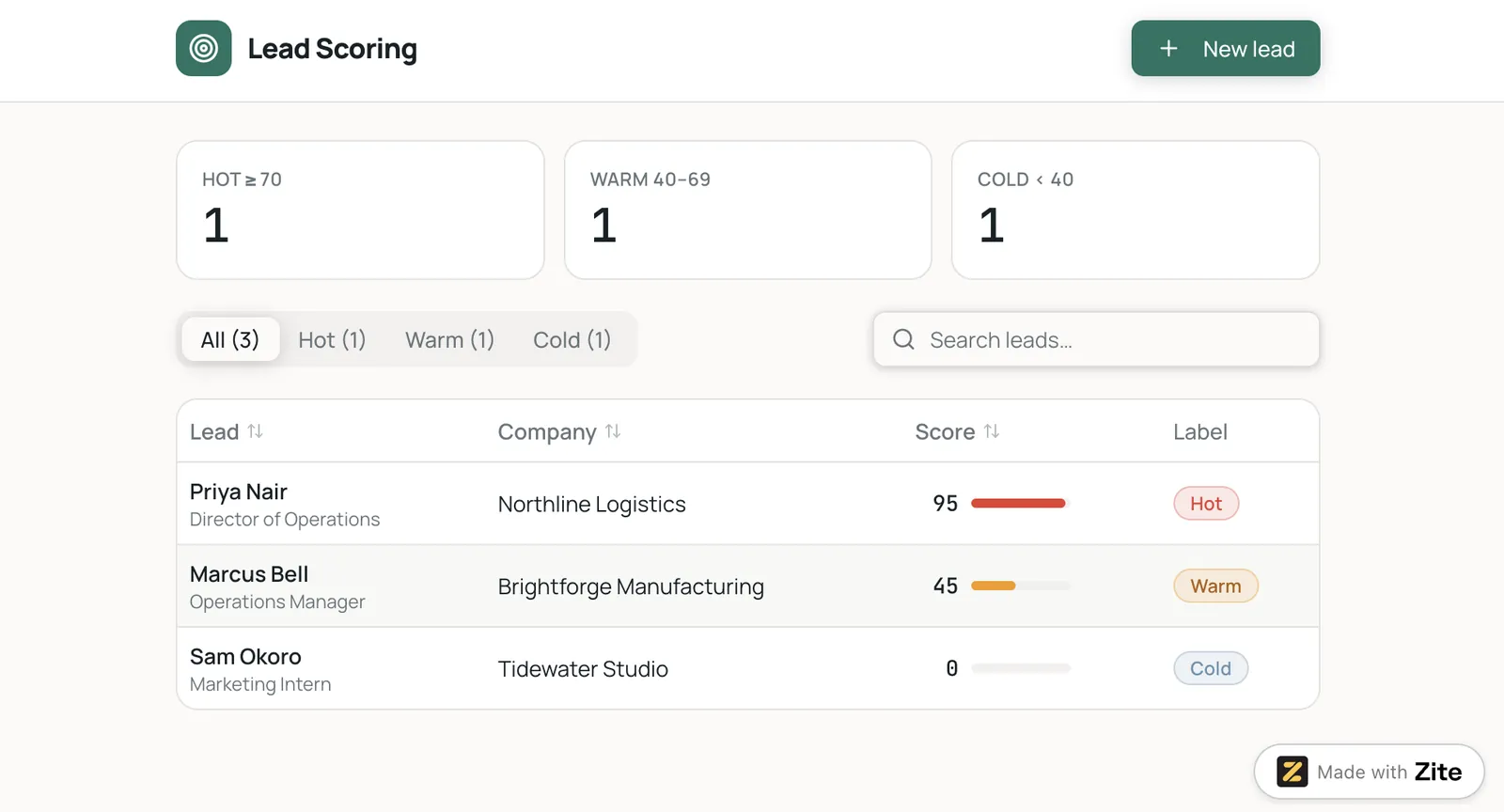
Here are three leads scored with the weights above:
| Lead | Fit | Behavior | Penalties | Score | Route |
|---|---|---|---|---|---|
| Priya, Director of Operations at a 180-person logistics firm (target industry), requested a demo, viewed pricing twice, clicked an email | 50 | 45 | 0 | 95 | Hot |
| Marcus, Manager at a 600-person manufacturer (adjacent industry), attended a webinar, clicked an email, viewed pricing once | 27 | 18 | 0 | 45 | Warm |
| Sam, intern at a 12-person company (other industry) with a Gmail address, read one blog post | 12 | 0 | 30 | 0 | Cold |
Sam's raw result is 12 minus 30, or negative 18, and the formula holds it at 0. Priya goes to a rep today, Marcus gets a follow-up email series, and Sam never reaches a rep.
Best practices and common mistakes
Here are five habits to build:
-
Start with one ideal customer profile: A model that tries to describe every buyer describes none of them well.
-
Get rep feedback: Ask which hot leads were wrong, since their answers show which weights to change.
-
Train your reps: Show them what Hot, Warm, and Cold mean and what to do with each, so a hot lead gets a call the same day.
-
Track a few results: Watch lead-to-opportunity conversion, sales velocity, and deal size, the measures Demandbase suggests, and adjust your thresholds when they move.
-
Keep a short change log: Write down each weight change and its date, so you can see which edit moved the results.
Here are two mistakes to avoid:
-
Scoring too many signals: A score built on dozens of signals can't explain why a lead landed on 63. Cut any signal that doesn't change what a rep does.
-
Treating the score as a verdict: A score ranks leads for attention, and the rep makes the final call on each one.
My verdict on AI lead scoring
AI lead scoring is worth adding when you have a steady flow of leads and a record of the ones that bought. Start with the weighted model above, because every point in it is traceable. Move to a trained score such as HubSpot's AI scoring once your closed-deal history is deep enough.
Whichever route you take, the score earns its place when reps work the hot leads first and win more of them.
Ready to build your own AI lead scoring?
In Zite, your sales team works from an app: each rep opens their own list of leads ranked by score, the manager gets a dashboard by source, every point traces back to a formula you can read, and AI fields handle the judgment calls. When the score needs to reach reps, the HubSpot and Slack connections carry it there.
Zite is free with unlimited users and 50 credits/month. You can set up the leads table and scoring formulas and share them with your sales team on the Free plan. The AI field from Step 5 and the Database Agent draw on the same credits, so check how far they stretch before you turn on Run automatically.
Paid plans start at $25/month for Pro. Scheduled workflows, which the inactivity penalty in Step 4 needs, start on the Business plan at $89/month.
Frequently asked questions
How do you use AI for lead scoring?
You use AI for lead scoring by collecting fit and behavior data in one place and letting a model or an AI field rate each lead against your best customers. You then route high scores to sales. The six build steps above show a version that needs no data team.
What is a lead scoring AI agent?
A lead scoring AI agent is software that researches a lead, scores it against your criteria, and acts on the result. Clay's Claygent researches a prospect from a plain-language prompt and assigns a score. Warmly says its TAM Agent sorts every account into Tier 1, Tier 2, or not a fit.
How does AI lead scoring work?
AI lead scoring works in three phases. The model pulls lead data from your CRM, website, and enrichment sources. It then learns which traits and behaviors separate buyers from non-buyers. Each new lead gets a live score that updates as its behavior changes.
What is an example of AI lead scoring?
One example of AI lead scoring is a model that ranks a lead who attends a webinar and then visits the pricing page above a lead who only reads a blog post. Past buyers followed the first path, so the model weights it higher. Demandbase's guide uses the same example, and the worked example above adds point values.
What is the best tool for AI lead scoring?
HubSpot's AI scoring is the best fit for teams on Marketing Hub Enterprise, 6sense suits account-based B2B selling, and Zite suits teams that want to build and control their own scoring model without a data team.