Workflows to run your operations
Describe what should happen and Zite writes the workflow. Run on schedules, incoming webhooks, or from your apps, with every run logged.
Trusted by 100,000+ organizations, from startups to the Fortune 500
Build for every workflow.
Describe once and let Zite handle the rest.
Run on any trigger
A schedule, an incoming webhook, or a click in your app.
Send email notifications
Send emails from your Gmail, Outlook, or via SMTP integration.
Integrate with your tools
30+ services you sign into once, plus any REST API.
View every run
Every run is logged, with its inputs and outputs.
Four ways a workflow starts
Build it once. Start it any of these ways.
On a schedule
Run a workflow regularly or at a specific time.
On a webhook
Trigger from services like Stripe, Twilio or Slack.
On a click in your app
A button, a form, a page that loads.
On demand
Run it yourself, or replay a past run.
Send renewal reminders
LiveWorkflows you can read.
Zite writes the steps from your description. Test before going live.
Set up workflows by chatting
"Send me a report at the end of every month."
Preview, code and history
Read the steps, open the code that runs them, and watch the runs.
Test your workflows
Easily test your workflows before they go live.
Every run is logged.
Open any run to inspect workflow execution.
Inputs and outputs on every step
Database calls, API calls and AI calls, input and output.
Filter by trigger, schedule or status
Narrow a week of runs down to the one that failed.
Replay a run
Run it again with the same inputs once you have a fix.
Built-in document automation.
Generate PDFs like invoices, quotes, contracts, certificates and reports.
Nothing to set up
PDF generation is on in every workflow. No integration to connect.
Email it, save it, or link to it
Every render returns a permanent URL you can attach, store or hand to a customer.
Change the design by asking
Send a screenshot of the document and say what should look different.
Automate the tools your team already uses
Sign in once and Zite keeps the connection. Automate any service with a REST API.
Workflows teams run every week
Weekly digest
Last week pulled from the database, summarized, and in every inbox on Monday.
Invoice on payment
Stripe says the charge went through, the workflow renders the invoice and emails it.
Lead routing
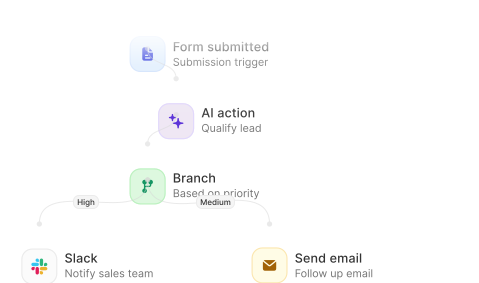
Score the lead, pick an owner, write it to the CRM and tell them in Slack.
Deadline reminders
Check what is about to lapse each morning and nudge the person who owns it.
Keep two systems in sync
A change in Airtable or Sheets calls in, and your database is updated to match.
Approval queue
A screen your team approves from, with a workflow behind the button.
Teams already running on Zite.
"We've tried many tools over the years.
Zite is in a league of its own.
It's more robust, more flexible and saves our county time and money."


Ravi K. Udeshi
Election Manager, Fairfax County
"We used to have a massive backlog of app and internal tool requests.
Now anyone on our team can build the software they need, and we know the apps match our brand and IT guidelines."


Michael Villenave
Head of Internal Comms, Domino's France
"As Iceland's largest media company, we've deployed Zite across all our brands.
We love Zite for its ease of use, SSO login, Salesforce integration, and their excellent support team."


Diana Viglundsdottir
Director of Product, Syn.is
Business reviews
5/5
Product Hunt
4.7/5
Questions about workflows
Learn more: Workflows overview