


Cursor vs Codex comes down to two working styles. Cursor keeps AI sitting next to you in the editor, staying in the loop line by line. Codex hands off a task and works on it with less supervision, so you check the result later.
I've used both across real feature work. Here's what each does well and which one fits how you code.
Cursor vs Codex: what's the difference?
Cursor is a full code editor (a fork of VS Code) with AI built into autocomplete, inline edits, and multi-file changes, so you stay inside one tool for the whole session.
Codex is OpenAI's coding agent, reachable from the web, a command line, a code-editor extension, or iOS, built to take a specific task and work on it somewhat independently, including in the background, before handing back a result or a pull request.
Choose Cursor if: Fast autocomplete and inline edits are your daily driver, and you want a choice of models to back them up.
Choose Codex if: You have a queue of well-scoped tasks, like tests and small fixes, you would rather not sit and watch.
Meet Cursor: features and highlights
Cursor took the VS Code experience and rebuilt the AI layer directly into the editor, from autocomplete through to multi-file edits.
Cmd+K (Ctrl+K on Windows) lets you select code and describe a change inline. Composer and Agent mode handle changes across multiple files from a single instruction.
It works with several model providers instead of a single one. Bugbot, MCP support, and Cloud Agents extend it toward Codex's own delegate-and-check-back-later workflow, while keeping the editor as the home base.
Meet Codex: features and highlights
Codex leans fully into delegation instead of continuous pairing.
You describe a task, and it works through the project somewhat independently, often in a sandboxed cloud environment, before returning a diff or opening a pull request for review.
You can reach it from the Codex web experience, the open command line in a terminal, an official VS Code extension, a desktop app for macOS, Windows, and Linux, or an iOS app. None of those is a code editor in its own right.
That makes it a natural fit for well-defined, bounded tasks, such as fixing a bug, adding a test, or refactoring a function, where you're comfortable reviewing the result once it's done.
Cursor vs Codex: at a glance
Cursor vs Codex: feature-by-feature comparison
Working style: pairing vs delegating
This is where the two diverge.
Cursor keeps you in the editor the whole time. Tab completions and Cmd+K edits happen as you type and select, so you're reviewing and steering continuously, without waiting for a batch result.
With Codex, you describe what you want, it works somewhat independently (sometimes in the background), and you review the result afterward, closer to reviewing a colleague's pull request than pair programming.
Winner: Tie. This comes down to working style, and choosing one is a matter of preference about whether you want to watch or review.
Autocomplete and inline editing
Cursor was built as an editor first, and that shows in the autocomplete.
Cursor's Tab completion predicts multi-line, context-aware edits, and Cmd+K handles targeted rewrites without ever pulling you out of the file.
This is the feature that makes Cursor feel faster day-to-day than switching to a separate chat window.
Codex is task-oriented, working from a description of the end goal instead of predicting keystrokes as you type. This section measures a job Codex was never built to do.
Winner: Cursor.
Handling multi-step, bounded tasks
This is where Codex's agent design stands out.
Codex works through a described task with less need for you to supervise each step, including running in the background while you do something else, then surfaces a diff or a pull request.
For a well-scoped task like "add input validation to this endpoint," that hands-off flow is efficient.
Cursor's Agent mode covers similar ground for multi-file changes, so that same validation task is workable there, and its Cloud Agents can even run without the editor open, started from the web, the iOS app, or a Slack command. The difference is that Cursor treats that as one mode among several, while Codex is built around it.
Winner: Codex, for tasks you want to walk away from.
Model flexibility
Cursor is the more open tool here.
Cursor supports multiple model providers, so you're not locked to a single vendor's models as the underlying engine improves or changes.
Codex is an OpenAI product built around OpenAI's own models. Those models are strong in their own right, but the choice ties you to OpenAI's roadmap instead of your own.
Winner: Cursor, specifically for flexibility.
Pricing and access
The two are priced so differently that comparing them directly takes some care.
Cursor is a standalone subscription. The free Hobby tier has a limited number of agent requests.
Individual plans range from Pro up through Pro+ and Ultra, topping out at $200/month. Each paid tier includes a monthly pool of model usage; beyond that, you continue at API rates on pay-as-you-go billing. That applies from Pro upward, so the bill can move on any paid plan, not only the top ones. Teams plans range from Standard to Premium at $120/user/month, with centralized billing.
Codex comes bundled with every ChatGPT plan, from Free through Go, Plus, Pro, Business, Edu, and Enterprise. See the Codex pricing details for the exact limits per tier.
Even the free ChatGPT tier includes limited Codex access, so you don't need a paid plan to try it. Heavier use pushes you toward Go at $8/month, Plus at $20/month, or Pro at $100, $200, or $500/month, depending on how much usage you need, instead of a coding-tool-specific price.
Winner: Depends on what you already pay for. Codex adds no separate subscription to a ChatGPT plan you already have; instead, past your plan's limits, you buy extra credits. Cursor is a separate coding subscription, and it climbs at the top end.
What real users are saying
I pulled sentiment from G2, the Reddit community, and Gartner, since both tools move fast enough that formal reviews age quickly.
Cursor
Pros: Developers consistently praise the autocomplete quality and how natural it feels to stay in one editor for the whole session, instead of pasting code into a separate chat window.

“Auto is essentially unlimited, and you can dip into either OpenAI or Claude's models for more complex stuff.” Verified User, Reddit
Cons: Cost comes up often once usage-based billing kicks in on any paid plan, not just the top tiers, and some note that very large, sprawling changes can still lose context compared to a narrowly scoped edit.
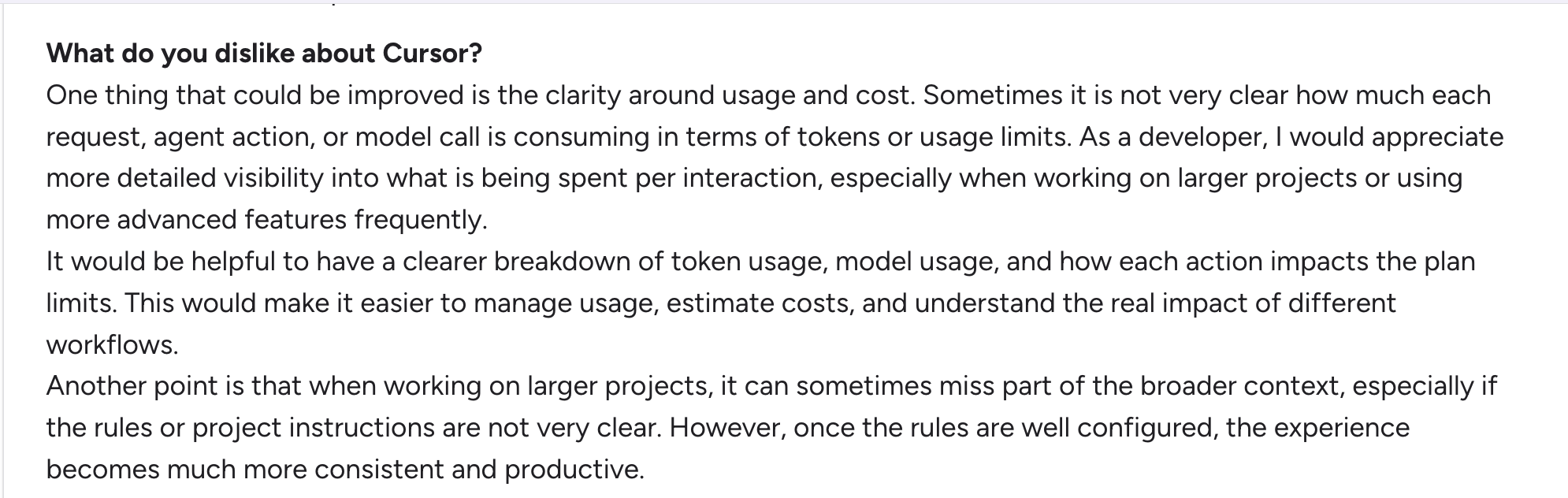
“Sometimes it is not very clear how much each request, agent action, or model call is consuming in terms of tokens or usage limits.” Lucas M, G2
Codex
Pros: Users like handing off a well-defined task and receiving a working pull request, especially for repetitive or clearly scoped work, such as adding tests or fixing a specific bug.
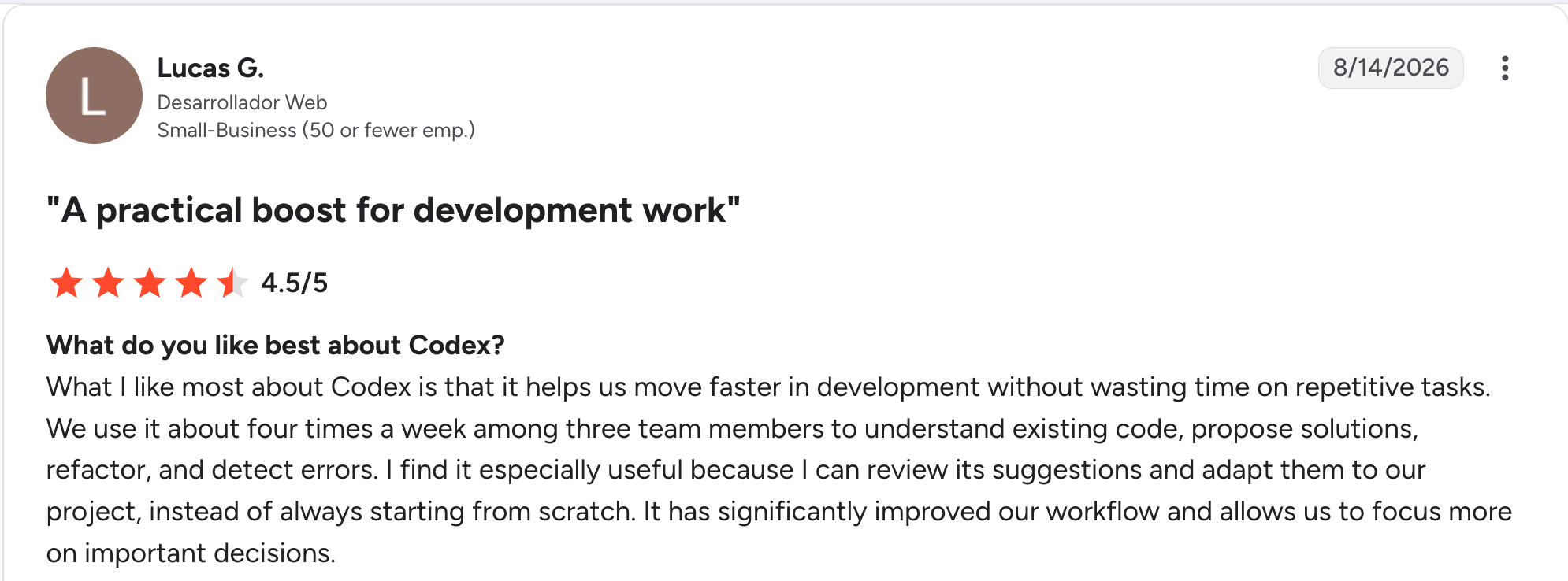
“What I like most about Codex is that it helps us move faster in development without wasting time on repetitive tasks.” Lucas G, G2
Cons: Reviewers note it's harder to course-correct mid-task compared to an editor where you're watching every change happen, and being tied to OpenAI's models is a real constraint if you prefer a different provider.

“I have found that while you can set some rules, you essentially get into a groove working with Codex and you end up adapting to it a little, rather than it adapting to you and some of your preferences.” Verified User, Gartner
How to make your choice
The decision comes down to how you like to work, more than which tool is objectively stronger.
Cursor is better for:
- Multi-file refactors you want to steer as they happen
- Developers who want model flexibility, not a single vendor
- Fast autocomplete and inline edits as the daily driver
Codex is better for:
- Well-defined, bounded tasks you're comfortable reviewing after the fact
- Teams already paying for ChatGPT who want coding tasks included
- A backlog of small tickets that would otherwise sit for a week
My verdict on Cursor vs Codex
Cursor takes two of the five rounds, Codex one, with two that come down to how you already work and what you already pay for. That is why this reads as a split rather than a win. The rounds Cursor takes are the ones you feel hour to hour, and the round Codex takes is the one you feel across a week.
Cursor is the better daily driver for active development. Codex is the better fit for the task queue you'd otherwise put off. Many developers reasonably run both.
Where this leaves non-developers
Cursor and Codex both assume you can read the code they produce. If you can't, you are choosing from a different category altogether, one built for people who never want to touch code.
If you're building a business app, not shipping software as a developer, that's the difference between vibe coding and traditional coding, and the best vibe coding tools round up the wider category.
Tools like Zite generate the app, keep the database and screens visible and editable, and lay the workflow logic out to read and trace, without ever asking you to read code.
Here's what that looks like in practice:
- You describe the app in plain language and get a working app back, with the database, screens, and logic generated together. There's no prompt-then-read-the-code step.
- You can see and change what was built yourself, without a developer. The database edits like a spreadsheet, and you click on any part of a screen to change it.
- When something breaks, you can see why. The workflow logic is laid out as a flowchart you can read and trace, so a failed step shows you which one, and you can ask the AI to fix it instead of digging through code.
- Everything lives in one workspace. Database, apps, forms, login, hosting, and a custom domain are all built in, so there's nothing to wire together or host separately.
- Your whole team works in it. Unlimited users on every plan, with no per-seat pricing, and role-based access controls that let you decide who sees what inside the app.
- It keeps working long after launch. Because the data and logic stay visible, the same non-technical person who built the app can keep changing it months later.
Cursor and Codex aren't wrong for this job. They're built for people who read code. Zite is built for people who don't.
You can also build Zite apps from inside Cursor, ChatGPT, or Claude through MCP on the Business plan and up, so a developer can keep their editor and still hand the finished app to a team that keeps it running without code.
If you've already looked at Replit, it sits between the two worlds, an AI agent that also hosts and runs the app but still shows you the code underneath.
Lovable vs Replit vs Zite breaks down how the three compare, and the Replit review covers it in more depth.
Frequently asked questions
Is Cursor or Codex better for beginners?
Neither is built for someone who can't read code, since both assume you'll review what they produce. Cursor's continuous, visible editing style is easier to follow as you learn, since you watch each change happen instead of reviewing a larger diff later.
Can I use Cursor and Codex together?
Yes, and many developers do. A common pattern is using Cursor for active, hands-on development and Codex for a queue of well-scoped tasks (tests, small fixes, repetitive changes) run in the background while you work on something else in Cursor.
Is Codex included with ChatGPT?
Yes, Codex is included in every ChatGPT plan, from Free through Go, Plus, Pro, Business, Edu, and Enterprise, not sold as a separate subscription. There's also a free, open-source Codex command-line tool for the terminal. Usage limits scale with your plan, so check those instead of expecting a separate Codex bill.
Which is cheaper, Cursor or Codex?
Codex is cheaper if you already pay for ChatGPT, since it doesn't require a separate subscription until you outgrow your plan's limits. Cursor is a separate subscription, free to start but running up to $200/month on Individual or $120/user/month on Teams.
Do Cursor and Codex use the same AI models?
No. Cursor works with multiple model providers, so you can choose or switch the underlying model. Codex ships with OpenAI's models by default. You can point it to another provider or a local model by editing a config file, but Cursor gives you that choice directly in the product.
What's the best alternative if I don't want to write code at all?
If you don't want to write or read code, Cursor and Codex both assume you will, so neither is the right fit. A no-code AI app builder like Zite generates the app, database, and logic from a description. The best AI app builders for business teams cover the wider category.

