


My first attempt at building internal business apps with AI took 50 minutes. The app was a purchase approval tracker, and I wrote no code for it.
It came out with its own database, separate logins for requesters, managers, and finance, and an email to the approver on every new request. I built two more apps that week, an equipment log in 35 minutes and an onboarding checklist in 40 minutes.
I spent 20 minutes planning before I typed the first prompt, and that planning shaped the result more than anything else I did. By the third app, things got messy fast. Here's the process that worked, and the parts most write-ups leave out.
What you can realistically build
Set expectations first. People hear "AI builds your app" and picture one of two things. Some expect finished software. Others expect a throwaway demo. You get something in between. It is a real tool, but you still have to check its work.
What AI can build for you: Internal trackers, approval queues, request intake, inventory and asset logs, simple CRMs, dashboards on your own data, and client portals. AI does well when a team needs records, a few roles, and steps that run on their own.
What AI can't build for you: Consumer products, apps that work offline, apps for the app stores, and tricky logic like payroll or regulated finance. Ask it for 40 rules that depend on each other, and you'll get an app that looks right. The errors are buried in the logic, where you won't spot them.
All three of my apps worked the same way. Each one stored records, gave each role only the records it should see, and ran a handful of rules on its own. AI builds that kind of app well.
How to build an internal business app with AI in 6 steps
Here's the process in the order I'd use it again. Step one matters most. What you decide there shapes every step after it.
Step 1: Write the process down before you prompt
Spend 20 minutes writing out, in plain sentences, who uses the app, what records it holds, what happens at each stage, and who is allowed to see what. Do this in a document rather than in the AI tool.
I skipped this on my first build and spent an hour re-prompting my way out of a data structure that didn't match how approvals moved in practice. On the second build, I wrote it down first, and the generated app was close enough to use immediately.
What to write down:
- What goes in each record: “Each purchase request has a requester, amount, vendor, category, and status.”
- The stages a request moves through: “Draft, submitted, manager approved, finance approved, ordered, rejected.”
- Who sees what: “Requesters see their own requests. Managers see their team's. Finance sees everything.”
- The automatic steps: “When a request passes $5,000, it also needs finance approval.”
Step 2: Describe the app in one detailed prompt
Give the AI the whole picture in one prompt. If you feed it a few details at a time, you get an app built from parts that don't fit together.
Here's the prompt that produced my approval tracker:
Build a purchase approval tracker. Every request stores the requester, the amount, the vendor, the category, and its status. Requesters see only their own requests. Managers see their team's. Finance sees all of them. Anything above $5,000 has to clear finance too. When someone submits a request, notify the person who approves it.
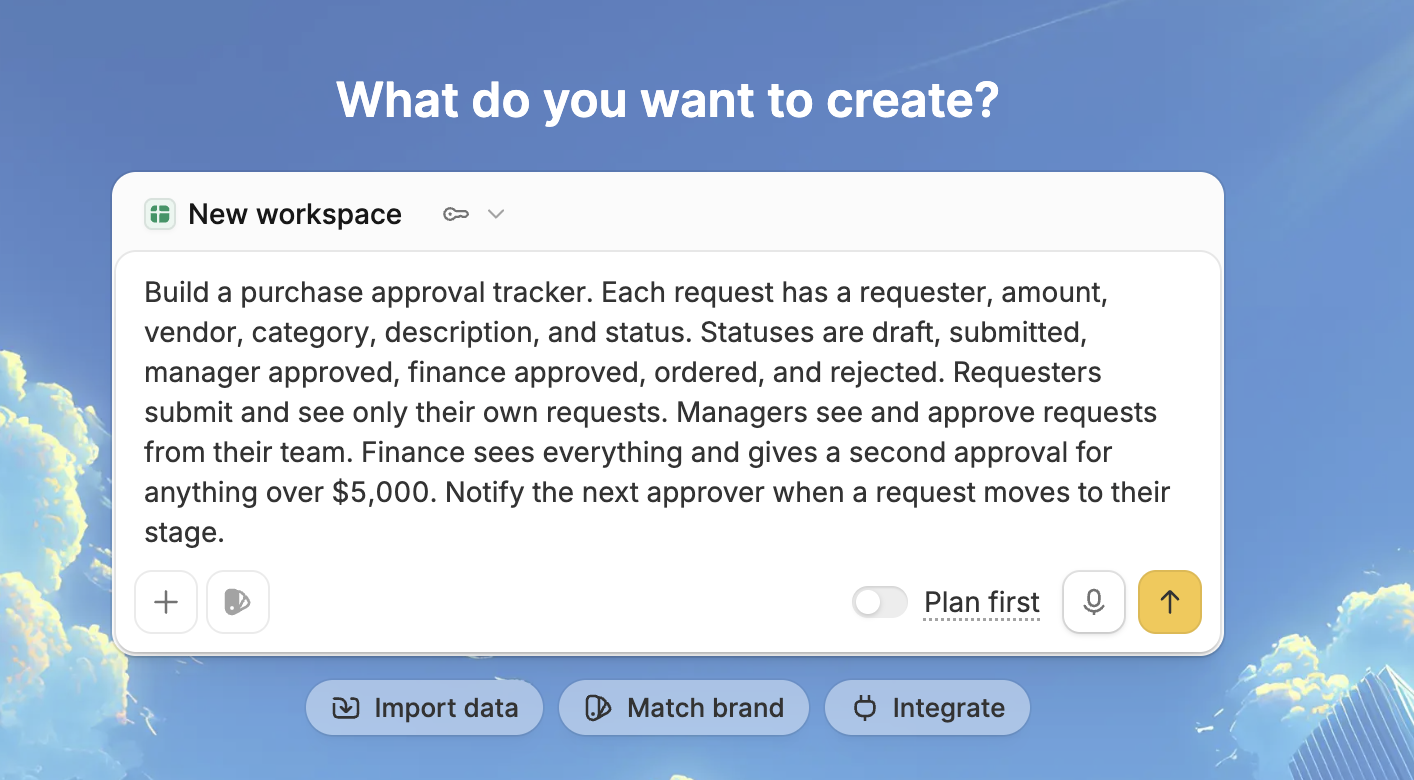
I made sure to be specific about records, roles, thresholds, and notifications. Zite asked two clarifying questions before building, including how managers should map to teams. I picked structured teams to match the prompt, and it generated the tables and the approval logic from there.
Step 3: Check the database before you touch anything else
This step separates a tool you can rely on from one you abandon in a month. Open the AI-generated database and read the tables, fields, field types, and how records link to each other.
I found a problem doing this on my equipment log. Checked Out By linked properly to a person record, but Borrower Name, the actual assignee, was a plain text field. Two spellings of the same name would be treated as different people forever.
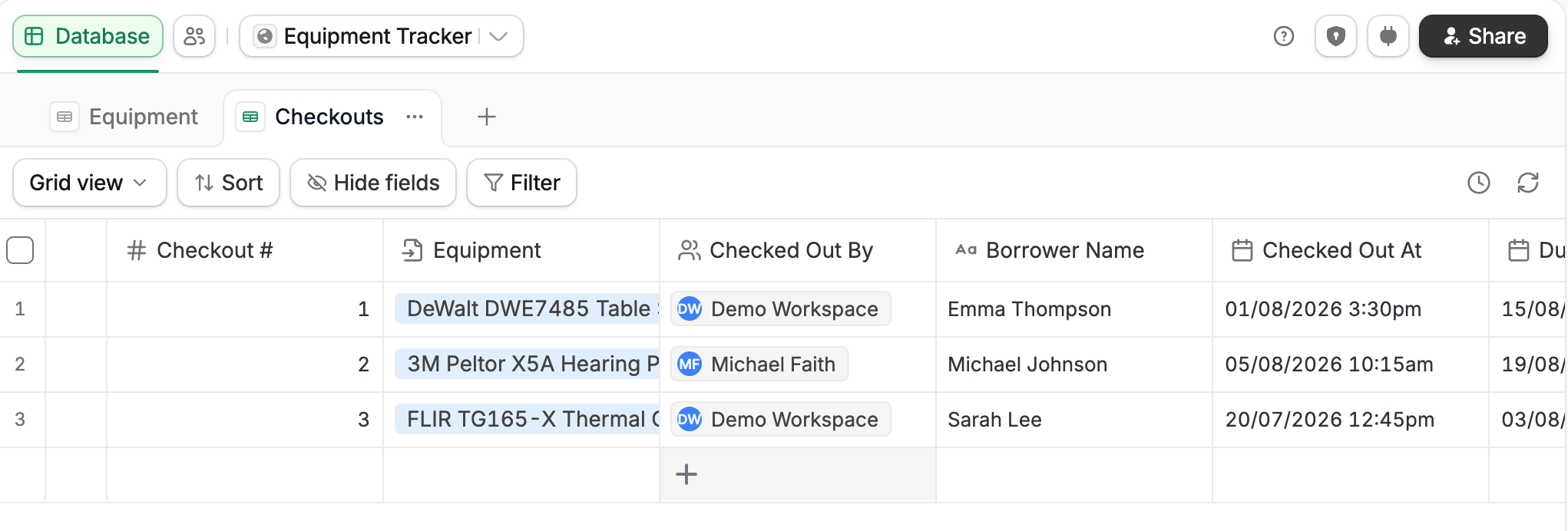
Look for four things in particular:
- Text fields that should link to another table.
- Status options that are missing.
- Dates stored as text.
- Anything that should be a dropdown and isn't.
Step 4: Set permissions before anyone else logs in
Decide who sees what while the app is still empty. Most internal tools go wrong because someone adds an access rule too late. By then, the app holds real data and real people are using it, so one wrong rule shows someone a record they should never see.
Test the rules yourself before anyone else logs in. Create a test account for each role. Sign in to each account and try to open a record that the role should not see. Don't trust the settings page on its own, because it shows a rule as switched on whether or not that rule blocks anything.
Step 5: Trace the workflows the AI wrote
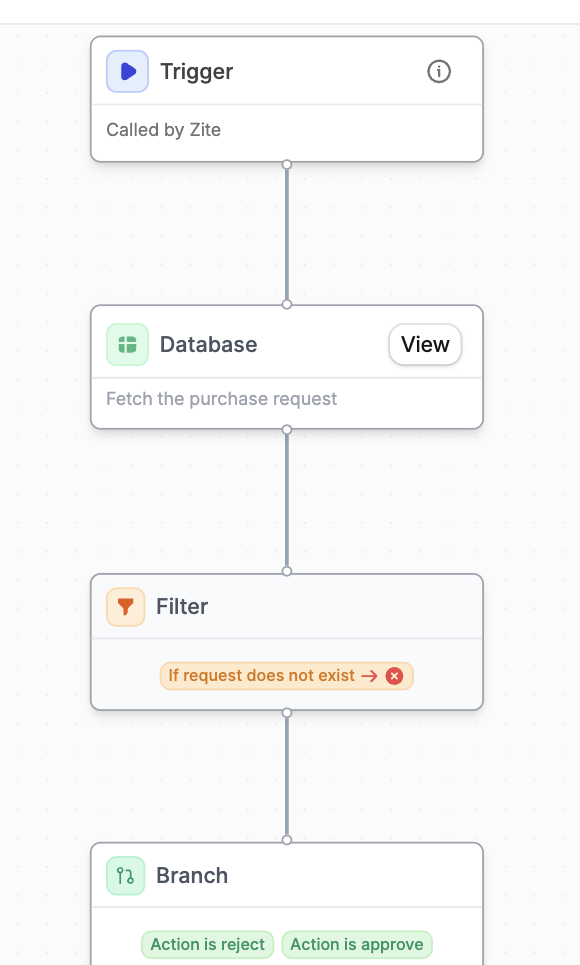
The AI writes the logic behind your app, meaning what fires when a status changes, who gets notified, and what happens at a threshold. Read through each one and follow it step by step so you understand what was built.
Most steps use plain language, like fetch, update, and notify. A few trickier calculations show up as a 'Code' step with a short plain-language explanation of what it calculates, so you can still follow the logic without reading any code.
When a step is wrong, prompt the AI with specific instructions rather than editing the logic by hand. Name the step, the threshold, and the person to notify. Zite then hands back a corrected workflow. A vague prompt like "fix the approvals" gives you a new set of problems instead.
Step 6: Pilot with three to five real users, then expand
Give it to the people who'll use it daily and watch for a week. Their friction list is more useful than a feature roadmap, and they'll find the case you didn't think of within about two days.
Only then add the second workflow. Most internal apps that fail got the whole department's wishlist built before anyone had used version one.
What I built, and how long each took
Three apps, one week, no code. The times below are hands-on build time, excluding the pilot period:
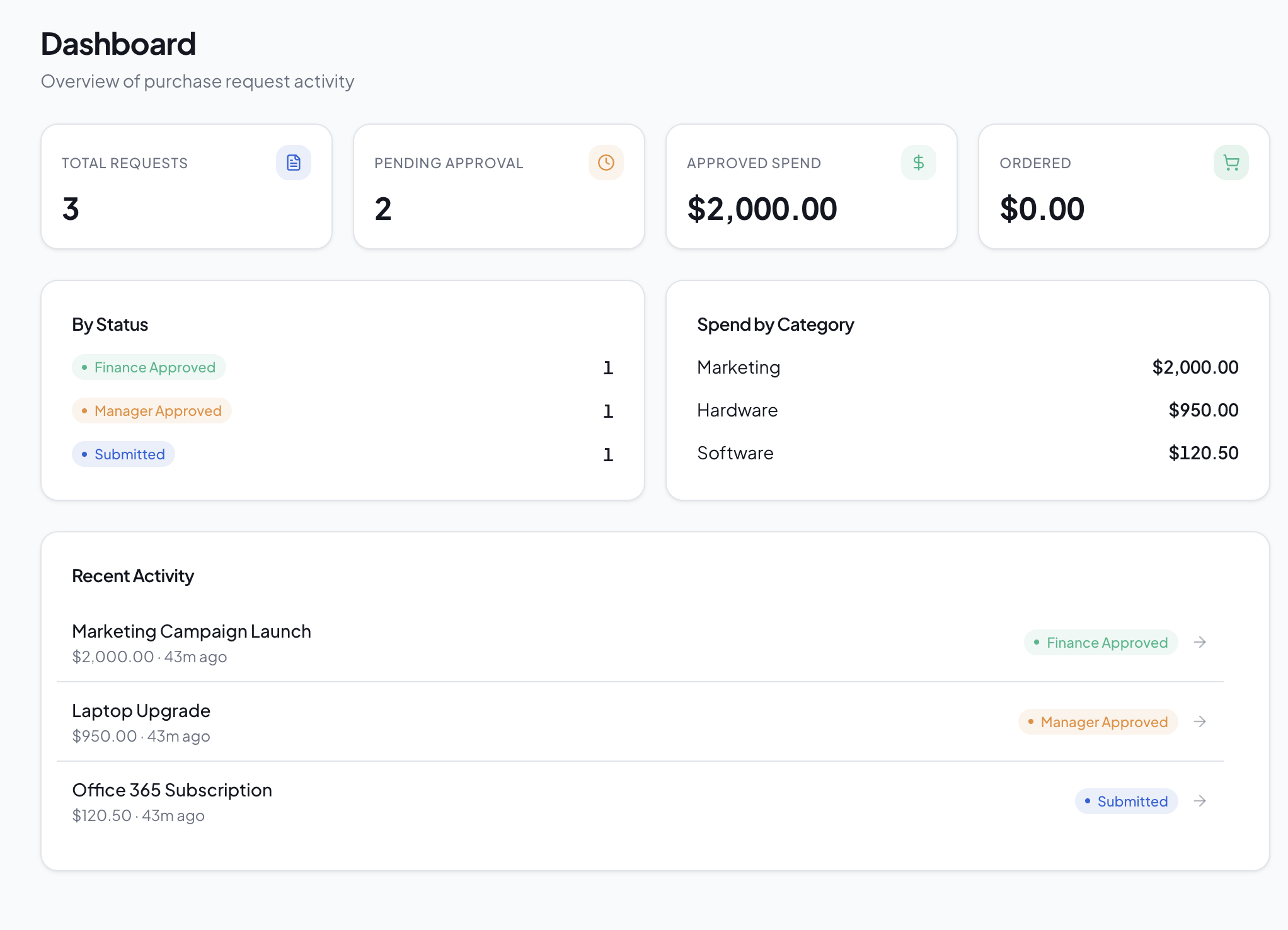
All three apps followed the same pattern. Zite took about 10 minutes to generate each one. I then spent 25 to 40 minutes checking the database, fixing the permissions, and correcting the workflow logic. That checking time is where the fixes happened. Skip it, and you ship the AI's first guess at your data, which, on my equipment log, was wrong.
The guide to developing an AI app for business workflows applies these same steps to other kinds of apps.
What went wrong
All four of these showed up after the apps went live:
- The prompt-and-hope trap: When something broke, I re-prompted until it looked fixed. That works once. By the fourth round, my earlier fixes had broken things I hadn't noticed. I learned to read the logic, find the wrong step, and then prompt about that step.
- Keep related apps in one workspace: Every app in a Zite workspace shares its database and user list, so a person who is a requester in one app and an assignee in another is the same record. Apps built in separate workspaces get separate databases, and you can't merge them later. Decide up front which apps belong together.
- Access rules drifting: Every time someone asked, "Can ops see this too?", the quickest answer was to widen a role. Roles in Zite apply across every app in the workspace, so three requests later, ops could see salary data. Fix: keep sensitive fields in their own table, since rules work per table, and put a periodic review on the calendar.
- Not knowing when to rebuild: Twice, I spent 30 minutes fixing an app when describing it again from scratch would have taken 10 minutes. If you have made more than about five fixes to the tables and fields, start over with a better prompt.
Which tool to use for internal apps with AI
The tools are split by who's meant to be building. Start with the option that matches your team:
If your team is non-technical: I built all three apps with Zite. You describe the app, and Zite generates the interface, its own database, and the workflow logic. The database works like a spreadsheet you can edit directly. Zite lays the workflows out visually, so you can read and trace what each one does.
Zite sets up access from the start, so permissions took me a couple of minutes. Per-user filtering inside a single app works on every plan. Workspace-wide roles with per-table rules, which I use in Step 4, are on the Team plan.
Zite also works with the data you already have. It connects to Airtable and Google Sheets and keeps them in sync in real time, reads and writes the Notion pages you choose, and imports Excel or CSV files into its own database.
Zite is free to start with unlimited users. Paid plans start at $25/month for Pro and $89/month for Business, both with unlimited users.
Zite builds web apps, not native iPhone or Android apps. It also isn't designed for consumer apps, such as social platforms or games.
If you only need a light layer over an existing base: Softr builds portals and internal tools on top of a connected source, starting at $25 a month. Softr is a good fit when the app only needs to show and filter records, with little logic behind it.
If you have engineers and strict access rules: Retool and Superblocks are built for exactly that setup, with central access control and audit logs. Both expect SQL and JavaScript, so they suit engineering teams. The Retool alternatives guide covers the non-technical path.
For a wider comparison: The roundups of the best internal tool builders for business teams and the best AI app builders cover more options. There's also a head-to-head comparison between Base44, Replit, and Zite.
When AI isn't the right route
Four cases where I'd stop and reconsider:
- The process isn't settled yet: AI will build the wrong thing, fast. Fix the process first.
- The logic is tricky: Payroll, tax, and regulated finance all count here. Small errors cost a lot of money and are hard to spot.
- You need offline or a real mobile app: A field crew with no signal needs a native app, and that's a different kind of tool.
- Nobody will own it: Somebody has to keep the records current and the rules correct. Without that person, the app drifts out of date, and the team goes back to the spreadsheet.
The bottom line
Building internal business apps with AI works. In under an hour, you get a working tool, and that same job used to take weeks of project work or a ticket in the IT backlog.
Three habits make the difference. Write the process down first. Check the database the AI built. Set permissions before anyone logs in.
Start with a single app for one team. Get people using it daily before you build the second. Build related apps in the same workspace so they share one database.
Frequently asked questions
Can AI build a working internal business app?
Yes, AI can build a working internal business app with a real database, user roles, and steps that run on their own. In my tests, the AI generated each app in about 10 minutes. I then spent another 25 to 40 minutes checking the data, the permissions, and the logic.
How long does it take to build an internal app with AI?
Building an internal app with AI takes about 35 to 50 minutes per app, based on the three I built. Generation is roughly 10 minutes, and the rest is checking the generated database, testing permissions per role, and correcting the workflow logic.
Do I need technical skills to build internal apps with AI?
No, you don't need technical skills to build internal apps with AI using tools aimed at non-technical teams. You describe the app and visually adjust the database and logic. You do need process clarity, which is a different skill. Developer tools like Retool expect SQL and JavaScript.
What kinds of internal apps work best with AI?
The internal apps that work best with AI are structured record apps with a few roles and simple automation, such as approval trackers, asset logs, and onboarding checklists. Dozens of conditional branches or regulated calculations are where the logic gets unreliable.
What are the risks of building internal apps with AI?
The main risks of building internal apps with AI are scattered data, widening access rules, and blind re-prompting. Permissions widen until someone sees what they shouldn't, and problems get patched without diagnosis. Keeping related apps in one workspace, scheduling permission reviews, and reading the logic before you re-prompt handle all three.
Is it cheaper to build internal apps with AI than to buy software?
Usually yes. Building internal apps with AI is cheaper than commissioning a custom build, since a no-code subscription costs $25 to $89 a month, compared with $50,000 or more for an agency. Compared with off-the-shelf software, the savings depend on how much of that product you use.

