


Business app development often starts with something as small as a purchase approval tracker, with a form to request a purchase, a queue for a manager to approve or reject it, and a record of what was spent and by whom. It's the example I'll use throughout this guide.
Every business app runs through the same six stages, whether you build it yourself, hire a freelancer, or commission an agency. AI and no-code tools now get some of those stages done in minutes. Other stages take just as long as they always have.
I've built business apps every way there is to build one, from no-code tools I ran myself to a freelancer engagement and a spec priced by an agency. This guide covers the types of business apps, what happens at each stage, and which parts get faster.
What is business app development?
Business app development means creating software for one organization's own internal or customer-facing work. The result is a tool built around how your company specifically works.
It differs from consumer app development in what it has to win. A consumer app competes for attention and downloads. A business app's users are the people already on your payroll or your client list, so what matters is whether it fits the process, stores data reliably, and controls who sees what. Polish matters less than accuracy.
It also differs from buying off-the-shelf software. A vendor's product decides the process for you. Building your own means your process decides the software instead. Ask whether your process is standard enough to fit a vendor's product, or specific enough that it's part of what makes customers choose you.
6 types of business apps
Business apps mostly fall into a handful of patterns, and knowing which you're building tells you which way to build it and roughly the effort. Here are the six types:
- Internal tools: Trackers, logs, approval queues, dashboards, and CRMs, the tools staff use to manage records. These are the easiest type to build without code. The best internal tool builders for business teams all start here.
- Customer-facing portals: A client login that shows only their own projects, files, invoices, or status. This covers a portal attached to a marketing site, a booking page, or a member area, anywhere each client should see only their own records.
- Operational systems: Inventory, scheduling, dispatch, and fulfillment, where the app runs a live process instead of just recording one.
- Data and reporting apps: Dashboards and analysis over your own data, usually read-heavy.
- Field and mobile tools: Apps used away from a desk, sometimes offline. The only category that often needs native development.
- Workflow and approval systems: Intake, routing, thresholds, and sign-off across departments. The purchase tracker used throughout this guide is one of these.
Five of these six types avoid native mobile and offline needs, putting them within reach of no-code tools. Field tools with offline needs are the one type still worth paying developers to build the traditional way.
The six stages of business app development
Every option runs through these stages. What changes between them is how long each one takes and who does it.
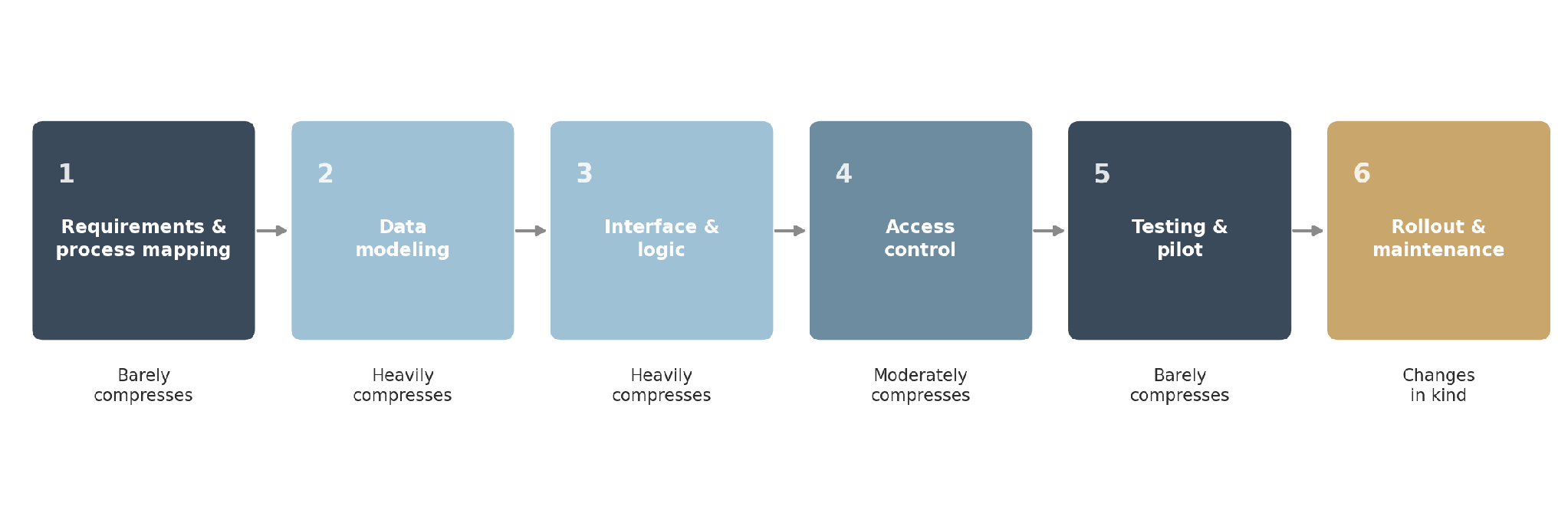
Stage 1: Map the process and requirements
Write down who uses the app, what records it holds, what happens at each step, and who sees what. Skip this stage, and the software gets built around a process nobody has confirmed.
In the purchase tracker, employees submit requests and managers approve them. Each request is one record with an amount, a reason, and a status, moving from submitted to approved or rejected before it's logged.
On a traditional project, this means discovery workshops and a specification document. On a no-code build, it means twenty minutes in a document before you touch a tool. The step is the same size either way. Only the tooling around it changes.
Stage 2: Set up the records and fields
Define the records, their fields, and how they relate to each other. A purchase request links to a requester and a team.
Get this wrong and the error compounds. Storing a requester's name as free text instead of a link to a people table means duplicate records once two people type the same name two different ways. This stage is short but unforgiving.
Stage 3: Build the interface and logic
This covers the screens, the forms, the views, and the rules connecting them. For the purchase tracker, that's a request form, an approval queue for managers, and a rule that notifies the requester's manager when a new request comes in and flags anything over a set amount.
This is the stage most people picture when they think of software development, and it's the one that has changed the most. Building it by hand used to take most of the project's timeline. Generating it from a description takes minutes.
Stage 4: Control access
Decide what each role can create, view, edit, and remove, then log in as that role to confirm it works. A requester should see and edit only their own requests. A manager should see every request from their own team, and nothing from other teams. Access rules get harder to change once the app is in daily use, with live data and live users.
Stage 5: Test and pilot
Live users try it on live work. In my own pilots, five people using the app for a week have surfaced the case I missed within two days, every time.
Write down every point where they stumble, because that list is worth more than any feature plan you write yourself. For the tracker, that's the purchase category nobody planned for, or the manager who's out with nobody set as a backup approver.
Stage 6: Roll out and keep it running
Launch, then keep changing the app because the process drifts. Maybe a new team starts submitting requests, or the approval threshold changes. This stage never ends. Deciding who can make those changes is the most consequential call in the whole build.
What AI and no-code dev tools compress, and what they don't
Vendors say these tools make development faster. In practice, some stages get done in minutes instead of weeks, and others take just as long as they always have. Knowing which is which is the difference between a realistic plan and a disappointing one.
Stage 3 is where the biggest change happened. Generating screens, forms, and workflow logic from a description takes minutes, whereas hand-building took weeks. That's the change that means a small internal tool no longer needs a development budget to justify building it.
Stage 1 doesn't compress, and pretending otherwise is the most common failure. AI will build the wrong thing quickly and confidently if your process isn't decided yet.
Stage 6 changes who does the work, not how long it takes. A traditional build means every change is a request and an invoice. A no-code build means the person who understands the process can make the change themselves.
Generating the purchase tracker took about 10 minutes. Checking the database and the approval logic against what I'd written down took about 25 minutes.
What it costs, by option
Cost tracks which option you pick. The feature list barely moves the number.
Here's what each option costs:
- No-code, built in-house: $0 to $89/month on an AI app builder like Zite, days of work, and your own team keeps it running. The database and the workflows stay visible, so the person who understands the process can see what was built, check it, and change it without a developer. Unlimited users on every plan, so the price doesn't move as the team grows.
- Hire a developer: You hand over a written description of what you need, and get back a working app plus their ongoing availability for changes. Most small and mid-sized work runs $20 to $50 an hour, according to GoodFirms' 2026 survey. Budget weeks, not months, for a single workflow, and expect to keep paying for every change after launch.
- Commission a custom build: $30,000 to $100,000 over three to six months, according to GoodFirms' 2026 survey. Upkeep after launch runs 10% to 20% of the build cost every year.
For a fuller breakdown, see this guide to AI app development costs. If you're not sure building makes sense at all, this piece on custom business software covers when building beats buying.
Choosing your option
What settles the choice is who will be changing this app six months from now.
If your own team will keep it running, build on a no-code tool. Builders like Zite generate the app, its database, and workflow logic from a description, covering internal tools, portals, trackers, CRMs, and dashboards. See the best business app builders for options.
If you'd hire a developer, you're choosing an ongoing relationship at $20 to $50 an hour. Price that in from the start, before the first change request forces the conversation.
And if the app needs native mobile with offline use, regulated calculations like payroll, or connecting to older company systems, hiring a developer is the right call. Budget preference doesn't change that.
If you're building with an AI app builder, this walkthrough on how to develop an AI app for business workflows covers the process step by step.
The mistakes that cost the most
Building before the process is decided costs more, whatever way you build. Write down how it works first, even if that's only twenty minutes in a document.
Scoping the full system before anyone has used version one means guessing at a feature list. Start with a single workflow, get it used, then expand.
Not assigning anyone to own the app after launch means every small change turns into a request and an invoice, because nobody has the authority to just make it.
Skipping verification after a generated build is how a structure that looks right ships with a gap underneath it. Fifteen minutes reading the tables, the same check I ran on the purchase tracker's requester and team links, catches it before it costs months of duplicate records.
The bottom line
Business app development still runs through the same six stages it always has. The build stage is compressed, which shifted the bottleneck to the stages that never did. Deciding what you need and confirming the build matches it now take up most of the timeline.
Plan for that. Spend the time you saved on the front end and on verification. Resist spending it on more features.
Start building with Zite for free if a no-code option fits what you're building.
Frequently asked questions
How long does business app development take?
Business app development takes days on a no-code tool and three to six months for a commissioned build, according to GoodFirms' 2026 survey. AI has compressed the build stage, but requirements gathering and testing with live users take just as long as they always did.
What are the main types of business apps?
The main types of business apps are internal tools like trackers and CRMs, customer-facing portals, and operational systems like inventory and scheduling, plus data and reporting apps, field and mobile tools, and workflow and approval systems. Five of the six stay within reach of no-code tools; field tools needing offline use are the exception.
Does AI make business app development faster?
AI makes business app development faster at the build stage, where generating screens, data structures, and logic takes minutes instead of weeks. It does not shorten requirements gathering or user testing, and it adds a verification step, since generated output looks finished whether or not the structure is correct.
How much does it cost to develop a business app?
A business app costs $0 to $89/month on a no-code tool like Zite, $20 to $50 an hour for a freelance developer, or $30,000 to $100,000 for a commissioned build, per GoodFirms' 2026 survey. Upkeep after a commissioned build adds 10% to 20% yearly.
Should I build a business app in-house or hire a developer?
Build in-house with a no-code tool when the work is ordinary business logic, and your team will own it afterward. Hire a developer for native mobile, offline use, regulated calculations, or connecting to older company systems, and budget for the ongoing support bill that comes with it.

