


Custom mobile apps for business put your own workflow in a customer's or employee's pocket, instead of bending a generic product to fit and hoping it holds.
The cost swing is enormous, from nothing on a no-code plan to well past $300,000 with an agency.
Two things set that number: whether you build a web app or a native app, and whether you build it yourself with no-code tools or hire someone. The features you add barely move it.
To write this, I built the same test app in three ways: as a mobile-friendly web app, as a no-code native app, and as a spec I had an agency price for.
This guide to custom mobile app development covers what these apps are, how to decide between a web app and a native app before you pick a tool, and what each route costs in 2026.
What is a custom mobile app for business?
A custom mobile app for business is software built around your specific workflow, customers, and staff, rather than an off-the-shelf product you adapt. It might be a booking app for customers, a loyalty app, or an internal tool a field team uses from a phone.
The key difference is between an app and a plain mobile website. A mobile website presents information, and people read it and move on. A custom app is something people work in. They log in, book, update a job, approve a request.
Custom apps come in two forms. Web apps open in the phone's browser and can still be added to the home screen, while native apps install from the app stores and add dependable push notifications and full offline use.
That extra reach costs more with native, so it only pays off when people open the app repeatedly, not for something they touch once a year.
When a custom mobile app is worth it
Custom apps pay off in a narrower set of cases than most vendors admit. These are the signals that one is justified:
- People will use it daily or weekly: Before you build, ask honestly how often someone opens it. Regular use justifies an app; something people touch once or twice belongs on a website.
- Your way of working is unusual: If an off-the-shelf product already fits how you work, buy that. Build custom only when the workflow itself is part of what makes you competitive.
- You need phone-specific capability: Offline access, push notifications, a camera, GPS, or barcode scanning.
- Staff work in the field, not at a desk: Field teams, drivers, and on-site crews need a phone-first tool, and often one that works offline, which a plain website can't do well.
- You're paying for shelfware: If you license a heavy product and use a fraction of it, a custom build can cost less over time.
The honest counter-signals matter just as much. Skip the build if your customers interact only once or twice a year, if a mobile-friendly website would do the job, or if no one internally owns the project.
Types of custom mobile apps: web app, native, or hybrid?
A "custom mobile app for your business" isn't one single thing. It comes in three forms, and which one you choose controls your budget more than any feature does. Most people get this wrong by picking a tool first. Decide on the form your app should take, then pick a tool to build it.
Here's the test that settles it: Does the app need to work without a signal, use phone hardware, or send push notifications? If yes, you need native.
If it's a tool people open from a link during the workday, a mobile-friendly web app does the same job for a fraction of the cost and updates instantly without an app store review.
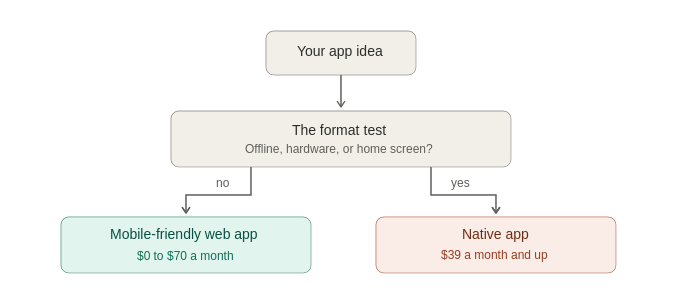
In practice, plenty of business apps split. A moving company's customer quote flow works fine as a web app, while the crew's offline job updates in low-signal areas require a native app. Deciding per audience beats forcing one format on both.
What custom mobile apps for business cost in 2026
Cost depends far more on which form you build and who builds it than on the features you add. The four routes below run from a cheap monthly subscription up to a large agency project. Read across each row for the typical cost, how long it takes, and who it suits.
The four build routes from cheapest to priciest:
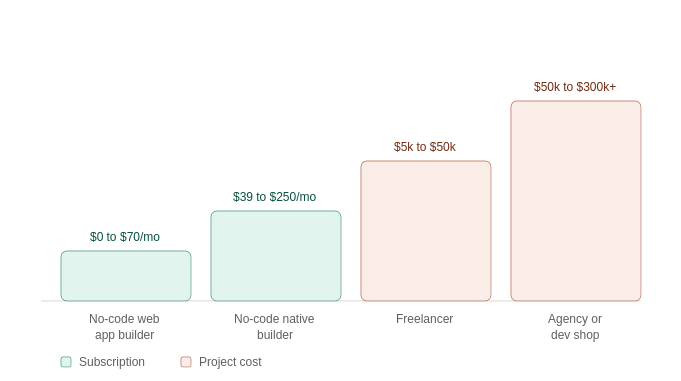
The gap between the no-code options and the agency option is the biggest single factor affecting your budget. A tool a non-technical person can build and maintain removes both the upfront build cost and the ongoing paid change requests that come after.
Two caveats worth pricing in. An agency build needs maintenance every year, usually 15% to 20% of the original build cost, and no-code pricing rises with usage and with user count on most tools, so read the pricing model, not just the starting rate.
For a fuller breakdown, see our guide to AI app development costs.
What mobile apps businesses build most often
Most business apps are one of five common types. Find yours below, and the note at the end of each line indicates whether it usually needs a web app or a native app.
The five most common business app types:
- Customer portals and booking: Clients log in to book, pay, or check status. Usually fine as a web app.
- Field service tools: Crews update jobs, capture photos, and collect signatures on site. Often needs native for offline use.
- Internal trackers and dashboards: Inventory, assets, approvals, and reporting. Web app territory.
- Loyalty and engagement apps: Points, offers, and push notifications. Native, because push and the home-screen icon are the point.
- Inspection and data capture: Checklists with photos and barcode scans. Native when scanning and offline matter.
For builds that aren't mobile-specific, our guide to custom business software covers the wider category.
Custom mobile app development: how to build one, step by step
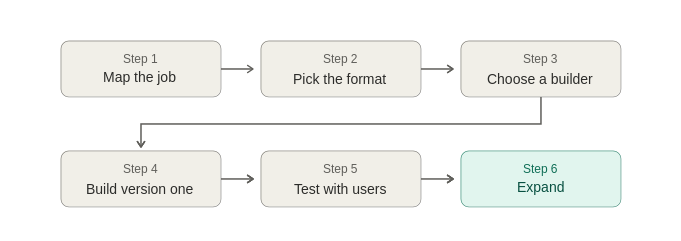
The order matters more than the tool. Here's the sequence that avoids expensive detours:
- Write down the job. One or two sentences covering who uses it, what they do with it, and how often. If you can't, you're not ready to build.
- Pick your format. Run the offline, hardware, and push-notification test above before you look at a single tool.
- Choose a builder that matches your format. Web app builders and native app builders are different categories, and picking between them wastes weeks.
- Build the smallest useful version. One workflow, one audience, working end-to-end.
- Put it in real hands. Give it to five actual users for a week. Their friction list is your roadmap.
- Then expand. Add the second workflow only after the first is in use, without prompting.
Pro tip: the fastest builds start with the audience that has the narrowest need. A staff tool for six people ships in days and teaches you what the customer-facing version should be.
For a realistic sense of the effort involved, our breakdown of how hard it is to make an app is worth reading before you commit.
Which tools fit which format
Tools split cleanly along the format line, so start with the row that matches your decision:
For mobile-friendly web apps: Zite generates the app, its own database, and the workflow logic from a plain-language description, so a non-technical team can build and maintain it. The apps run in any phone browser, can be added to the phone's home screen with their own icon, and are shared by link or embedded.
Zite does not publish native apps to the stores, so it fits business tools well and store-bound products poorly. It's free to start, with Pro at $25/month and unlimited users across all plans. Teams like Bombas and Domino's build business apps this way.
For native iOS and Android apps: FlutterFlow is a strong starting point because its first store-publishing tier is only $39 a month and it can export the underlying code, so you're not locked in. Adalo starts at $45 a month, publishes directly to the app stores, and includes its own database.
For spreadsheet-driven mobile apps: Glide turns spreadsheet data into polished, mobile-friendly apps, with Explorer at $25/month and Maker at $60/month. Its output is web-based rather than truly native, so treat it as a web app option.
For complex or regulated builds: Hire a freelancer or agency and budget for yearly maintenance costs on top of the build.
To compare the builder landscape in more depth, see our roundup of the best AI app builders for business teams and our Glide alternatives guide.
Mistakes that cost the most
Four patterns account for most failed business app projects:
- Building native when a web app would do: This is the costliest common mistake. Going native adds an app store review, a separate iOS and Android build to maintain, and higher costs. If your app doesn't need offline use or phone hardware, you get little back for it.
- Scoping everything up front: Feature lists written before anyone has used version one are mostly wrong. Build one workflow first.
- Ignoring who maintains it: An agency build you can't change yourself means a change request and an invoice for every tweak.
- Skipping the usage question: If you can't say how often someone will open it, you can't justify the build.
The bottom line
For most businesses in 2026, a mobile-friendly web app, one that opens in the phone's browser, does the job a native app would, and it turns the cost from a big one-time project into a monthly subscription. You only need a native app for specific reasons, which we cover next.
The test is simple: If your app has to work offline, use phone hardware like the camera or GPS, or send push notifications, build native. For everything else, a web app does the job.
If you land on the web-app side, a no-code builder gets you there in days for the price of a subscription. If you do need native, budget properly for FlutterFlow, Adalo, or an agency, and account for the maintenance tail.
Frequently asked questions
How much does a custom mobile app for business cost?
Custom mobile apps for business cost from $0 a month on a no-code plan to $300,000 or more for a complex agency build. No-code native builders sit between $39 and $250 a month, freelancers between $5,000 and $50,000, and agencies from $50,000 upward.
Do I need a native app or a web app for my business?
You need a native app only when it has to run without a signal, tap the camera or GPS, or send push notifications. Otherwise, a mobile-friendly web app covers internal tools, portals, dashboards, and booking at a fraction of the cost.
How long does it take to build a custom business app?
Building a custom business app takes days on a no-code web app builder and weeks on a no-code native builder. A freelancer-built app takes one to four months, and an agency-built one takes three to twelve months.
Can I build a custom mobile app without coding?
Yes, you can build a custom mobile app without coding. No-code builders cover both paths: Zite builds mobile-friendly business apps from a description, and FlutterFlow and Adalo publish native apps to the stores. What you give up is unlimited flexibility.
Is a custom mobile app worth it for a small business?
Sometimes. A custom mobile app is worth it for a small business when people use it repeatedly, when your process differs from what off-the-shelf software offers, or when staff work away from a desk. It's the wrong spend for interactions that happen once or twice a year.
What is the difference between a custom app and an off-the-shelf app?
The difference between a custom app and an off-the-shelf app is who the software was shaped around. An off-the-shelf app is built for a general market, and you adapt to it. A custom app is built around your workflow, and it pays off when your process is your edge.

