
Data validation is a rule that checks information as it enters a system, rejecting anything that doesn't match expectations before it becomes a downstream problem. A dropdown that only accepts "Open," "In Progress," or "Closed" is data validation, and a form field that rejects an invalid email format is too.
I've set these rules up across spreadsheets, forms, and databases, and the pattern holds everywhere. By the end, you'll know which type of rule a field needs and where to set it up. Catching bad data at entry is far cheaper than fixing it later.
What is data validation? The 30-second answer
Data validation is a rule on a field that checks an entry before it goes through. It tests the format, the range, or whether the field was filled in at all. That's the whole mechanism.
Validation runs before anything is saved, while cleanup happens afterward.
The 7 types of data validation
Most data validation falls into a handful of types, and knowing which one a field needs is most of the work.
Here are the seven types to know:
- Format validation: Checks that an entry matches an expected pattern, like a valid email address or a phone number.
- Range validation: Restricts a number to an acceptable range, like a discount percentage between 0 and 100.
- Required field validation: Blocks submission until a field is filled in at all.
- List or dropdown validation: Limits entry to a predefined set of options, so "in progress" and "In Progress" can't both exist as separate values.
- Uniqueness validation: Rejects a duplicate where one shouldn't exist, like two customer records with the same email.
- Referential validation: Confirms a value correctly points to something that exists, like an order referencing a customer ID already in the system.
- Consistency validation: Checks one field against another, like confirming an end date falls after a start date, instead of judging a single field in isolation.
Why data validation matters
Bad data doesn't stay contained to one field. A single mistyped entry can throw off a report, feed the wrong number into a forecast, or, if that data ever trains an AI model, teach it the wrong pattern.
Scale changes the stakes too. A typo in a five-row spreadsheet is a five-minute fix. The same typo pattern across ten thousand records, feeding a dashboard three teams rely on, is a much bigger cleanup, and a much bigger reason for people to stop trusting the numbers.
How does data validation work?
Data validation works by attaching a rule to a field, then running a check every time someone tries to enter data. If the entry passes, it's accepted. If it fails, the system rejects it and, ideally, explains why.
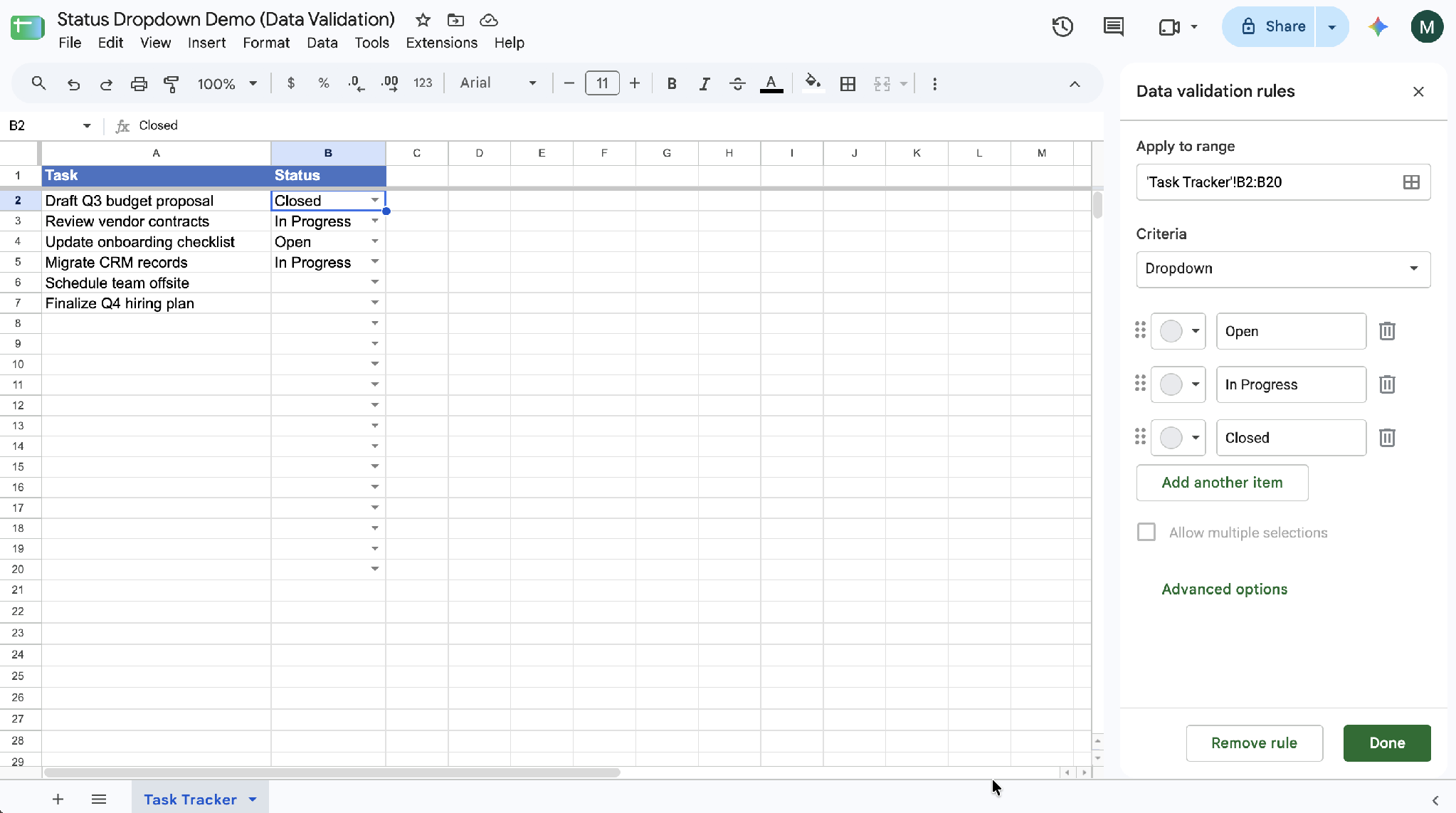
In Google Sheets, select the range, open Data > Data validation, and click Add rule. Under Criteria, pick Dropdown for a fixed list of options, Is between for a number range, or Custom formula is for a pattern the built-in options don't cover.
In Excel, the path is similar. Select the range, open the Data tab, and click Data Validation. Under Allow, choose List to restrict entries to a set of values, or Whole Number or Decimal to set a range. The Source field takes either a cell range or a typed list separated by commas.
This comparison of Google Sheets vs. Airtable vs. Zite walks through where each one fits. In a form, it looks like a required-field flag or a format check on an email input.
In a database, it's usually a rule built into the field itself, enforced no matter what tries to write to it. This roundup of the best AI database software for businesses covers the tools that work this way.
Say a returns form caps the return quantity at whatever the customer bought. Someone tries to return 50 items on an order of 3, and the form blocks it. Without that rule, 50 is a perfectly valid number, and your inventory count is now wrong.
Data validation vs. data cleaning: what's the difference?
People mix these two up all the time, and picking the wrong one means paying for the same cleanup every month.
Data validation happens at the moment of entry, stopping bad data before it's stored. Data cleaning happens afterward, fixing data that already made it into the system.
| Factor | Data validation | Data cleaning |
|---|---|---|
| Timing | At entry | After the fact |
| Purpose | Prevents bad data | Fixes existing bad data |
| Effort over time | Low once set up | Repeats as new bad data accumulates |
| Where it lives | The field or form itself | A separate process or tool |
| Best for | Ongoing data entry | A one-time fix of a messy dataset |
Validation wins for anything ongoing, since it's cheaper to prevent an error once than to clean up the same kind of error every month. This comparison of spreadsheet vs. database covers what that looks like once the rules outgrow what a spreadsheet can hold.
Cleaning still matters for data that predates any validation rules, or for catching errors validation can't, like a value that's correctly formatted but factually wrong.
Data validation vs. data verification: what's the difference?
Validation and verification aren't the same, even though people often use the terms interchangeably. Validation checks data against a rule the moment it's entered. Verification checks data against something trusted, either the original copy after a move or migration, or an outside source that confirms the value is right.
That second kind is what catches the correctly formatted but factually wrong entry validation lets through.
A backup compared against the live database to confirm nothing was lost in the copy is verification. A dropdown that blocks an invalid status value is validation. Migrating data from one system to another needs both. Validation checks it on the way in, and verification confirms the migrated records match what was in the old system.
What I liked and didn't like about data validation
Pros (what works well)
The upside, in short:
- Catches format and range errors before they reach a report or a downstream system.
- Reduces cleanup work significantly once rules are in place.
- Builds trust in dashboards and reports, since the underlying data is more reliable.
- Runs automatically once configured, with no ongoing manual effort.
Cons (where it falls short)
The trade-offs worth knowing about:
- Doesn't catch a value that's wrong but correctly formatted, like the wrong customer's email entered in the right format.
- Overly strict rules block legitimate edge cases and frustrate the people entering data.
- Needs upkeep as business rules change, or the validation keeps enforcing an outdated policy without anyone noticing.
- Cross-field rules get complicated fast, since checking one field against another means the system needs both values before it can decide.
- Checking against existing records can slow a system down, especially at the moment of entry when a rule has to scan a large dataset first.
Should you use data validation? My take
Almost every business collecting structured data benefits from at least basic validation. That means required fields, format checks, and a dropdown wherever the options are known. From there, the harder decision is how strict each rule should be.
Data validation is worth prioritizing for:
- Any field that feeds a report or dashboard, where inconsistent entries silently break the numbers.
- Forms collecting information from people outside your team, who won't know your internal conventions.
- Fields with a small, known set of valid options, like status, category, or region.
Lighter validation is fine for:
- Free-text notes fields where flexibility matters more than consistency.
- Low-volume, internal-only data where a person can catch errors by eye.
How to set up data validation in 5 steps
Here's the process:
- Identify the fields most likely to collect bad data: Start with anything feeding a report, not every field at once.
- Decide the validation type each field needs: A status field needs a dropdown; an email field needs a format check; a discount field needs a range.
- Set the rule in your tool: A spreadsheet's Data Validation menu, a form field's validation setting, or a database field constraint, depending on where the data lives.
- Write a clear error message, and a helper message if your tool offers one: "Invalid entry" tells someone nothing. "Enter a value between 0 and 100" tells them what to fix. Some tools, like Excel's Input Message, can also show guidance before anyone types anything, heading off the error before it happens.
- Test with intentionally bad input before rolling out: If a clearly wrong value gets through, the rule needs adjusting before live data hits it.
Pro tip: Validate the same field consistently everywhere it's entered, on every edit as well as first entry. A rule enforced only once stops working the moment someone updates the record later.
Data validation best practices I wish I knew earlier
Write the error message before you write the rule. If you can't explain clearly why an entry would fail, the rule probably isn't specific enough yet.
Revisit rules when the business changes. A dropdown built around last year's product categories will reject valid entries the moment a new category launches.
Don't copy someone else's rule set without adjusting it. A validation list built for a different team's workflow rarely fits yours.
My verdict on data validation
Any workflow feeding a report someone relies on is better off with data validation in place. The payoff is concrete. Less cleanup, more trust in the numbers, and fewer late surprises.
Where it runs out of room is the ceiling every spreadsheet or single form eventually hits. The more rules you stack, the harder they get to keep straight.
Tools for data validation
Most validation happens in whatever tool already holds the data, rather than a separate validation product.
Spreadsheets (Google Sheets, Excel) handle format, range, and list validation natively, covered above.
Forms (Google Forms, Typeform) validate at the point of collection, before data ever reaches a spreadsheet or database. This roundup of AI form builders covers the tools that collect the data in the first place.
Databases and no-code app builders (Airtable, Zite) enforce rules at the field level, so a rule holds no matter where the data comes from.
Scripts and code (Python's pandas, a custom validation library) handle logic too complex for a built-in tool, usually as part of a larger data pipeline.
When data validation outgrows a spreadsheet
Spreadsheet and form-level validation cover the basics well, handling dropdowns, required fields, and format checks. Where they strain is conditional logic, validation that depends on more than one field, or a rule that needs to check against another record entirely.
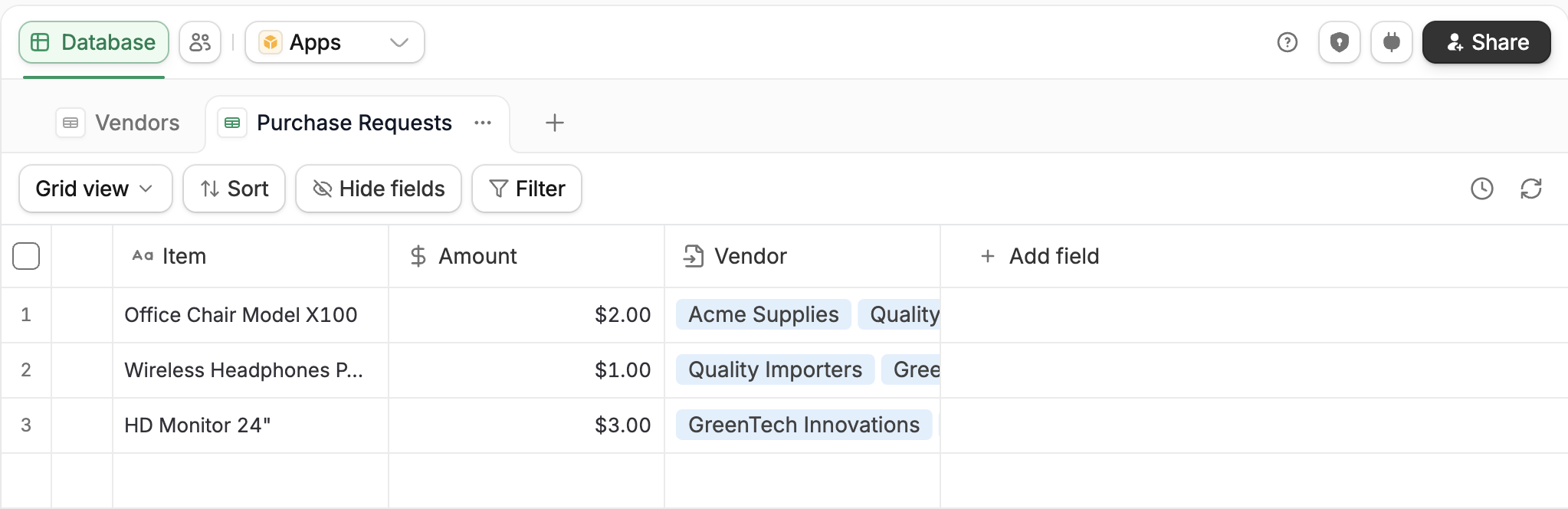
Zite handles that in two layers. The database gives each field a type, so a select field holds one of the options you set, a number field holds a number, and a linked record points to a record in another table.
For the rules a spreadsheet can't hold, you describe the rule in plain language, and Zite builds the check into the app's form or workflow, such as "a return can't exceed the quantity on the order" or "an end date has to come after the start date."
Every form and app writes to the same records, so the data stays in one place, and a User field can limit each person to the records they own.
Zite is free with unlimited users and 50 AI credits a month, capped at ten messages a day. Paid plans start at $25/month for Pro, with 100 credits and a custom domain. Business is $89/month with 400 credits. Team is $300/month with 800 credits, and Enterprise is custom-priced.
Start building with Zite for free if your validation rules have outgrown what a spreadsheet can hold.
If the data itself has outgrown a spreadsheet, this list of Google Sheets alternatives is worth reading next.
Frequently asked questions
What is data validation in simple terms?
Data validation in simple terms is a rule that checks whether an entry is acceptable before a system accepts it, like a dropdown that only allows specific values or a form field that rejects an invalid email. It stops bad data at the point of entry instead of catching it later.
What is the difference between data validation and data cleaning?
The difference between data validation and data cleaning is timing. Data validation happens at entry, preventing bad data from getting in. Data cleaning happens afterward, fixing bad data that already made it into the system.
What are the main types of data validation?
The main types of data validation are format, range, required field, list or dropdown, uniqueness, referential, and consistency validation. Format checks a pattern like an email address, referential confirms a value points to a record that exists, and consistency checks one field against another.
What is the best tool for enforcing data validation?
The best tool for enforcing data validation depends on how complex the rule is. A spreadsheet or form's built-in validation covers basic checks. For rules that depend on other fields or other records, Zite gives each database field a type and builds the cross-field rules you describe into the form or workflow.
Can data validation catch every kind of error?
No, data validation can't catch a value that's correctly formatted but factually wrong, like the right format with the wrong customer's information entered. It catches format, range, and required-field errors reliably, but factual accuracy still depends on the person entering the data.