
Multi-channel inventory management keeps one stock count accurate across every place you sell, so a unit sold on Amazon stops showing as available on Shopify, eBay, and your store. A seller who lists the same SKU in four places and tracks stock in a spreadsheet can sell the last unit twice. Below is how the system works, where it breaks, and how to choose one.
What is multi-channel inventory management? The 30-second answer
Multi-channel inventory management is the process of tracking and controlling stock across multiple sales channels from one centralized system, as Cin7 defines it. Three components make it work.
One source of truth for stock
The count lives in one system, and every channel receives a number from it. SkuNexus models this as one product with one SKU and one stock number, connected to each channel by a listing.
Real-time syncing across channels
When an order lands on any channel, the system deducts the unit and pushes the new count to the others. Cin7 advises syncing in real time or near real time, and at minimum every few minutes during active selling hours. SkuNexus adds that real-time sync narrows the overselling window, and scheduled sync widens it.
Integrations into each storefront and marketplace
Connectors carry the count out and the orders back. Cin7 warns that a flaky connector that drops updates is almost worse than no connection at all, so check each integration before you rely on it.
How multi-channel inventory management works
Every order runs the same two-step loop, which is workflow automation applied to stock. The product is the physical item on your shelf, a channel is a store you sell from, and a listing connects the product to that channel.
Here are two steps in the loop:
1. An order arrives: The order lands on any channel, and the central system deducts the unit from available stock.
2. The count goes out: The system pushes the updated quantity to every other channel, from Amazon to eBay to your retail point of sale.
Returns, transfers, and purchase orders adjust the same count.
Available to promise
A channel can show a lower number than the on-hand count. SkuNexus calls that number available to promise, the figure pushed to a channel after any overrides. Say a product has 100 units on hand.
A reserve of 20 on the Walmart listing makes Walmart show 80, while another channel still shows 100. For a different product with 200 in stock, a cap of 50 on the Shopify listing makes Shopify show 50.
In plain terms, available stock is on-hand stock minus reserved stock minus safety stock, and it never drops below zero.
How stock reaches each channel
Each channel handles that number differently.
Here are seven channels and how stock reaches each one:
| Channel | How stock reaches it | What to watch |
|---|---|---|
| Shopify | Quantities are tracked per location, and Shopify's inventory docs say apps can manage inventory across locations | Decide which locations are sellable online |
| Amazon | Connected through the inventory system's Amazon integration, which Cin7 and Veeqo both list | Brightpearl notes that an Amazon FBA order may need different handling from an eBay or webstore order |
| eBay | Orders flow in through the inventory system's eBay connector (Veeqo lists automatic order import) | Confirm the count flows back as well as the orders |
| Walmart | The inventory system pushes stock levels out to Walmart (Veeqo lists stock-level syncing) | Confirm the count reaches Walmart after every sale |
| Etsy | Veeqo lists real-time syncing of listings and inventory, and Zoho Inventory lists Etsy too | Variants and listings must map to one SKU |
| TikTok Shop | Orders flow in, and counts go out through the inventory system's connector (Veeqo lists both) | Confirm that both orders and counts move |
| Physical POS | Brightpearl says its POS syncs online and offline channels in real time | Decide whether the register shares the web store's pool |
Why it matters: Overselling and stockouts
Two failures push sellers toward a system: overselling and stockouts.
Overselling
Overselling happens when each channel keeps its own count, and the updates arrive late. Cin7 pictures the last unit of a popular SKU selling on Amazon and Shopify within the same minute because neither channel got the memo. The table shows the same thing with five units, and the numbers are an example.
Here are three moments in the overselling example:
| Moment | Shopify shows | Amazon shows | Net stock |
|---|---|---|---|
| Start | 5 | 5 | 5 |
| Shopify sells 3 | 2 | 5 (not yet updated) | 2 |
| Amazon sells 3 | 2 | 2 | -1 |
Six units are sold against five on hand, so one order has to be canceled. With near real-time sync, Amazon would show two right after the Shopify sale, and the three-unit order could not go through.
Stockouts
Stockouts have two causes that can strike even when sync works.
Here are two causes of stockouts:
-
Stock in the wrong channel: Cin7 describes slow channels holding units while fast-moving ones run dry, so the stock sits in the wrong place.
-
Fragmented sales history: Cin7 notes that when sales history is split across five platforms, demand planning becomes guesswork.
Single-channel vs. multi-channel inventory management
Selling on one channel keeps the count simple, since one store holds the only number. Adding a second channel creates a second number, and you have to reconcile the two.
Here are five differences between single- and multi-channel:
| Single channel | Multi channel | |
|---|---|---|
| Stock count | One count in one store | One shared count pushed to every channel |
| Sync needed | None | Required |
| Overselling risk | Low | Higher without proper tools |
| Visibility | Easy to monitor | Needs a centralized system |
| Reach | Limited to one audience | Access to more customers |
Inriver separates this from omnichannel, saying multichannel focuses on managing stock across separate environments, while omnichannel unifies the customer journey.
Six pitfalls to avoid
These problems show up once a second channel goes live.
Here are six pitfalls to avoid:
-
Sync lag: A slow or scheduled sync widens the overselling window, so ask each vendor whether sync is real-time or scheduled for every channel, and how it handles a failed push.
-
Mismatched SKUs: SkuNexus traced at least seven "order won't import" incidents at one fulfillment company over four months to empty SKUs, renamed SKUs, and deleted products.
-
Safety stock and reserves: Keep a safety stock buffer below which you stop selling, then set a separate reserve for each channel that needs its own number, such as a marketplace with cancellation penalties, a wholesale account, or a flash sale.
-
Multi-location allocation: Each location holds its own stock, so decide which locations each channel can sell from, and remember that a 3PL adds another location to track.
-
Returns: Brightpearl advises a well-defined return and receiving process, noting that the process for an Amazon FBA order may differ from the one for eBay or your own webstore.
-
Shared register and web pool: SkuNexus describes a retailer whose register began draining the warehouse's sellable stock as retail grew, so the two were split.
What works and what falls short
- Accurate stock shows on every channel because one count feeds them all.
- Fewer cancellations result when orders stop landing on units that are already gone.
- Faster fulfillment is one benefit Cin7 lists, along with more accurate orders.
- Better demand planning becomes possible with sales data from every channel in one place.
- Connector reliability is a risk, since a connector that drops updates can be almost as harmful as no connection.
- Clean data is a must because mismatched SKUs break imports and counts long before sync speed does.
- Plan limits cap integrations and orders, as Cin7's Standard plan shows with two e-commerce and app integrations, 6,000 sales orders a year, and more integrations available to buy.
- More to learn comes with allocation rules, reserves, and locations that single-channel sellers never see.
How to choose a multi-channel inventory system
Sellers have three routes. Pick by channel count, order volume, and how unusual your rules are.
Here are three routes to compare:
| Route | Examples | Best for | Watch for |
|---|---|---|---|
| Dedicated inventory system | Cin7, Brightpearl, Linnworks, Veeqo, Zoho Inventory | More than three channels or growing order volume | Plan limits on integrations and orders |
| ERP suite | NetSuite and similar suites | Businesses that want stock, purchasing, and accounting in one system | Whether the suite's connectors cover your marketplaces |
| Custom tracker | Zite | Sellers who want inventory, purchasing, and team tasks in one system built around their own rules | No ready-made marketplace connections, so you set up each one yourself |
Dedicated inventory systems
Each is built for multi-channel selling, and their pricing differs. Here are five dedicated systems:
-
Cin7: Standard costs $349/month for new customers. It includes five users, two e-commerce and app integrations, and 6,000 sales orders a year, with more integrations available to buy. Cin7 lists native integrations with more than 700 platforms.
-
Brightpearl: It uses tailored pricing with unlimited users included, and it has an integrated POS as part of a system built for retail and wholesale.
-
Linnworks: Its pricing page lists syncing inventory instantly across 100+ channels.
-
Veeqo: The inventory plan starts at $19/month with automated inventory sync across channels. Veeqo prices it by monthly order volume and also lists a free shipping plan.
-
Zoho Inventory: The Free plan covers 50 orders a month, one user, and one location. Standard costs $39/month on monthly billing.
ERP suites
An ERP (enterprise resource planning) is software that organizations use to manage day-to-day business activities, and Oracle says it can include procurement, supply chain management, inventory, and manufacturing. In an ERP, inventory is one module next to purchasing and accounting.
A custom tracker
If you sell on two or three channels and your rules don't fit a standard system, build your own tracker. This guide to no-code app builders shows what that route involves, and the build section below walks through one.
Questions to ask any vendor
Here are four questions to put to any vendor:
-
Ask whether sync is real-time or scheduled for each channel, and what happens when a push fails.
-
Ask whether you can hold stock back from one channel without hiding it from the rest.
-
Ask whether you can change how the register and the web store share stock later.
-
Ask which integrations come with the plan and which cost extra.
How to build a custom multi-channel inventory tracker
This build suits a seller with two or three channels and a short SKU list. Zite has no ready-made connections for Shopify, Amazon, eBay, Etsy, Walmart, or TikTok Shop, so you set up each channel yourself. You can describe the connection to Zite, or use Zapier, n8n, a webhook (an automatic message one app sends another when something happens), or a file import.
Step 1: Create the products table
Describe the table to Zite, and it builds the fields in Zite's built-in database.
Here are eight fields for the products table:
| Field | Type | Purpose |
|---|---|---|
| SKU | Text | The one code every channel maps to |
| Product | Text | What it is |
| Stock Movements | Link to table | Connects each product to its rows in the movements log |
| Movement Quantities | Lookup | Pulls the quantity from each linked movement |
| On Hand | Formula | Total of the movement quantities |
| Reserved | Number | Held for wholesale or open orders |
| Safety Stock | Number | Buffer below which you stop selling |
| Available | Formula | The number sent to channels |
This build uses one reserve for every channel. To hold stock back from one channel only, add a reserve field for that channel and a matching Available field to send to it.
On Hand adds up the linked quantities with a short formula.
SUM({Movement Quantities})You don't have to write these formulas yourself. Describe the rule, for example, "Available is On Hand minus Reserved minus Safety Stock, and never below zero," and Zite writes the formula. For reference, the Available formula looks like this:
MAX(0, {On Hand} - {Reserved} - {Safety Stock})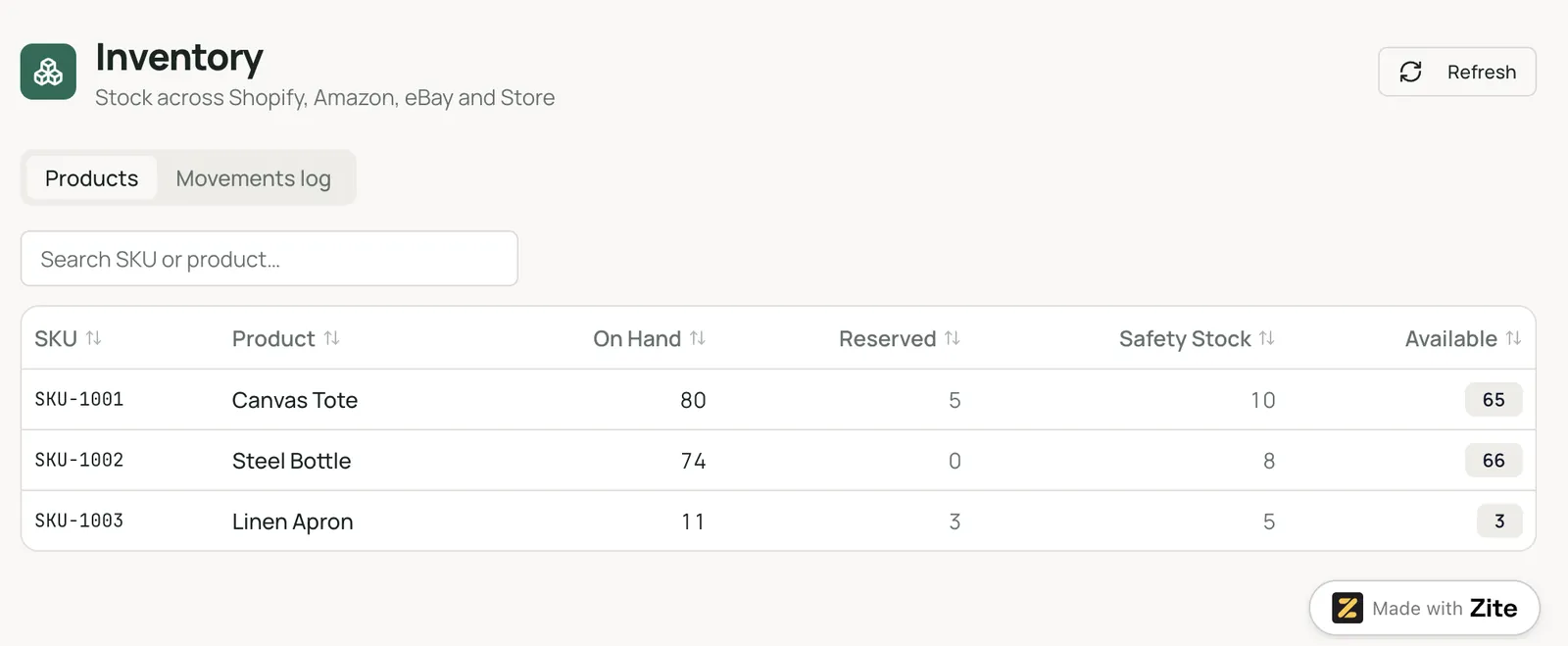
Step 2: Add a stock movements log
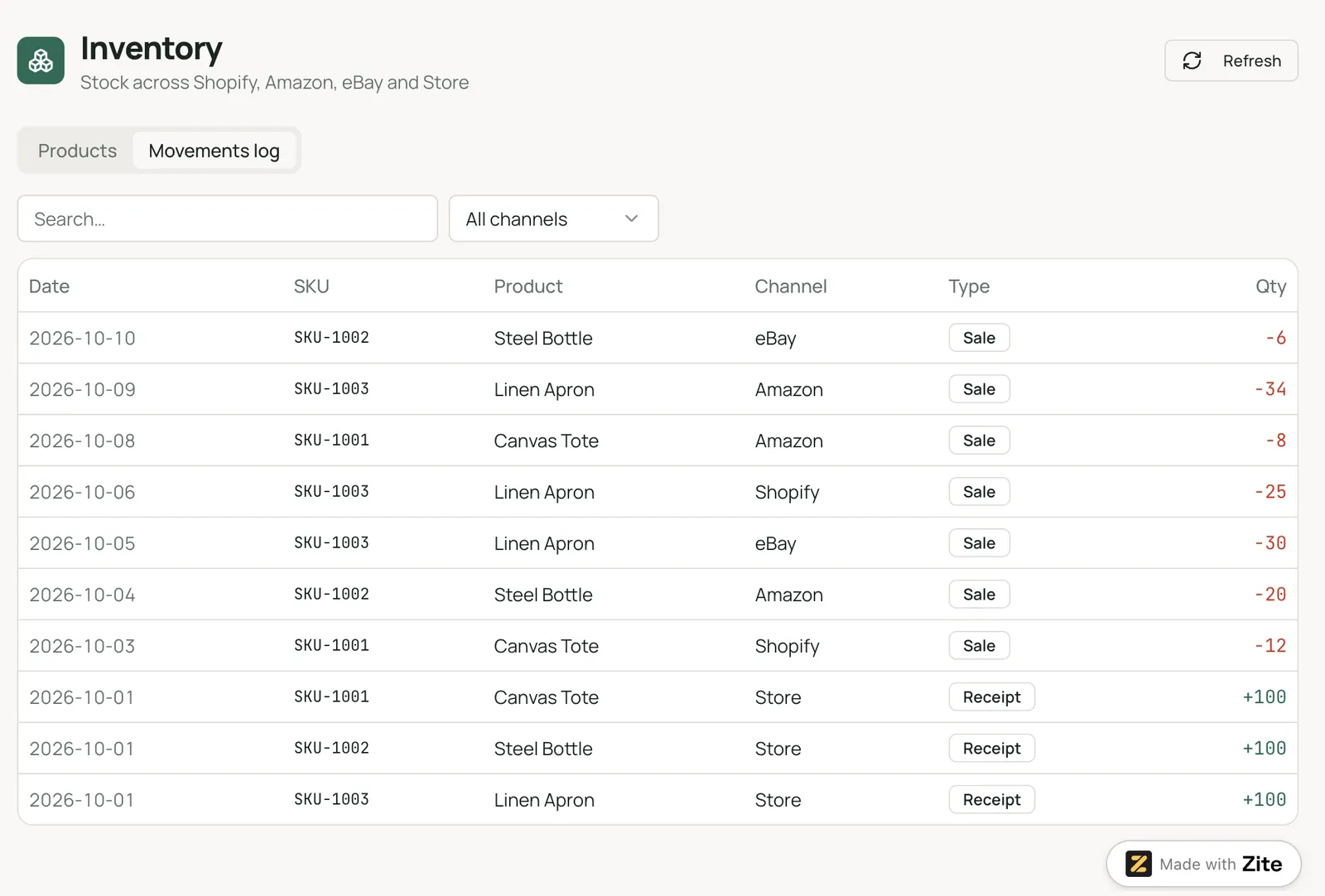
Every change to stock becomes a row, with the date, the SKU, the channel, the type (Sale, Return, Receipt, or Adjustment), and a quantity that is negative for stock going out and positive for stock coming in. The On Hand formula totals the linked movements, so every count comes from logged movements, and every change leaves a trace.
Step 3: Feed orders in
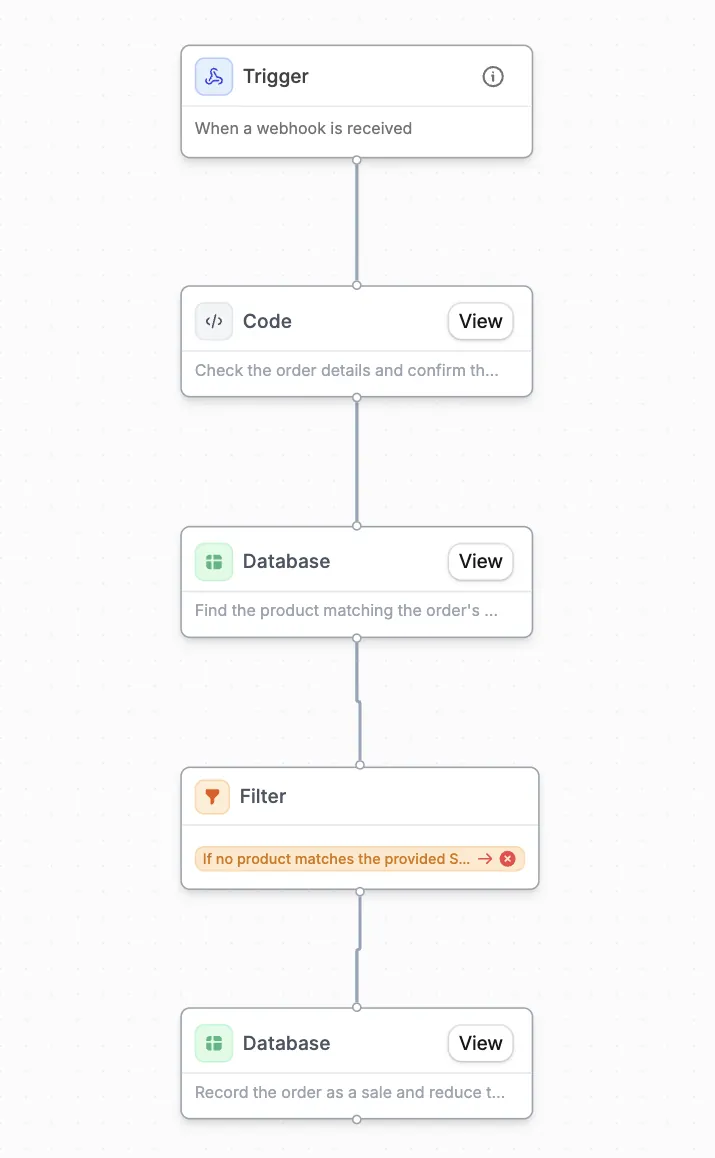
Webhooks are available on every Zite plan. Tell Zite what the workflow should do, for example, add a movement row each time a webhook fires, and it builds the workflow. Zite's Zapier integration can push data into a table from other apps, and a file import covers channels that offer neither.
Publish the app before you rely on a webhook for live orders. Order lines come from an order system, and this guide to order management software covers the tools for that job.
The free plan holds 5,000 records, and a movement log grows with every order line. Pro starts at $25/month and holds 100,000 records, which leaves room for a busier shop.
Step 4: Send counts back out
Zite's Zapier integration also offers triggers such as New Record, so each new row in the movements log can start a Zap that updates a channel with a Zapier app. Once a channel is connected, the workflow that logs a movement can send that channel the new Available count as its last step.
Not every channel accepts stock updates from outside, so try each one on a single SKU first. For more ways to connect apps, see this guide to no-code business process automation.
Step 5: Add alerts and a weekly review
Ask for an email when a movement drops Available to zero, since email sending is available on every plan. A scheduled daily check needs a scheduled workflow, which starts on the Business plan at $89/month. Review the log weekly against a physical count.
Zite can also build the apps your team works in, all on the same records, and you describe each one the way you described the tables. Warehouse staff get a screen to log receipts, returns, and adjustments; whoever does the reordering gets a low-stock dashboard, and a purchase order request goes to a manager for approval.
Five habits that keep counts accurate
Here are five habits:
-
Pick one source of truth: Hold the count in a single system and let channels receive it.
-
Standardize SKUs before connecting channels: Fix empty, duplicate, and renamed SKUs first, since mismatches break imports.
-
Set safety stock and reorder points: Cin7 recommends a minimum level that triggers a reorder plus a buffer for demand spikes.
-
Run weekly cycle counts: Brightpearl lists weekly cycle counts among its practices for accurate inventory.
-
Automate routine updates: Every manual entry is a chance for a typo or a forgotten channel, and this comparison of process automation software covers tools that remove those steps.
My verdict on multi-channel inventory management
Multi-channel inventory management pays off once one SKU sells in two places, because that is when a second count appears.
Pick a dedicated system once you have more than three channels or a growing volume. A custom tracker fits a small channel count with unusual rules, as long as you accept that you own every connection. In return, every count traces back to a logged movement, so you can see exactly where a number came from.
Ready to build your multi-channel inventory tracker?
Zite's free plan includes unlimited users, so everyone on your team can work in what you build before you pay anything. The warehouse logs stock in its own app, the buyer sees what's running low, and every app reads the same count. The pricing page lists the limits for every plan.
Frequently asked questions
What are the top 5 inventory management software options for multiple channels?
The top five inventory management software options for multiple channels to compare are Cin7, Brightpearl, Linnworks, Veeqo, and Zoho Inventory. Cin7's Standard plan costs $349/month for new customers. Veeqo's inventory plan starts at $19/month, and Zoho Inventory has a free plan for 50 orders a month.
How do you manage inventory across multiple sales channels?
Manage inventory across multiple sales channels by holding the count in one system and connecting every channel to it. Standardize SKUs first, since mismatched SKUs break imports. Keep the sync fast, add safety stock and per-channel reserves, and check the count against a physical count each week, so errors surface early.
How do you prevent overselling across channels?
You can prevent overselling across channels by closing the gap between a sale and the update that reaches the other channels. Near real-time sync narrows that gap, and a safety stock buffer covers the orders that still arrive inside it. A separate reserve for each channel protects stock held back for marketplaces.
What is the difference between multichannel and omnichannel inventory management?
The difference between multichannel and omnichannel inventory management is what each one connects, according to Inriver. Multichannel keeps stock accurate across separate sales channels, while omnichannel unifies the customer journey across them. Accurate multichannel control comes first, because omnichannel promises rest on it.
What is the best tool for multi-channel inventory management?
For most multichannel sellers, the best tool is a dedicated system like Cin7 or Linnworks, since both list wide channel coverage. Veeqo and Zoho Inventory start at lower prices. Zite fits a seller with two or three channels who wants a tracker built around their own rules and is comfortable setting up each channel connection, directly or through Zapier or n8n.