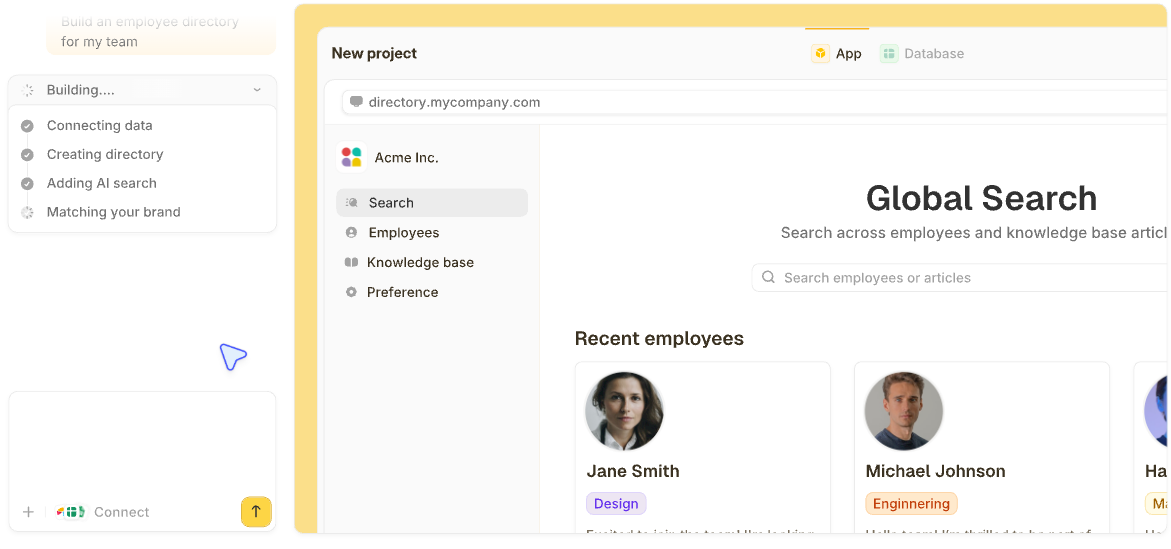

Someone on your team just built a working app by typing a few sentences into a chatbot. No engineering degree, no six-week dev cycle, no ticket rotting in a backlog. That's the promise of vibe coding, and in 2026 it's everywhere.
So what is vibe coding, really? It's building software by describing what you want in plain language and letting an AI write the code. This guide gives you a straight answer in plain English: what it is, how it works, where it bites, and when it's the right call.
What is vibe coding?
Vibe coding, a term AI researcher Andrej Karpathy coined in February 2025, is building software by describing what you want to an AI in plain English and running with the code it writes. You describe the outcome, and the AI does the typing, so you never touch the code line by line.
Karpathy described it in his original post as fully giving "in to the vibes" and forgetting "that the code even exists." The post took off, and within weeks, the term was showing up in mainstream coverage, which tells you how ready people were for the idea.
The shift is simple. For decades, building software meant learning syntax. Vibe coding swaps syntax for description: you say what you want in the same words you'd use to brief a coworker, and the model generates the app.
The term has a strict meaning and a loose one. In Karpathy's strict sense, vibe coding means accepting the AI's output without really reading it. In everyday use, people say "vibe coding" for almost any AI-first building, even when they check the code carefully. That distinction comes back around when we get to the risks.
How vibe coding works, step by step
Under the hood, it works like a conversation. Most people follow the same loop:
- Pick a tool: Choose an AI builder or coding assistant that fits what you're making.
- Describe what you want: Type a plain-language prompt, like "an internal app that tracks equipment checked out to staff."
- Let it generate: The AI produces a first version, often a working one, in seconds to minutes.
- Refine by prompting: Ask for changes in words. "Make the form shorter." "Add a login." The app redraws.
- Review and test: Click through what it built and confirm it does what you meant.
- Publish and share: Put it in front of the people who'll actually use it.
The tools split into a few camps. Full app builders like Replit and Bolt turn a prompt into a complete working app. AI code editors and coding agents like Cursor, Devin Desktop (formerly Windsurf), and GitHub Copilot work where developers already write code and speed them up.
General assistants like Claude and ChatGPT can write and explain code in a chat window. For a shortlist of which ones to try first, see this roundup of the best vibe coding tools.
Here's what that looks like in practice. Say you want a tool that tracks equipment checked out to staff. You type roughly that sentence, and a working version appears with a table, a form, and a list. Don't like the layout? You ask for a change, and it redraws. That back-and-forth is the whole game.
Vibe coding vs. AI-assisted coding vs. traditional coding
People mix these three up constantly, so it helps to line them up side by side.
| Approach | Who writes the code | Best for |
|---|---|---|
| Traditional coding | You or your dev team, by hand | Full control, complex production systems |
| AI-assisted coding | You write and review; AI autocompletes and suggests | Developers who want to move faster |
| Vibe coding | You describe; the AI writes; you mostly accept | Non-coders and fast prototypes |
So is vibe coding just coding with AI? Not quite. With AI-assisted coding, a developer still reads and owns every line while the AI suggests. With vibe coding, you hand more of that judgment to the model.
Prompt engineering often gets lumped in too: it's the craft of writing instructions an AI follows well, and vibe coding is one of the places where that craft pays off. The deeper version of this comparison lives in our breakdown of vibe coding versus traditional coding.
There's also a third path most explainers skip. Some tools also show you what they built: the screens, the logic behind them, and the data underneath. For a non-technical team, that visibility is what makes the next prompt fix the right thing.
The benefits of vibe coding
Vibe coding caught on for a practical reason: it removes steps that used to take weeks. Three benefits do most of the work.
- Speed: You go from an idea to a working prototype in hours, not the weeks a traditional build takes.
- Access: People who never learned to code can build a real tool themselves. If you've ever wanted to make an app from scratch with zero code experience, this is the door.
- Cheap experiments: Trying an idea costs an afternoon instead of a budget line, so throwaway internal tools finally become worth building.
Serious builders already work this way. Y Combinator managing partner Jared Friedman said a quarter of the winter 2025 startups had codebases that were about 95% AI-generated. When some of the most technical founders around lean on it that hard, the approach clearly has legs.
The risks and downsides of vibe coding
Vibe coding has real failure modes, and they hit hardest exactly where non-technical builders can't see them coming.
Four risks show up again and again:
- Messy code: The AI optimizes for "looks like it works," so the structure is hard for a person to follow later.
- Hidden bugs: The app runs fine in the demo and quietly breaks on the edge case you didn't test.
- Security holes: Generated apps routinely ship with weak or missing access controls.
- Hard to maintain: Code nobody on the team understands is code nobody on the team can safely change.
The root problem sits under all four. When you accept code you can't read, you can't fix or trace what breaks. You can only re-prompt and hope the AI guesses right the second time.
Security is where that gets expensive. In 2025, security researcher Matt Palmer's scan of Lovable-built apps found 170 of 1,645 projects with flaws that let anyone access users' personal information, thanks to missing access controls.
The security firm Veracode tested code generation across more than 100 AI models and found that nearly half the samples introduced a security flaw, and the newer, larger models didn't do any better.
AI coding still has a real place in all this. Just remember that a vibe-coded prototype and a production system are different animals, and treating the first like the second is how teams get burned.
What vibe coding is good for (and what it isn't)
So when should you actually vibe code? The honest answer: for anything low-stakes and fast-moving, go for it; for anything you can't afford to have quietly break, slow down.
Great for:
- Prototypes and MVPs you want to test before committing real money.
- Internal tools like trackers, directories, and simple dashboards.
- Mockups and demos to show a stakeholder what you mean.
- Personal and throwaway apps that only you or a small team will touch.
- Learning, because you see results fast enough to stay motivated.
Not the right call for:
- Production systems handling sensitive customer or financial data.
- Anything with strict security or compliance requirements.
- Complex apps that can't fail silently.
- Software you'll need to maintain for years without understanding how it works.
For a non-technical team, one question sorts most of this out: if this app breaks, can you see why and fix it, or are you stuck re-prompting a black box? Tools vary wildly here. Raw code generators leave you with files a non-developer can't easily follow.
Others, like Zite, generate an app whose screens, workflow logic, and database all stay visible, so the person who built it can spot what broke and fix it with the next prompt.
Zite also runs every app in a workspace on one shared database, so the team's tracker, the manager's dashboard, and the client portal all work from the same records, and a change in one shows up in the others. With most vibe coding tools, each app is a separate project with its own data, and a second app means copying data across or wiring the two together.
If you're building something your team will rely on every day, pick a tool made for non-technical people, since developer-focused tools assume you can read the output. A no-code app builder made for non-technical teams or one of the AI app builders aimed at business teams will save you the debugging spiral.
Build apps you can actually see and control
Vibe coding's core trade is speed for visibility. You get a working app fast, and in return, you often can't see how it works or fix it when it breaks.
Non-technical teams can get the speed and keep the visibility. You can build something real and still understand how it works afterward.
Zite is built for that. You describe the app you want in plain language, and Zite generates it along with its workflow logic and its database. All three stay visible afterward, so when something needs to change, you can see exactly where, and your next prompt fixes that part instead of starting over.
It's also built for a whole team rather than one builder: everyone can use what you build, with no per-seat pricing, and each person sees only their part.
Here's what you get:
- AI-generated apps from a prompt: Describe a tool like an equipment tracker or a client portal, and get a working version you can use.
- One database behind every app: Build an app for your team, a dashboard for managers, and a portal for clients, all on the same records, with nothing to keep in sync.
- Visual workflows you can trace: The logic Zite builds shows up as a flowchart you can read and troubleshoot, so you're never guessing why something fired.
- A built-in database with a spreadsheet feel: Your records live in tables and fields with linked records and AI Fields, no separate backend to wire up.
- Works with the data you already have: Connect Airtable, Google Sheets, Notion, HubSpot, Stripe, or Slack directly, or bring records in with a CSV import.
- Access you can check: Apps stay internal by default, so everyone in your organization can use them right away, and you turn on logins when a client needs in. Each person sees only the records that are theirs, Zite warns you before publishing a change that would affect who can get in, and you can open the app as any user to see exactly what they see. Roles for different kinds of users come with the Team plan.
- Unlimited users and apps on every plan: Headcount never changes the price. There's a free plan, and paid plans start at $25 a month.
- Built by the team behind Fillout: Zite comes from the company that makes the Fillout form builder.
It's a newer platform, so the template library is still growing, and everything runs as a hosted web app with no native mobile export.
Start building with Zite if you want the speed of vibe coding and a clear view of what you built.
Frequently asked questions
Is vibe coding a skill?
Yes, vibe coding is a real skill, just a different one from traditional programming. The skill is describing what you want clearly, spotting when the AI's output is wrong, and knowing when to stop trusting it. Prompting and judgment carry more weight than syntax here.
How hard is it to learn vibe coding?
Vibe coding is easy to start and harder to master. Anyone can prompt a tool and get something working in an afternoon, but the judgment to know when an app is genuinely ready takes longer. Our breakdown of how hard it is to make an app walks through what to expect.
Is AI replacing coders?
No. AI is shifting what coders do. The typing gets automated, and human developers move toward directing, reviewing, and fixing what the AI produces. Complex and production-grade work still needs people who understand the code underneath.
How much do vibe coders make?
There's no reliable salary figure for "vibe coder" because it isn't a standard job title yet. It's a way of working, and it usually shows up as a skill that makes founders, ops staff, and developers more productive in the jobs they already have.
Is vibe coding just coding with AI?
No. AI-assisted coding means a developer still writes and reviews the code while the AI suggests; vibe coding means you describe the outcome and largely accept what the AI generates. The difference is how much you write and check yourself.