
An inventory database is a set of linked tables that records what you stock, where it sits, who supplies it, and every movement in or out.
A shop that tracks 200 products in one spreadsheet can answer "How many do we have?" until a second person edits the file or a SKU appears twice.
I ran the sample SQL below against three products and eight movements. This guide covers the four parts of an inventory database, a six-step build, and where each kind of tool breaks.
What is an inventory database?
An inventory database stores products, suppliers, orders, and stock movements in separate tables that link to each other, so every question about stock has one answer. Microsoft's database design basics describe the same idea, with one table each for products, suppliers, customers, and orders.
One rule keeps the numbers honest: calculate on-hand stock from a log of movements and never type over it.
The four parts of an inventory database
Four parts make up an inventory database, whether it lives in a spreadsheet or in PostgreSQL.
Tables
A table is a list of rows and columns about one kind of thing. Knack's inventory model lists products, suppliers, orders, and stock level tables. It also describes a transaction table that keeps records of all interactions involving inventory.
Fields and records
Each row is a record, and each column is a field. In a Products table, one record holds one product, and the fields hold its name, SKU, category, unit cost, and reorder point.
Primary keys
A primary key uniquely identifies each record in a table. SKU is the usual choice for products, as long as no two products share one and nobody reuses a retired SKU for a different item.
Relationships
Relationships link tables through shared keys. A supplier can supply many products, so the Products table stores the supplier's ID as a foreign key, and Microsoft calls this a one-to-many relationship.
Products and orders are many-to-many, since an order can hold many products and a product can appear on many orders. Microsoft's fix is a third table, called a junction table, with one row for each product on each order.
What to track in each table
These five tables are the starting set for a small inventory database.
Here are the five tables and their key fields:
| Table | Key fields | Links to |
|---|---|---|
| Products | SKU, name, category, unit cost, reorder point | Suppliers |
| Suppliers | Supplier ID, name, contact, lead time in days | Products |
| PurchaseOrders | PO number, supplier, date ordered, expected date, status | Suppliers |
| PurchaseOrderLines | PO number, SKU, quantity ordered, quantity received | PurchaseOrders, Products |
| StockMovements | Movement ID, date, SKU, type, quantity, location | Products |
How to build an inventory database in 6 steps
These steps work in any tool, and the Zite version comes later.
Step 1: List what you track per SKU
Write down the fields you need before you open any tool. A typical list is SKU, name, category, supplier, unit cost, reorder point, and a location if you hold stock in more than one place. If a spreadsheet is enough for now, start with this inventory list sheet template.
Pro tip: Start with 10 of your own SKUs. A small sample exposes naming problems before they are copied across thousands of rows.
Step 2: Create the Products table with a unique SKU
Give each product one row and make SKU the primary key. Pick a format that carries meaning and stays fixed, such as TEE-BLK-M for a black medium tee.
Pro tip: Keep the product name out of the key. Names get reworded, and every link to the product breaks when they do.
Step 3: Add Suppliers and link each product
Create a Suppliers table with an ID for each supplier, then add a SupplierID field to Products that points at it. That field is the foreign key, and it keeps a supplier's phone number in one place.
Step 4: Record every change in StockMovements
Create a table where each row is one movement, with a date, the SKU, a type (Receipt, Sale, Return, or Adjustment), and a signed quantity. Receipts are positive, and sales are negative, so on-hand stock is the sum of a SKU's movements.
The SQL for Steps 2 to 4:
CREATE TABLE suppliers (
  supplier_id INTEGER PRIMARY KEY,
  name TEXT NOT NULL,
  lead_time_days INTEGER
);
CREATE TABLE products (
sku TEXT PRIMARY KEY,
name TEXT NOT NULL,
category TEXT,
reorder_point INTEGER NOT NULL DEFAULT 0,
supplier_id INTEGER REFERENCES suppliers (supplier_id)
);CREATE TABLE stock_movements (
movement_id INTEGER PRIMARY KEY,
moved_at TEXT NOT NULL,
sku TEXT NOT NULL REFERENCES products (sku),
movement_type TEXT NOT NULL,
quantity INTEGER NOT NULL,
location TEXT
);In PostgreSQL, the references make the database reject a movement for a SKU that does not exist. MySQL needs them written as separate FOREIGN KEY lines, and SQLite needs foreign keys switched on first. Supply a movement ID yourself or use your database's auto-numbering.
Step 5: Add purchase orders and link receipts to them
Create PurchaseOrders and PurchaseOrderLines tables, link each line to a product, and log a Receipt movement that points back to the PO number when goods arrive. This guide to order management software walks through how an order moves from capture to shipping.
Step 6: Add reorder points and a low-stock check
Compare on-hand stock with each product's reorder point and flag anything at or below it. The sample data has 100 black tees received and 83 sold, leaving 17 against a reorder point of 20.
SELECT p.sku, p.name, s.name AS supplier,
       COALESCE(SUM(m.quantity), 0) AS on_hand, p.reorder_point
FROM products p
LEFT JOIN stock_movements m ON m.sku = p.sku
LEFT JOIN suppliers s ON s.supplier_id = p.supplier_id
GROUP BY p.sku, p.name, s.name, p.reorder_point
HAVING COALESCE(SUM(m.quantity), 0) <= p.reorder_point;
Here is how the three sample SKUs compare with their reorder points:
| SKU | On hand | Reorder point | Status |
|---|---|---|---|
| TEE-BLK-M | 17 | 20 | Reorder |
| TEE-WHT-M | 40 | 20 | OK |
| MUG-12 | 25 | 10 | OK |
The query returns only TEE-BLK-M and its supplier, so that is the product to reorder.
Inventory database best practices
Six practices cover a first build. They come from guides by Fishbowl, SkuNexus, and Shopify.
Here are six practices to follow:
-
Keep one source of truth: Hold the count in one system and let every channel receive it, which is how SkuNexus describes stopping overselling. If you sell on more than one channel, multi-channel inventory management covers how to keep those counts in sync.
-
Log every change: Shopify's adjustment history records inventory changes automatically and shows who made each one and when.
-
Set reorder points: Give each product a stock level that triggers a low-stock alert and a restock when inventory falls to or below it.
-
Count on a schedule: Fishbowl describes audits as comparing a physical count with the database, and cycle counting does the same in smaller batches throughout the year.
-
Standardize SKUs and categories: Clearly defined categories make items easier to find, and SkuNexus traced repeated failed order imports to empty and renamed SKUs.
-
Scan barcodes: Fishbowl says a barcode scanner automates data entry, so people type less into the movement log.
Spreadsheet, no-code app, or relational database?
People build an inventory database in three ways, and each way has a different ceiling. No-code apps such as Airtable, Baserow, and Zite sit between spreadsheets and relational databases, and this roundup of no-code app builders covers more of them.
Here are the three ways to build one:
| Option | Examples | Hard limit | Best for |
|---|---|---|---|
| Spreadsheet | Excel, Google Sheets | Excel allows 1,048,576 rows per sheet, and Google Sheets allows 20 million cells per file | One or two editors at one location |
| No-code app | Airtable, Baserow, Zite | Record caps set by plan | Teams that need forms and shared access |
| Relational database | PostgreSQL, MySQL, Access | PostgreSQL lists no database size limit, and Access allows 2 GB per file | Large catalogs and many integrations |
The no-code caps come from each vendor's plan pages. Airtable allows 1,000 records per base on Free, 50,000 on Team, and 125,000 on Business. Baserow allows 3,000 rows per workspace on Free and 50,000 on Premium. Zite allows 5,000 records on Free, 100,000 on Pro, 250,000 on Business, and 1,000,000 on Team.
Where each one breaks
How often stock moves decides the limit, because every movement adds a row. A catalog of 80,000 SKUs with 20 columns is 1.6 million cells, which is 8% of Google's 20 million-cell cap, but the movement log keeps growing underneath it.
At 50 movements per SKU a year, the movement log fits about 5,000 SKUs for a year on Zite Business, about 20,000 on Zite Team, and about 2,500 on Airtable Business.
A single Excel sheet holds the movements for about 20,000 SKUs, and Google Sheets holds about 65,000 at six columns per movement. A relational database such as PostgreSQL has no size limit at any of these counts.
Here are three scenarios showing how long each cap lasts for the movement log alone, assuming one row per movement spread evenly through the year:
| Scenario | Rows per year | Zite Business cap | Zite Team cap | Airtable Business cap | Excel sheet cap |
|---|---|---|---|---|---|
| 2,000 SKUs, 50 movements each | 100,000 | 2.5 years | 10 years | 15 months | 10.5 years |
| 10,000 SKUs, 100 movements each | 1,000,000 | 3 months | 12 months | 1.5 months | 12.6 months |
| 80,000 SKUs, 12 movements each | 960,000 | 3.1 months | 12.5 months | 1.6 months | 13.1 months |
These figures count movement rows only. Product, supplier, and order records count against the same cap in Zite and Airtable, so 80,000 SKUs alone use 32% of Zite Business's 250,000 records and 64% of Airtable Business's 125,000.
A spreadsheet starts to strain when several people edit at once or load times slow, which this guide to spreadsheet vs database lists as a warning sign. A no-code app reaches its limit when the movement log, plus your product and supplier records, nears the plan's record cap. A very high-volume log belongs in a relational database.
Free inventory database options
Seven options cost nothing to start, and each has a limit worth knowing.
Here are seven free options:
-
Google Sheets: Anyone with a Google Account can create a spreadsheet in Google Sheets, and each table above becomes a tab.
-
Airtable Free: Airtable's plans overview lists 1,000 records per base.
-
Baserow Free: 3,000 rows per workspace, with non-premium, non-enterprise features that are MIT-licensed and self-hostable.
-
Zoho Inventory Free: The free plan covers 50 orders a month, one user, and one location.
-
Sortly Free: Holds 100 unique items for one user on the free plan.
-
InvenTree: This open-source inventory system uses the MIT license, and you host it yourself.
-
Zite Free: 5,000 records and unlimited users.
If a Google Sheets tracker is where you start, this guide to Google Sheets alternatives covers what to move to when it stops working.
Tools to manage your inventory
If you'd rather not build from scratch, these tools give you a database to start from. The six below range from databases you shape yourself to ready-made inventory systems.
Here are six tools and where each one fits:
| Tool | Best for | What stands out | Limit to know | Starting price (monthly) |
|---|---|---|---|---|
| Zite | Small teams that want forms, shared access, and alerts | Linked records, rollups that total stock, barcode scanning, team apps built on the same tables, and unlimited users without per-seat pricing | 100,000 records on Pro | $25/month |
| Airtable | Teams that want linked tables | Linked records across tables and automations that start when a record changes | 50,000 records per base on Team | $24/user/month |
| Baserow | Teams that want an open-source database | MIT-licensed non-premium features and self-hosting with no storage restrictions | 50,000 rows per workspace on Premium | $12/user/month |
| Zoho Inventory | Small businesses selling on marketplaces | Integrations for Amazon, Etsy, Shopify, and eBay, plus Zoho Books and Zoho CRM | 500 orders a month on Standard | $39/month |
| Sortly | Small catalogs and physical items | Photos on items, in-app barcode and QR scanning, and built-in labeling | QuickBooks Online integration starts on Premium | $49/month |
| Cin7 Core | Businesses that sell to other businesses | Unlimited locations on every plan and Amazon, Shopify, and WooCommerce integrations (Standard includes 2, with more available to buy) | B2B portal costs extra on every plan | $349/month |
Each price is the entry paid plan billed monthly, and Airtable and Baserow price per user.
Build an inventory database with Zite
Zite suits a small team that wants to build this without writing SQL, and its apps run in the browser. Zite connects directly to tools like Airtable, Google Sheets, Slack, HubSpot, and Stripe. Shopify and Amazon have no ready-made connection, so you set those up yourself, either by describing the connection to Zite or through Zapier or a file import.
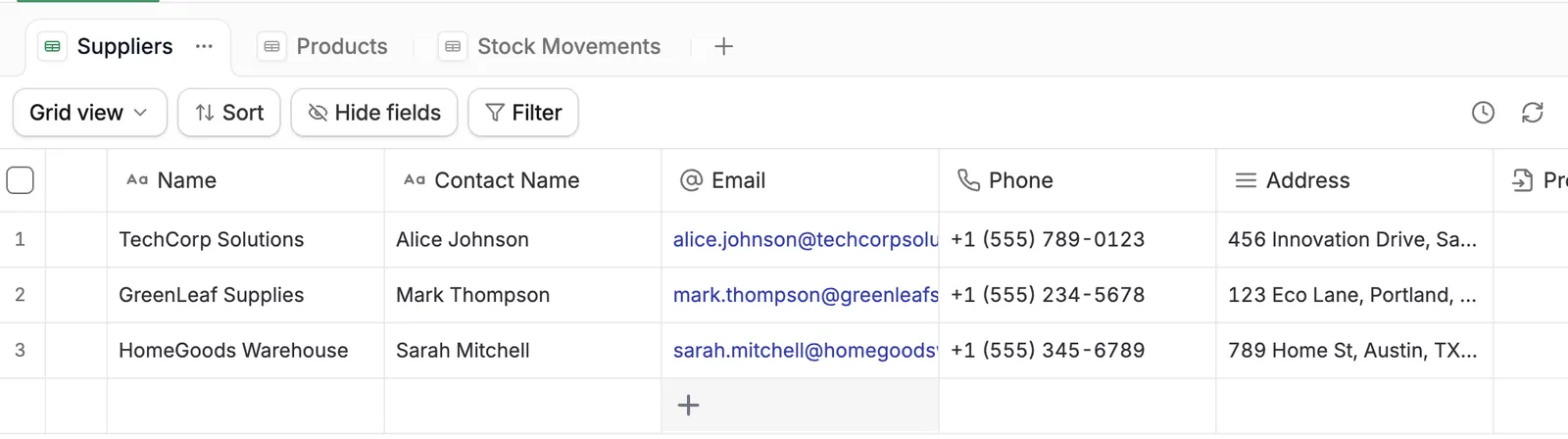
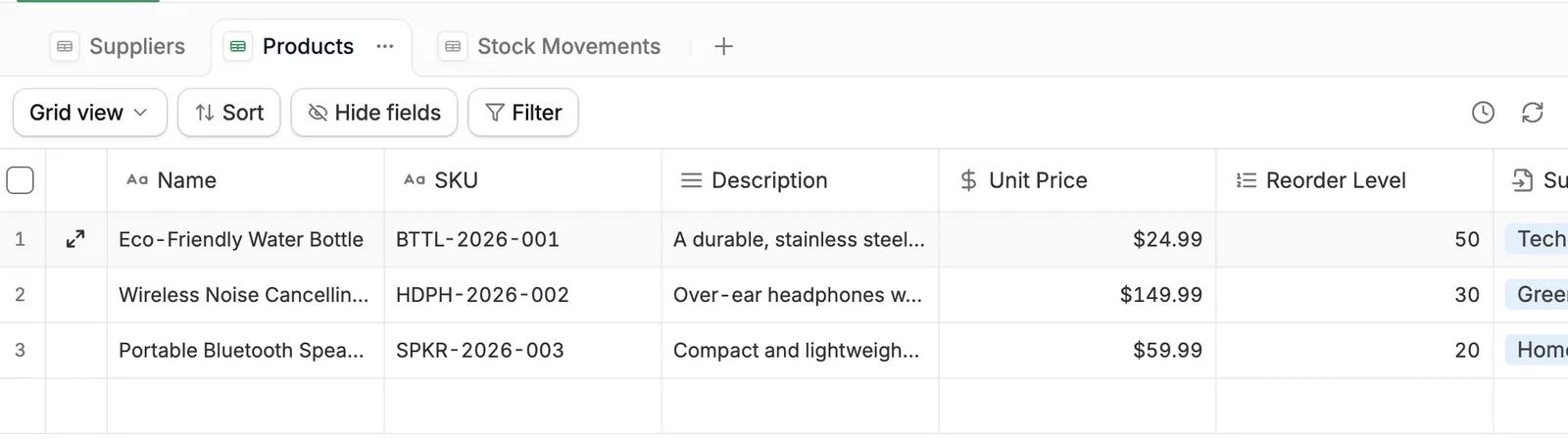
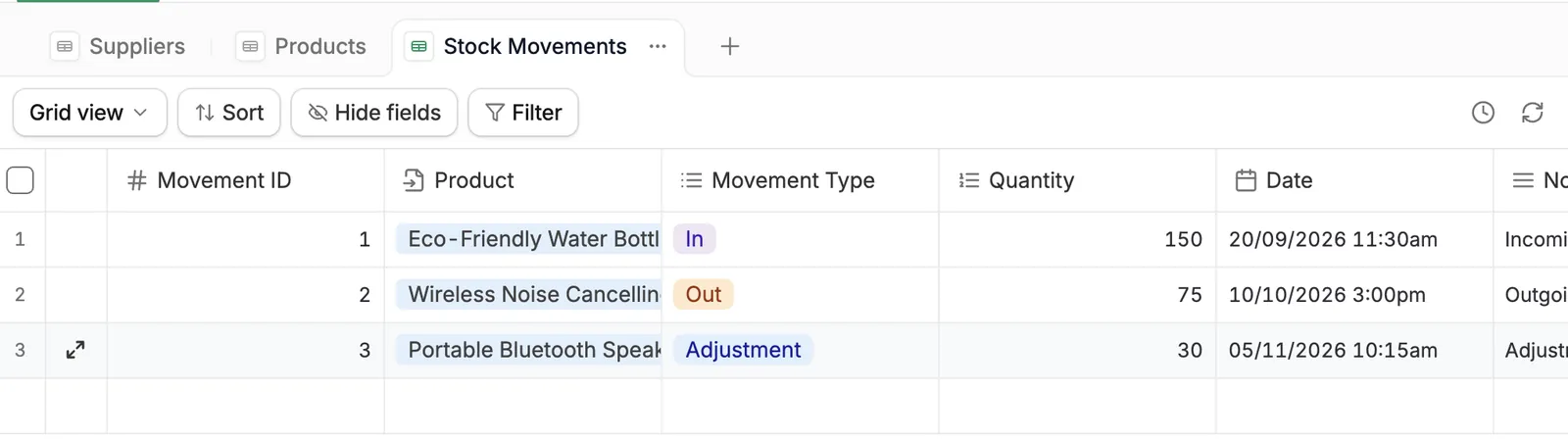
Describe the tables from earlier in plain language, and Zite's Database Agent creates them with the linked-record fields in place. This prompt sets up the three tables and their links.
Create tables for Products (SKU, Name, ReorderPoint), Suppliers (Name, LeadTimeDays), and StockMovements (Date, Type, Quantity). Add a linked-record field called Supplier on Products that links to Suppliers, and a linked-record field called Product on StockMovements that links to Products.
After you approve the tables and fields, Zite creates the three tables as grids with the links in place.
Here are four field types this build uses:
-
Autonumber: Numbers each record in order from 1, and a Formula column can turn that number into a custom ID, which gives purchase orders their own numbers.
-
Lookup: Shows a linked record's value, such as the supplier's lead time, on each product without retyping it.
-
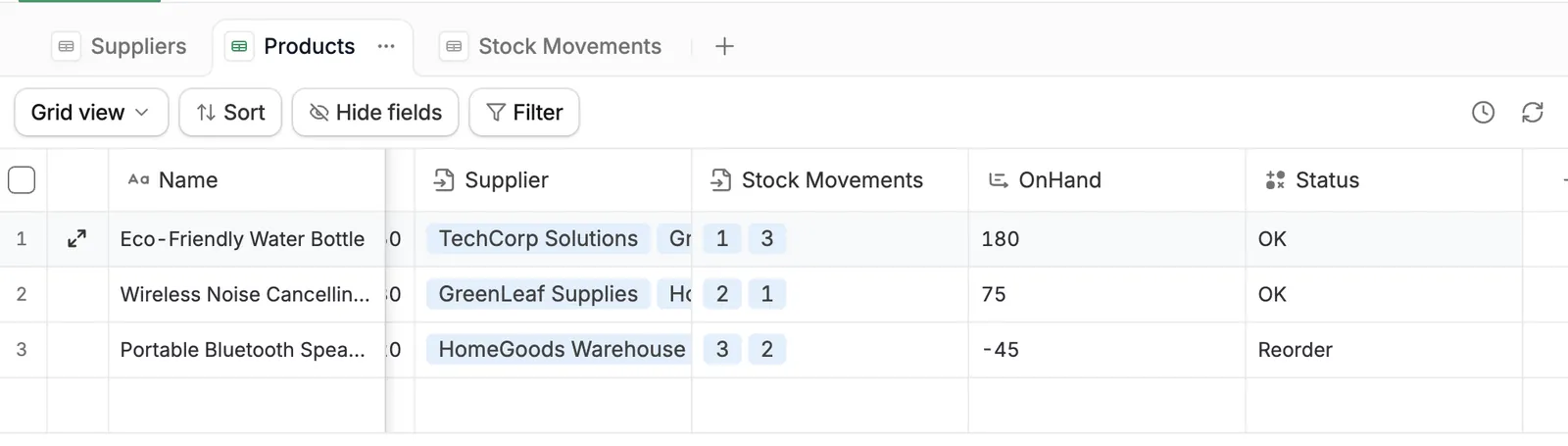
Rollup: Rolls the Quantity of a product's linked movements up into OnHand, using a function such as SUM, AVERAGE, or COUNT.
-
Formula: A Status field reads IF({OnHand} <= {ReorderPoint}, "Reorder", "OK").
With the Rollup and Formula fields in place, the Products table shows each product's stock and whether it needs reordering.
Zite can also build the apps your team works in on top of these tables. A receiving screen lets warehouse staff scan a barcode and log the delivery, a low-stock dashboard shows whoever reorders what is running low, and a purchase order form goes to a manager for approval. Every plan includes unlimited users, so the whole team can use these apps without per-seat pricing.
If your inventory already lives in a sheet, you can import CSV or Excel files, Google Sheets, or Airtable data, up to 250,000 records per import, and your plan's record cap still applies.
Email sending is built into every plan, including Free. Scheduled workflows, such as a low-stock digest, need the Business plan or above.
You can control who changes what on any plan: describe the rule, such as warehouse staff logging movements while only managers change reorder points, and Zite builds it into the app. The Team plan adds roles you define once for the whole workspace.
A phone camera in a Zite app can scan QR codes and common 1D barcodes (EAN-13, EAN-8, UPC, Code 128, and Code 39) to find a record, such as a product whose stock you're updating. An app opens in the phone's browser and works as a web app you can add to your home screen, so you don't need to install anything from an app store.
How to choose
Choose by who edits the data and how often stock moves.
Choose a spreadsheet if
Here are two signs a spreadsheet fits:
-
One or two people edit the file, and stock moves at a single location.
-
You need something working this afternoon.
Choose a no-code app if
Here are two signs a no-code app fits:
-
Several people need forms, permissions, and a shared view.
-
The movement log will stay under the plan's record cap.
Choose a relational database if
Here are two signs a relational database fits:
-
The catalog or the movement log is large, or many systems write to it.
-
Someone on the team can write SQL and run the server.
Three structural mistakes to avoid
Here are three structural mistakes:
-
Typing stock on hand into a cell: A typed number overwrites the previous count, so sum the movements instead.
-
Using names as keys: A renamed product breaks every link, so key on SKU or an ID that never changes.
-
Putting everything in one wide table: Microsoft's design basics say duplicate information wastes space and raises the chance of errors, so keep supplier details in the Suppliers table.
My verdict on the inventory database
An inventory database earns its keep once stock moves often enough that nobody trusts the typed number. Start with linked tables and a movement log in whatever tool you already use, and move to a no-code app or a relational database when the log or the number of editors outgrows it. This list of AI database software compares the tools worth considering.
Ready to build your inventory database?
Zite's free plan includes unlimited users and 5,000 records, so you can build the database and the apps on top of it, then have your whole team working in them before you upgrade. The pricing page lists the limits for every plan.
Frequently asked questions
Is there free inventory software?
Yes, there is free inventory software, with limits on each. Zoho Inventory's free plan covers 50 orders a month and one user, Sortly's covers 100 unique items and one user, and InvenTree is open source and free to host yourself. Airtable, Baserow, and Zite also offer free record caps, and the free options section above lists all seven.
How do you create an inventory database in Excel?
You create an inventory database in Excel by turning each list into a table with Format as Table, adding drop-downs with Data Validation, and totaling stock with SUMIFS over a movements sheet. Add a column that compares each total with the reorder point to flag low stock, and pull supplier details with XLOOKUP in Excel 2021 or later or Microsoft 365.
Which database is best for inventory management?
For a small team without SQL skills, the best database for inventory management is a no-code app such as Zite, which gives you linked tables, forms, and shared access. PostgreSQL suits large catalogs and lists no database size limit in its documentation, while Access caps a file at 2 GB.
How many SKUs can a spreadsheet handle?
A spreadsheet can handle as many SKUs as its row or cell cap allows, which is 1,048,576 rows in an Excel sheet and 20 million cells in a Google Sheets file. The practical limit comes sooner because a movement log grows with every sale, and slow load times and edit conflicts between several editors are the first warning signs.
Can Zite build an inventory database?
Zite can build an inventory database for a team that wants linked tables, a calculated stock level, and email alerts without code. Its record caps rise from 5,000 on the free plan to 1,000,000 on Team, with more on Enterprise. It has no ready-made Shopify or Amazon connector, so you describe each connection to Zite or use Zapier or a file import.